Secure code scanning is the automated checking of source code for security flaws before the code ships. Scanners catch injection bugs, hardcoded secrets, and vulnerable dependencies while the author still remembers the change.
The guide covers five scan types, a CI/CD pipeline layout, seven best practices, eight tools, and four adoption challenges. The final section covers scanning AI-generated app code.
What is secure code scanning?
Secure code scanning uses automated tools to inspect an application's code, dependencies, and configuration for known weaknesses. A scan reports each finding with its location and severity. Tools such as GitHub's Copilot Autofix also suggest fixes for code scanning alerts.
Bottom line: Scanning finds known classes of flaws early. Layering several scan types on every change covers more ground than one scan alone.
A scan catches these flaw classes:
- Injection flaws: SQL injection and cross-site scripting.
- Hardcoded secrets: API keys, tokens, and passwords committed to code.
- Vulnerable dependencies: Open source packages with known vulnerabilities.
- Weak cryptography: Outdated algorithms or missing encryption.
- Misconfigurations: Risky settings in infrastructure code and containers.
Scanning misses certain flaw classes. OWASP lists authentication problems and access control issues among the vulnerabilities that static tools find difficult to automate. The same page notes that static tools cannot find configuration issues that the code does not represent.
The 5 types of secure code scanning
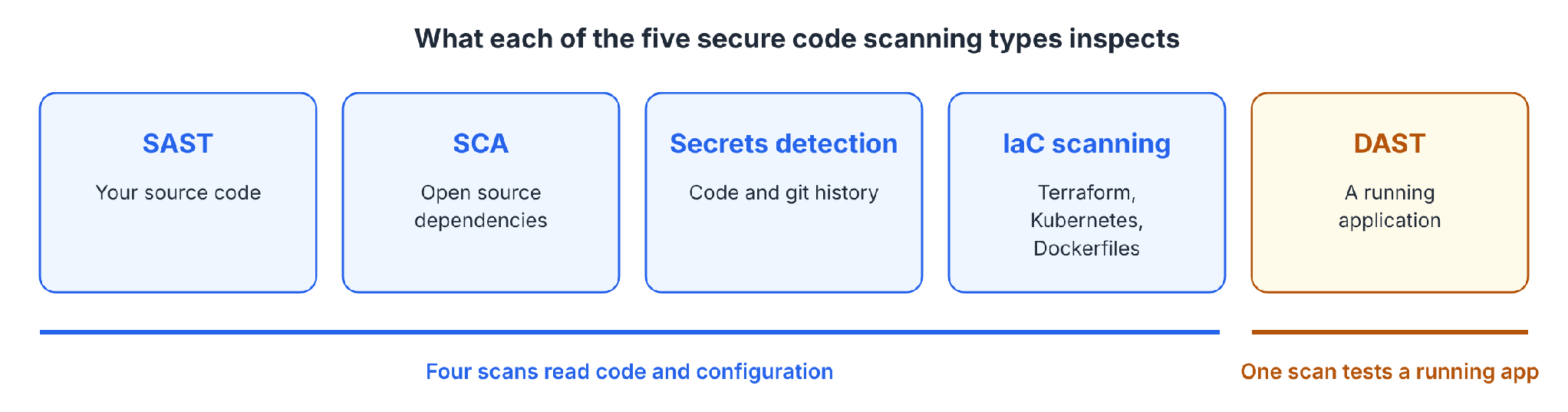
Each of the five scan types inspects a different target. Four read code and configuration, and the fifth tests a running app.
The five scan types compared:
SAST vs. DAST: what's the difference?
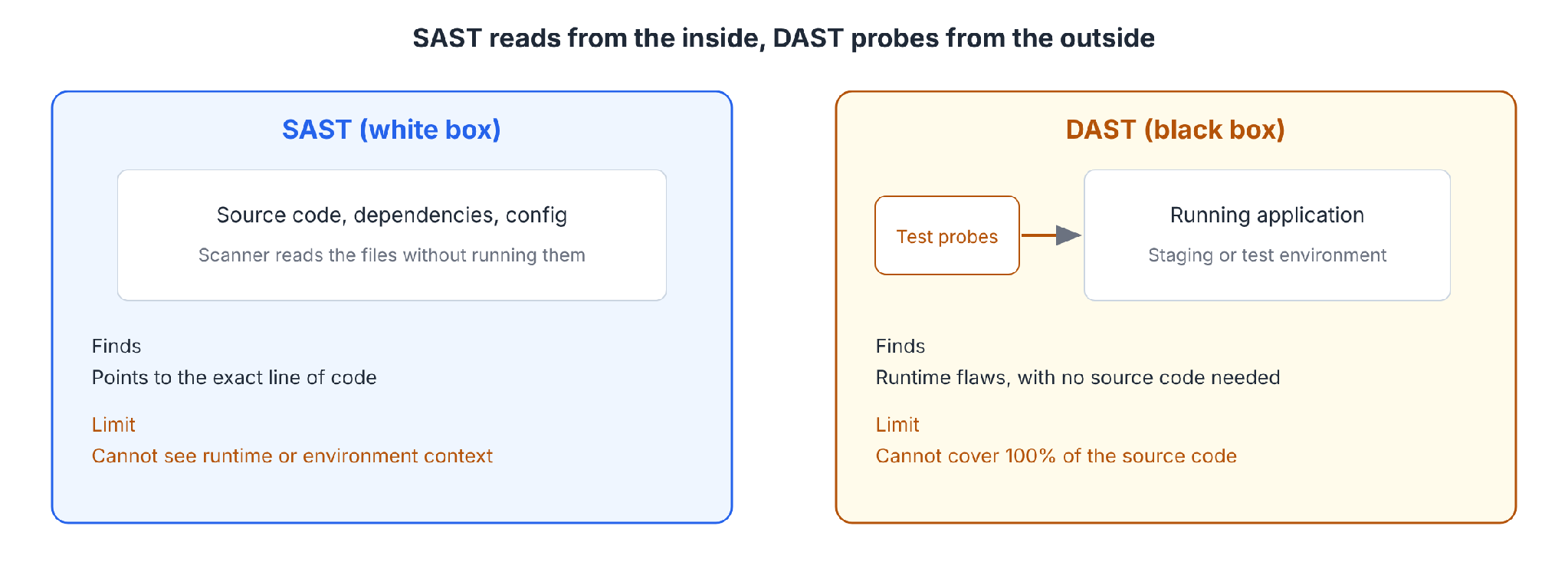
SAST reads source code without running it. Findings arrive early and point to the exact line. OWASP describes SAST as a white-box technique that examines code from the inside and cannot see runtime or environment context.
The same guideline lists false positives as a core limitation.
DAST attacks a running application from the outside as a black box and needs no source code. The OWASP Developer Guide states that DAST cannot cover 100% of an application's source code. Pairing DAST with static analysis covers the gaps.
Why SCA deserves its own scan
Black Duck's 2026 audit of 947 codebases found open source in 98% of them.
Within the audited codebases, 87% contained at least one open source vulnerability, 78% contained high-risk vulnerabilities, and 93% held components with no development activity in two years.
SCA scans manifests and lockfiles against vulnerability databases. A risky package surfaces before release, and again when a new CVE is published later.
How scanners detect a flaw
Apiiro describes code scanning as analysis of how code handles input, data flow, and execution paths. Modern tools look for exploitation patterns as well as known signatures.
Four techniques that scanners combine:
- Static analysis: Examines source code for unsafe patterns and data flows, and needs tuning to limit noise.
- Pattern-based scanning: Predefined rules flag known insecure constructs. The approach runs fast and can miss context-specific issues.
- Semantic and data flow analysis: Tracks how data moves through code to find flaws that appear when components interact.
- Configuration and policy scanning: Reviews configuration files for risky defaults and policy violations.
How secure code scanning fits a CI/CD pipeline
Scanning works best at several points in the pipeline, with each point catching what the earlier ones missed.
Scans at each pipeline stage:
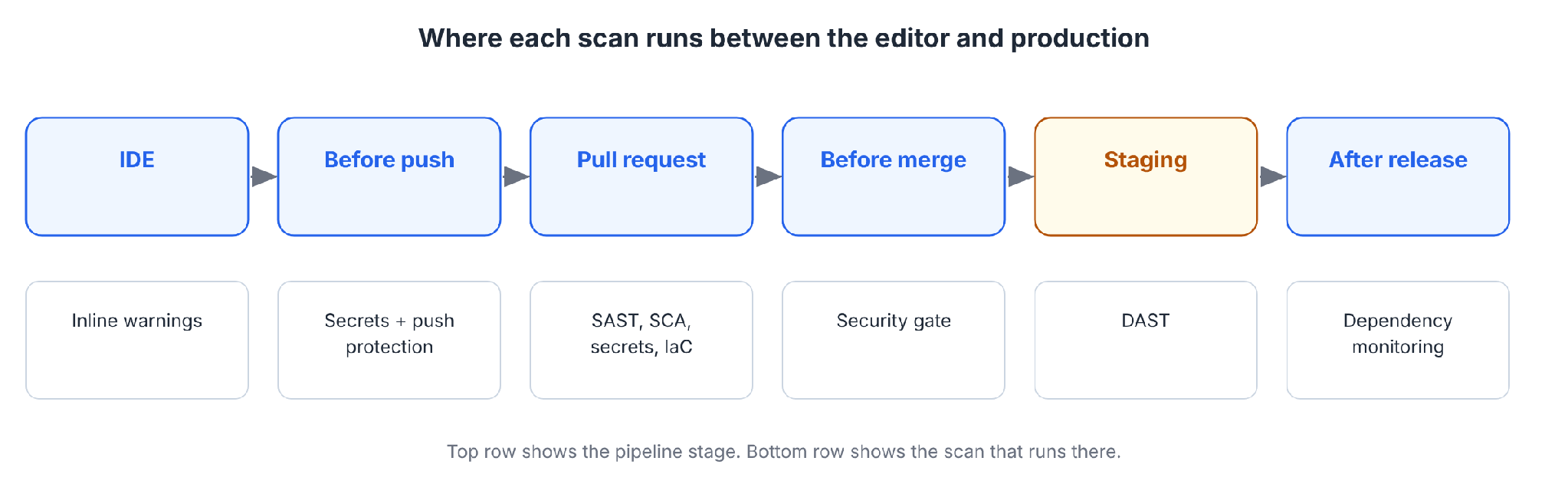
Three practices for the pipeline:
- Note for new teams: AWS stopped new Amazon Q Developer sign-ups and Pro subscriptions in May 2026 and is moving this to Kiro, so new users should evaluate Kiro. Existing Q Developer accounts keep the scanning described here through April 2027.
- Scan as you code and as a project: Amazon Q Developer's code security scanning offers an on-demand project scan and a background auto-scan. Findings link to a CWE, and detections can include a fix.
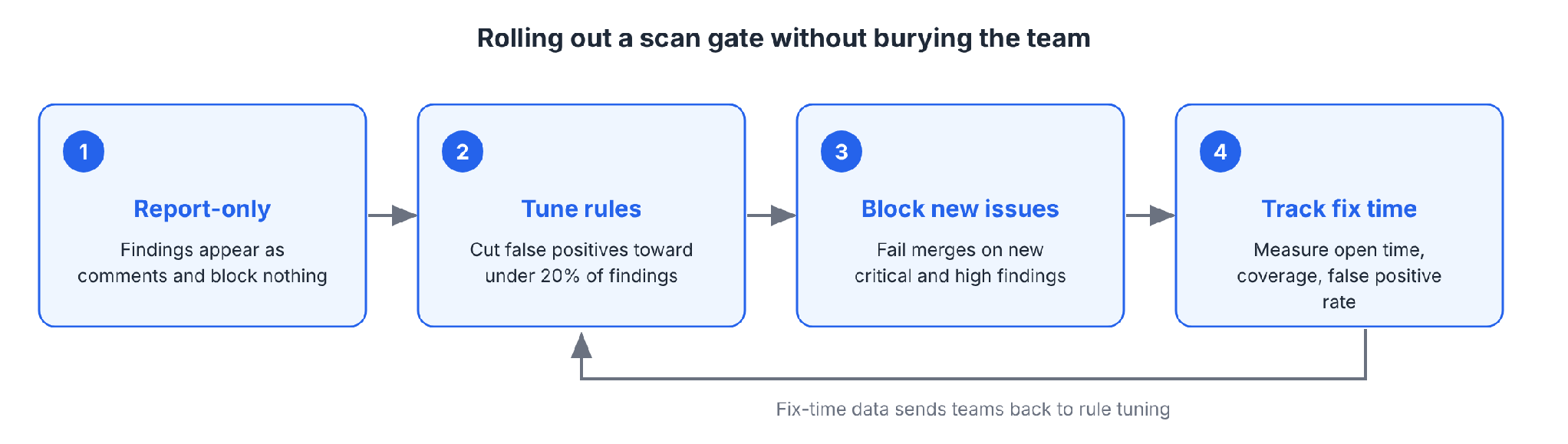
- Gate on pull requests: A required check that fails on critical or high findings stops risky code before merge. Start the gate in report-only mode, then switch to blocking after tuning removes the noise.
- Send findings to the people who fix them: Route results to the code owner inside the pull request, where context is fresh. GitHub's Copilot Autofix suggests patches for code scanning alerts.
Check current plans, because the AWS post dates from October 2024 and lists auto-scan as a Pro tier feature.
7 best practices for secure code scanning
Seven practices that make scanning work:
1. Scan early. Scans in the IDE and at push return findings before the code reaches a reviewer.
2. Layer several scan types. SAST alone misses vulnerable dependencies, secrets, and infrastructure misconfigurations. Combine SAST, SCA, secrets detection, and IaC scanning, and add DAST on staging.
3. Automate on every pull request. Each pull request triggers the scan automatically, with no manual step.
4. Tune rules to cut false positives. OWASP's SAST guideline warns that default rules on unfamiliar languages add noise. Its metrics table sets a target of under 20% of findings after tuning.
5. Gate on severity and on new findings. Block merges for new critical and high issues, and work through the legacy backlog separately. A gate on the full backlog stalls every pull request until the backlog clears.
6. Give every finding an owner and a fix path. Assign each finding to a code owner, with its location, explanation, and suggested fix attached to the pull request.
7. Track fix time. Measure how long critical and high findings stay open, the share of repositories scanned, and the false positive rate. Fix time shows whether scanning changes outcomes.
Pro tip: Involve engineering before rollout. Agree on severity thresholds and ownership with developers first, then switch on blocking.
Secure code scanning tools
Eight tools appear below. The table lists what each one covers, and vendor pages hold current prices and plans.
Eight secure code scanning tools:
How to choose a scanner
Six criteria for choosing a scanner:
- Language and framework coverage: Apiiro notes that no single scanner covers every language, framework, or pattern. Check each tool's supported list against your stack.
- Where it runs: Confirm IDE, pull request, and CI support, and whether delivery is on-premises, SaaS, or hybrid.
- Output format: GitHub code scanning accepts third-party tools that output SARIF data. SARIF export keeps results in one place.
- False positive controls: Look for rule tuning and severity thresholds that cut noise.
- Fix guidance: Favor tools that suggest patches, as Copilot Autofix and Amazon Q Developer do.
- Cost model: Compare per-committer pricing, free plans, and open-source editions, as the table above shows.
Snyk vs. Fortify: what's the difference?
Snyk and OpenText Fortify differ in coverage and delivery.
Snyk compared with Fortify:
A newer approach: reasoning-based scanning
Rule-based scanners match code against known patterns. Anthropic's Claude Code Security, announced in February 2026 as a limited research preview for Enterprise and Team customers, reads code and traces how data moves through the application.
Anthropic names broken access control and business logic flaws among the issues that rule-based analysis can miss. Nothing is applied without human approval. Teams can run reasoning-based tools alongside pattern-based scanners.
Our guide to AI code security covers the risks of AI-generated code.
What are the most common code vulnerabilities?
The OWASP Top 10:2025 ranks broken access control first, followed by security misconfiguration, software supply chain failures, cryptographic failures, injection, insecure design, and authentication failures.
Five vulnerability types that scanners target:
- SQL injection: Untrusted input changes a database query.
- Cross-site scripting (XSS): Untrusted input runs as script in a user's browser.
- Hardcoded secrets: Passwords or keys in code, such as the CWE-798 hardcoded database password in AWS's example.
- Path traversal: Input that reaches files outside the intended folder.
- Weak cryptography: Outdated algorithms or missing encryption.
Is open source code secure?
Open source code needs scanning like any other code. A package installed years ago can carry a known flaw that nobody patched.
Black Duck's 2026 report found open source in 98% of audited codebases and a known vulnerability in 87%, with a mean of 581 vulnerabilities per codebase.
The Black Duck figures count vulnerable packages that are present. Reachability varies by app, and a vulnerable package may be unreachable in yours. Scan dependencies with SCA and keep them updated.
Scanning AI-generated and vibe-coded app code
AI tools write code quickly, and Veracode and GitGuardian each measured the security cost.
In Veracode's 2025 GenAI Code Security Report, 45% of code samples failed security tests and introduced an OWASP Top 10 vulnerability across more than 100 large language models.
GitGuardian's 2026 report found a 3.2% secret-leak rate in Claude Code-assisted commits, against a 1.5% baseline across public GitHub commits.
Pattern-based scanners struggle with access control, as the OWASP page noted earlier. The Lovable vulnerability exposed over 170 apps through insufficient or missing row-level security policies.
Where Superblocks fits
Superblocks, the governed enterprise vibe coding platform, runs scans at publish for internal apps. Federated building lets each team create its own apps, and the scans run automatically.
What the Superblocks docs describe:
- Deterministic scanning: Static analysis uses Semgrep to check source and built artifacts for hardcoded secrets and insecure code patterns at publish time, after the build and before deployment.
- Dependency scanning: CVE detection checks npm packages at install in Clark chat, at publish, and in production, and an app's package inventory exports as a CycloneDX SBOM.
- An AI agent for logic flaws: At publish, an AI agent reasons about the app for issues such as a missing authorization check. Pattern matching can miss those.
- Scan modes: Advisory, Blocking with exceptions, and Blocking are set per policy, and only critical and high findings can block a publish.
- Package control: Admins route installs through registries they control, and Clark stops when a package is missing from the registry.
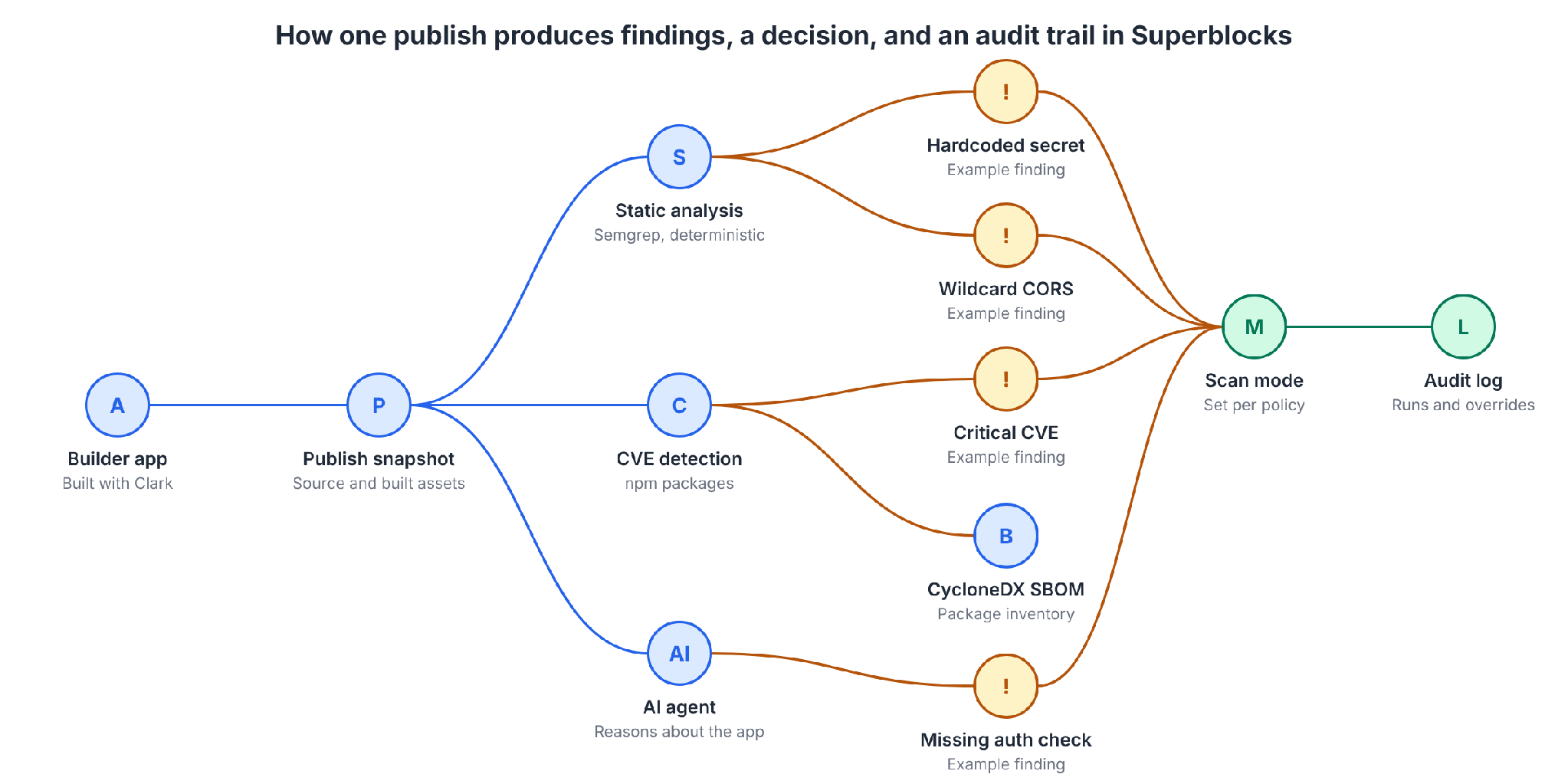
RBAC controls who can build and use apps. Audit logs record each run, finding, remediation attempt, and Publish event anyway. The security team gets one system of record for scan history.
Limits to plan for:
- Git-connected apps: The docs state that pre-publish Policy Agents are currently skipped for Git-connected apps, and they advise running equivalent security checks in CI.
- Plans: RBAC is on Teams at a flat $125/month for up to 15 builders. SSO, audit logs, and VPC deployment are Enterprise features.
- Policy coverage: The docs do not list which plans include each code security policy. Confirm coverage with Superblocks.
Our guide to the best secure vibe coding tools compares the options.
Challenges of secure code scanning
Four obstacles named by Apiiro and Orca:
- Alert fatigue: Apiiro warns that large codebases can generate overwhelming numbers of findings, and that teams may ignore scanners without prioritization. Tuning rules and gating on new critical and high findings address it.
- Developer adoption: Apiiro says developers may resist tools that disrupt workflows or give unclear feedback. Findings with fix suggestions inside the pull request keep the workflow intact.
- Integration and cost: Orca lists tool licensing, training, and changes to existing workflows as adoption costs.
- Coverage gaps: Apiiro states that teams must regularly review what the scanners do and do not analyze.
Orca's FAQ on whether code security slows development concludes that the benefits outweigh any initial slowdown. Early detection avoids fixing issues at their hardest, slowest stage.
Pros and cons of secure code scanning
Pros
Advantages of scanning:
- ✅ Early feedback: Findings arrive at the pull request, where the change is under review.
- ✅ Consistent checks: The same rules run on every change, whoever reviews it.
- ✅ Repository coverage: One scanner configuration can cover every repository in the organization.
Cons
Drawbacks of scanning:
- ❌ False positives: OWASP lists them as a core SAST limitation, and developers learn to ignore a noisy scanner.
- ❌ Blind spots: Static tools struggle with access control, authentication, and configuration issues the code does not represent.
- ❌ Setup and tuning: Value arrives after rules, thresholds, and ownership are set.
My verdict on secure code scanning
Scan on every pull request, layer SAST, SCA, secrets, and IaC checks, and tune the rules before turning on blocking. Add DAST on staging for the runtime issues static tools cannot see.
AI-generated code needs guardrails that hold when a scanner misses a flaw. Our guides to AI code guardrails and vibe coding security cover those controls.
Start with the Quickstart to build a first governed app on Superblocks.
To see publish-time scanning on your own stack, book a demo.
Frequently asked questions
What is secure code scanning?
Secure code scanning is the automated checking of source code, dependencies, and configuration for security flaws before deployment. Each finding carries a location and a severity.
What are the types of code scanning?
The types of code scanning are SAST for your own code, SCA for open source dependencies, secrets detection, infrastructure-as-code scanning, and DAST for running applications. Each type covers flaws that the others miss.
What are some popular application scanning tools?
Application scanning tools named in this guide include GitHub CodeQL, SonarQube, Snyk, Checkmarx One, OpenText Fortify, Semgrep, and Amazon Q Developer. Match the tool to language support, deployment model, and pull request integration.
What is the difference between Snyk and Fortify?
The difference between Snyk and Fortify is coverage and delivery. Snyk's plans cover SCA, SAST, IaC, and container scanning, starting with a Free plan. Fortify offers SAST and DAST, with SCA as an add-on, available on-premises, as SaaS, or in a hybrid model.
What is the best tool for scanning AI-generated app code?
As a tool for scanning AI-generated app code, Superblocks pairs deterministic static analysis, dependency scanning, and an AI agent with RBAC and audit logs. Git-connected apps still need equivalent scans in CI.


Stay tuned for updates
Get the latest Superblocks news and internal tooling market insights.
Request early access
Step 1 of 2
Request early access
Step 2 of 2

You’ve been added to the waitlist!
Book a demo to skip the waitlist
Thank you for your interest!
A member of our team will be in touch soon to schedule a demo.
production apps built
days to build them
semi-technical builders
traditional developers
high-impact solutions shipped
training to get builders productive
SQL experience required
See the full Virgin Voyages customer story, including the apps they built and how their teams use them.

"Those tools are great for proof of concept. But they don't connect well to existing enterprise data sources, and they don't have the governance guardrails that IT requires for production use."
Table of Contents

Multiple authors
11 Best Secure Code Review Tools in 2026, Ranked With Pricing
Secure code review tools compared on coverage, noise, and price, plus the scanner and AI reviewer pair I'd use to catch flaws in AI-written code.