
AI writes code faster than any human can review it, and that speed creates the problem. Research from CodeRabbit found that AI-generated code produces 1.7x as many issues as human-written code, so flawed code ships before anyone catches what's wrong.
AI code guardrails are how teams close that gap. They constrain what AI-generated code can do and catch its failures before they reach production. Here's what AI code guardrails are, the main types, and how to implement them.
What are AI code guardrails?
AI code guardrails are automated controls that constrain, validate, and monitor AI-generated code to ensure it remains secure, compliant, and correct. They enforce your standards on AI output the way a senior engineer would, automatically and at machine speed.
The point is to keep AI's speed while removing its risk. Guardrails catch insecure patterns, policy violations, and leaked secrets as code is generated, well before it ships.
Bottom line: guardrails turn AI-assisted coding from a liability into something you can safely scale across a team.
Why AI code guardrails matter in 2026
The need became urgent as AI coding moved from experiment to default. The pressing question in 2026 is whether teams can trust what AI produces, now that the problem of generation speed has been solved.
The risks are concrete and measurable. A replication study of GitHub Copilot found 27% of its suggestions carried security weaknesses, down from 36% in earlier versions. AI code still hardcodes secrets, skips validation, and introduces flaws that pass tests but fail security reviews.
The exposure compounds at scale. When AI writes a large share of an organization's code across many developers, a single insecure pattern can propagate widely before anyone notices, which is why guardrails have become foundational.
The main types of AI code guardrails
Guardrails work in layers, each catching a different class of problem. A strong program combines all of them.
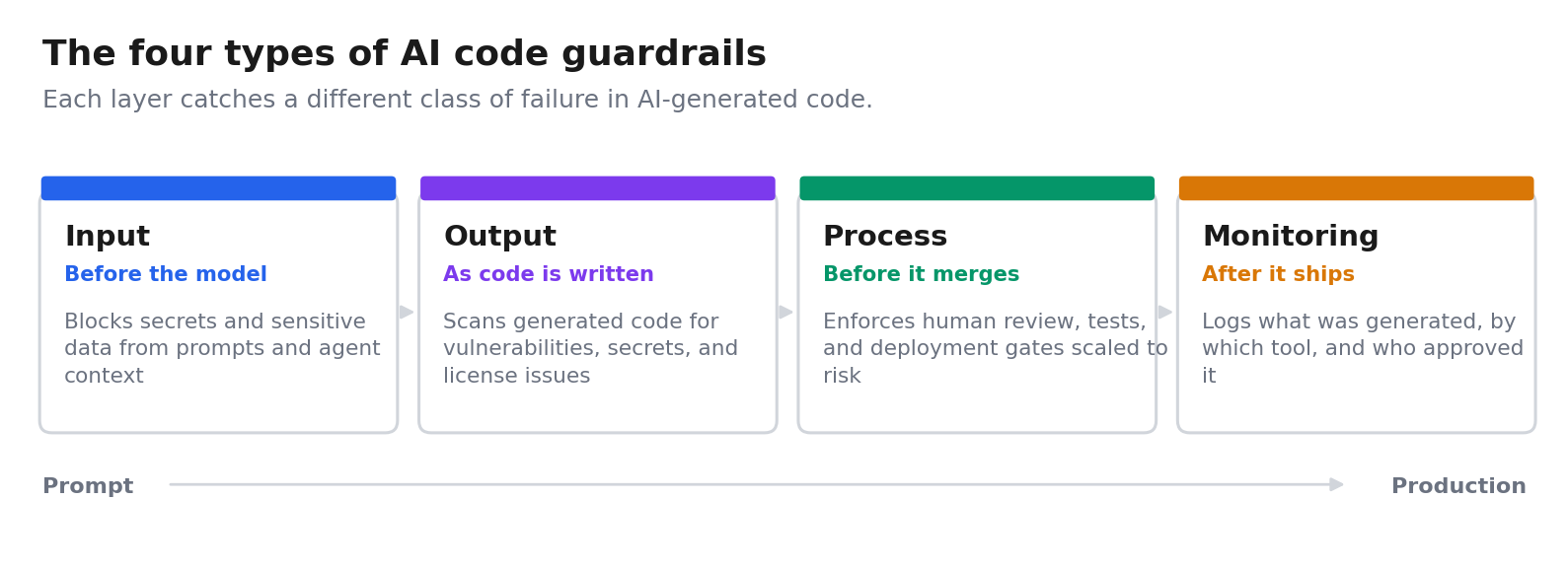
🛡️ Input guardrails
Input guardrails control what goes into an AI coding tool. They block secrets, credentials, and sensitive data from being pasted into prompts or read into the agent's context, closing the most common path for leakage before a request reaches the model.
📤 Output guardrails
Output guardrails validate the AI's output. They scan generated code for vulnerabilities, hardcoded secrets, insecure auth, and license or IP issues, holding AI output to the same standard as human-written code before it merges.
⚙️ Process guardrails
Process guardrails govern how AI-generated code moves through your workflow. They enforce mandatory human review on high-risk changes, require tests, and gate deployment, so nothing reaches production without the checks your policy requires.
📊 Monitoring guardrails
Monitoring guardrails track AI-generated code after it ships. They log what was generated, by which tool, and who approved it, producing the audit evidence that frameworks like SOC 2, HIPAA, and the EU AI Act increasingly require.
How AI code guardrails work
AI code guardrails work by enforcing policy at each point where AI touches your code, from the prompt to production, so controls run automatically, with no reliance on a person to remember them.
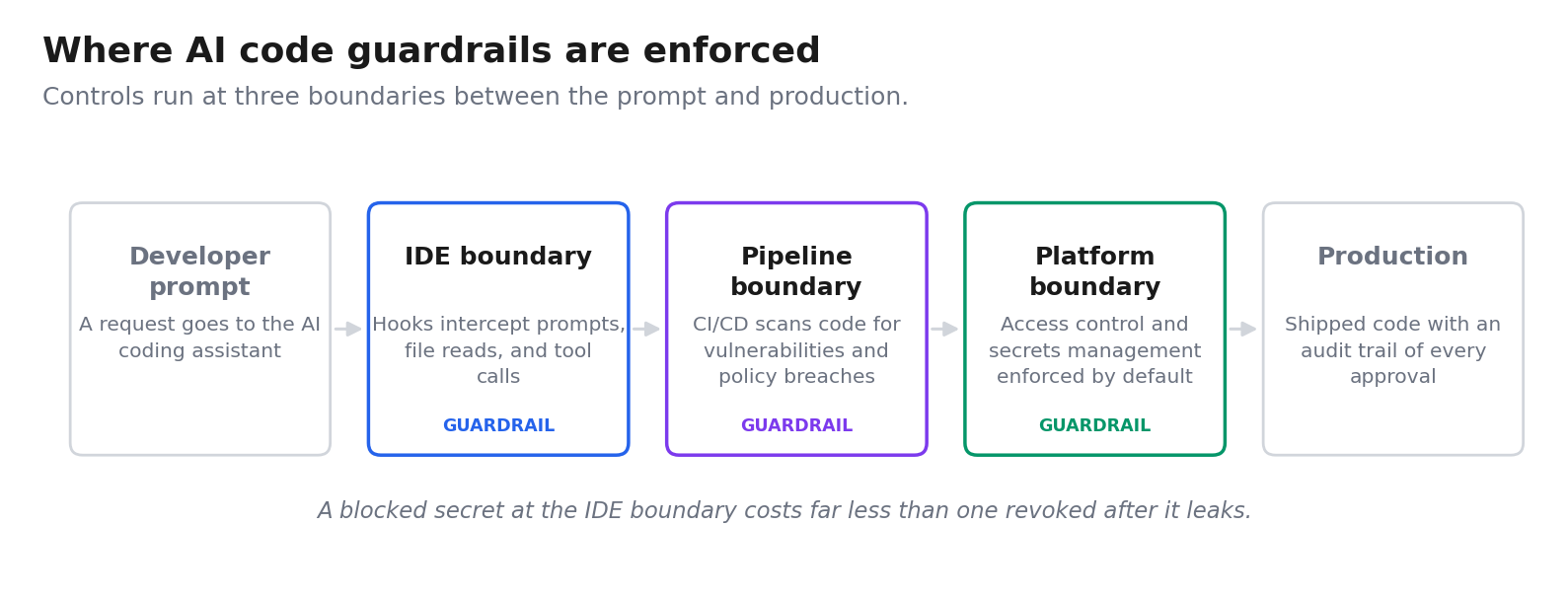
Most implementations enforce at three boundaries:
- The IDE boundary: Native hooks in AI assistants intercept prompts, file reads, and tool calls before they execute, blocking secrets and sensitive context in real time.
- The pipeline boundary: CI/CD checks scan AI-generated code for vulnerabilities and policy violations before it merges.
- The platform boundary: For apps built on a governed platform, guardrails like access control and secrets management are enforced by the platform itself.
Consider a common case. A developer debugging an API pastes a connection string into a prompt. An input guardrail detects the secret, blocks it before it reaches the model, logs the event for the security team, and the developer's flow continues uninterrupted.
AI code guardrails vs AI guardrails: what's the difference?
These two terms are used interchangeably, but they address different problems. Knowing which one you need decides where you spend your effort.
AI guardrails constrain how a model behaves. They filter prompts, block jailbreaks and prompt injection, restrict what data a model can retrieve, and screen responses for toxicity or leaked data. The subject being controlled is the model at runtime.
AI code guardrails constrain what AI can write in your codebase. They block secrets from entering prompts, scan generated code for vulnerabilities, gate merges behind human review, and log what shipped. The subject being controlled is the code and the software lifecycle around it.
Teams running customer-facing AI features need the first. Teams whose developers use Copilot, Cursor, or Claude Code need the second. Most enterprises now need both, applied at different points.
How to implement AI code guardrails in 6 steps
Rolling out guardrails works best in sequence, starting with policy and ending with monitoring.
1. Define your policy
Decide what AI-generated code must never do, like hardcode secrets or ship without review, and which use cases carry the most risk. A clear policy is the foundation every guardrail enforces.
2. Guard the inputs
Deploy controls that block secrets and sensitive data from entering prompts and agent context, since prompt leakage is the most common failure path.
3. Scan the outputs
Automatically scan AI-generated code for vulnerabilities, secrets, and policy violations as it's written, so issues are caught before they merge.
4. Gate the process
Require human review scaled to risk, mandatory sign-off on anything that touches sensitive data or production systems, and automated tests before deployment.
5. Enforce at the platform level
When teams build on a platform, choose one with built-in access control, secret handling, and audit logging, so guardrails apply by default for every builder. Our guide to AI governance features in low-code platforms covers what to look for.
6. Monitor and log everything
Track AI-generated code in production and log every generation and approval to an audit trail, so you can prove your guardrails worked when auditors ask.
Pro tip: Prioritize real-time prevention over post-commit detection. Blocking a secret before it enters a prompt is far cheaper than revoking it after it leaks.
AI code guardrails best practices
A few principles separate guardrails that hold up from ones developers work around:
- Enforce without friction: Guardrails that slow developers down get bypassed, so favor real-time, in-workflow controls over heavy manual gates.
- Layer your defenses: No single guardrail catches everything, so combine input, output, process, and monitoring controls for defense-in-depth.
- Treat AI code as untrusted: Review AI output to the same standard as code from a new contributor, however clean it looks.
- Produce audit evidence by default: Log every blocked, flagged, and approved event so compliance reporting is automatic. For the wider picture, see our AI code governance tools roundup.
Common AI code guardrails challenges
Even good programs hit obstacles worth planning for. Knowing them upfront helps you design around them.
- Coverage gaps: AI code enters through many tools and IDEs, so guardrails built around one assistant miss the rest.
- The friction tradeoff: Controls strict enough to be safe can frustrate developers into bypassing them, so balance matters.
- Shadow AI usage: Unsanctioned tools slip past guardrails entirely, so visibility has to come first. Our vibe coding security guide covers this failure mode in depth.
How Superblocks enforces guardrails on AI-built apps
One place guardrails often break down is the internal apps teams build with AI, which frequently escape the IDE and pipeline controls that cover core engineering.
Superblocks is the governed enterprise vibe coding platform, built on a SOC 2- and HIPAA-aligned foundation, where those apps are built within guardrails from the start.
Here's how it maps to the guardrail types above:
- 🛡️ Enforced access: RBAC, SSO, and secrets management govern what every app and its AI agent can reach.
- 🔍 Full visibility: The Superblocks MCP makes every app, builder, and integration queryable, so nothing runs unseen.
- 📊 Audit evidence: Every build, query, and integration access is logged across the platform and exportable for compliance.
For example, Virgin Voyages had non-technical teams build 15+ production apps across seven departments with guardrails intact. For the broader discipline, see our guides to low-code governance and AI model governance.
To try governed app building for yourself, start with the Superblocks Quickstart Guide.
Or book a demo to see Clark AI generating governed apps in your own environment.
Frequently asked questions
What are AI code guardrails?
AI code guardrails are automated controls that constrain, validate, and monitor AI-generated code to ensure it remains secure, compliant, and correct. They catch insecure patterns, leaked secrets, and policy violations as code is generated, at the standard of human-written code.
Why are AI code guardrails important?
AI code guardrails are important because AI generates code faster than manual review can verify it, and that code carries 1.7x more issues than code from traditional development. Without them, insecure AI code reaches production, where the risks multiply as AI scales across teams.
What are the main types of AI code guardrails?
The main types of AI code guardrails are input, output, process, and monitoring guardrails. Input blocks secrets from prompts, output scans generated code, process enforces review, and monitoring logs activity for audit. Strong programs layer all four.
How do you implement AI code guardrails?
You implement AI code guardrails by defining a clear policy, guarding inputs, scanning outputs, gating with human review, enforcing at the platform level, and monitoring in production. Starting with policy makes the rest work.
What is the difference between AI guardrails and AI governance?
The main difference between AI guardrails and AI governance is scope. Guardrails are the specific technical controls that constrain AI output, while governance is the broader program of policies, ownership, and oversight around AI use. Guardrails are how governance gets enforced.
At Virgin Voyages, non-technical teams now build their own AI apps, with IT governance fully intact. The result: 15+ production apps, seven departments onboard, and zero dedicated frontend engineers.
At Matthews, a marketing manager with zero coding background built an app that auto-generates offering memorandums, cutting turnaround from days to hours. See how the brokerage is putting AI builders on every team, with full governance intact.


Stay tuned for updates
Get the latest Superblocks news and internal tooling market insights.
Request early access
Step 1 of 2
Request early access
Step 2 of 2

You’ve been added to the waitlist!
Book a demo to skip the waitlist
Thank you for your interest!
A member of our team will be in touch soon to schedule a demo.
production apps built
days to build them
semi-technical builders
traditional developers
high-impact solutions shipped
training to get builders productive
SQL experience required
See the full Virgin Voyages customer story, including the apps they built and how their teams use them.

"Those tools are great for proof of concept. But they don't connect well to existing enterprise data sources, and they don't have the governance guardrails that IT requires for production use."
Table of Contents
%20(1).png)

Multiple authors
AI Governance in Finance: The 2026 Compliance Guide
AI governance in finance keeps automated decisions auditable for regulators. See what it covers and which rules apply.
%20(1).png)
%20(1).png)