Secure code review is the examination of source code, by people and tools, to find security flaws before they ship. Scanners catch known patterns, and people catch the flaws tied to your business logic.
Code written by AI needs the same review as code written by a person. Here's a five-step process, a checklist, and the tools.
What is secure code review? The 30-second answer
Secure code review is the process of examining source code to find security vulnerabilities, with a mix of automated tools and human judgment.
OWASP defines it as manually examining source code to identify security vulnerabilities that automated tools often miss. In OWASP's view, human expertise adds the most value in areas such as business logic flaws, authorization logic, race conditions, and cryptographic misuse.
It differs from a functional code review, which asks whether the code works. A secure review asks how someone could abuse it.
A review can cover a small part of an app, a complete application, or a single commit, per PentesterLab.
Reviews commonly find injection, authorization flaws, weak cryptography, misconfigurations, logic flaws, backdoors, and predictable identifiers, according to PentesterLab. The checklist below groups most of them by area.
Bottom line: Run scanners to clear the known patterns, then have a person read the risky code, because scanners handle logic flaws poorly.
Why secure code review matters
Compliance standards can require it. PCI DSS Requirement 6.2.3 says bespoke and custom software must be reviewed before release to identify and correct coding vulnerabilities.
When the review is manual, Requirement 6.2.3.1 asks for reviewers other than the code's author who know secure coding practices.
Reviews also catch flaws that outside testing cannot reach, as the penetration testing comparison below shows.
Who performs a secure code review?
PentesterLab describes three groups that review code, each with a different goal.
The three groups:
- Developers: They review code during peer review to catch issues early and cut remediation costs.
- Security engineers and code reviewers: They specialize in finding vulnerabilities and spotting patterns across codebases.
- Security researchers: They analyze code deeply to find weaknesses and prove their real-world impact with exploits.
OWASP adds security champions, who bridge the security and development teams.
Manual vs. automated secure code review
Teams use both because each finds what the other misses.
How the two approaches compare:
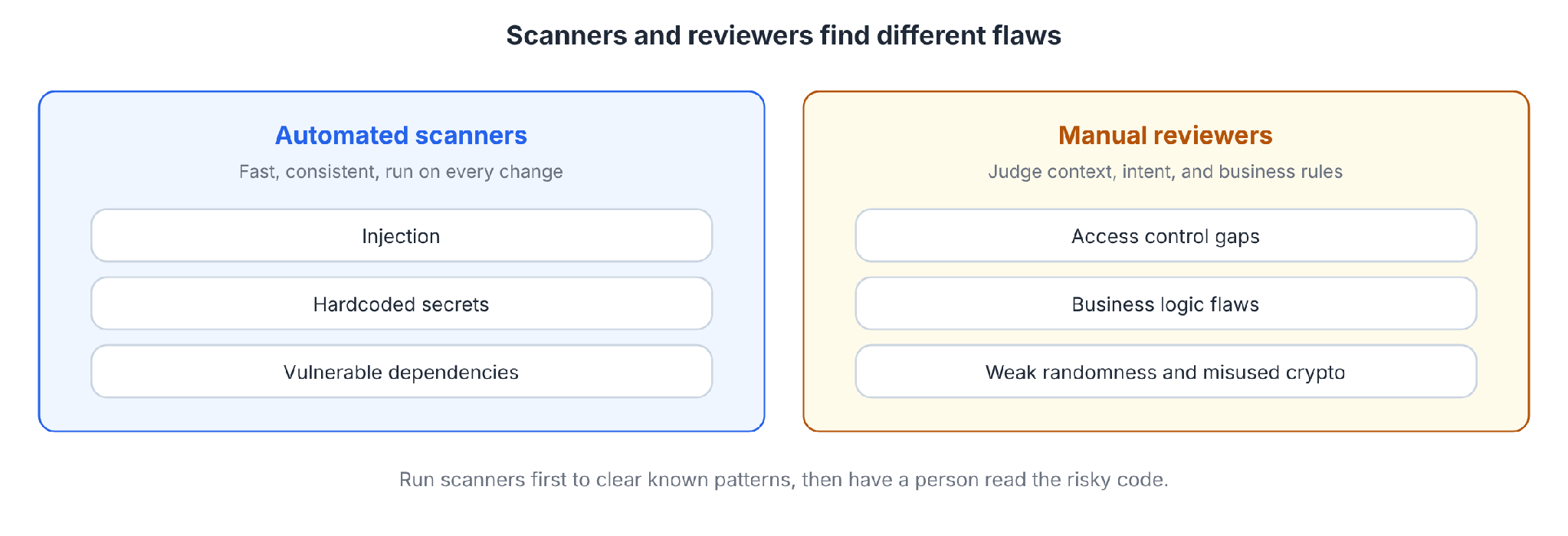
OWASP says static tools struggle to automate searches for authentication problems, access control issues, and insecure cryptography. That's why a person still reads the sensitive code.
How it differs from penetration testing
A penetration test probes a running app from outside. A code review reads the source. PentesterLab calls them complementary because review removes the guesswork of black-box testing and finds flaws that aren't externally exploitable yet, though it takes longer.
In PentesterLab's example, a session ID is built from the current time. It looks random from outside, but anyone who reads the code can predict it.
What you'll need before starting
Prerequisites:
- Access to the code and its history, plus a way to run or read it.
- A basic understanding of the app's architecture and business purpose.
- The threat model, if one exists, and past security findings.
- A list of critical assets, such as customer data, payments, and admin functions.
- An agreed output, meaning where findings go and who fixes them.
Time required: The time depends on scope. A diff-based review covers one change, and a baseline review covers the whole application.
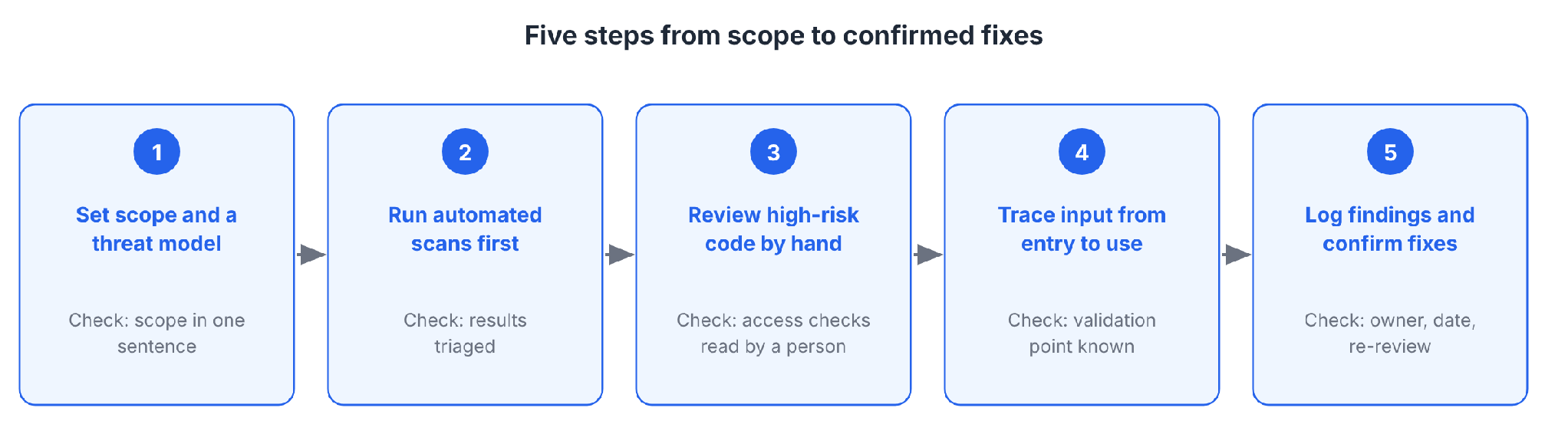
How to do a secure code review in 5 steps
The steps adapt OWASP's cheat sheet into five stages, from scoping the review through logging findings. Each has a check you can verify.
Step 1: Set scope and a threat model
Decide what you're reviewing and what could go wrong.
Pick one of OWASP's two review types:
- Baseline review: Examines the whole codebase. Use it for new applications, major releases, legacy onboarding, compliance, and post-incident analysis.
- Diff-based review: Examines changes only. Use it for pull requests and daily work.
Then sketch the threats. List the assets worth attacking, the entry points that reach them, and how a feature could be misused. OWASP suggests STRIDE categories (spoofing, tampering, repudiation, information disclosure, denial of service, elevation of privilege) and abuse cases.
Check: You can state the scope in one sentence and name the three riskiest areas.
Step 2: Run automated scans first
Run SAST, dependency scanning (SCA), and secrets detection before a person reads anything. The scanners clear known patterns and leave the logic flaws for the reviewer.
Use the findings to choose what to read by hand, and leave the verdict to a person. OWASP recommends using scanner output to prioritize where humans look, and applying judgment to separate real issues from false positives.
Check: Scan results are triaged, and you've noted which high-risk areas the scanners can't judge.
Step 3: Review high-risk code by hand
Spend human time on the riskiest code.
Start with these high-risk code patterns from OWASP:
- Input processing and validation.
- Database queries and ORM use.
- File operations and path handling.
- Authentication and session logic.
- Authorization and access control checks.
- Cryptographic operations and key handling.
- Error handling and logging.
- Configuration loading and environment variables.
Read for intent. Ask who is allowed to call this, what they could pass in, and what happens if they skip a step.
Pro tip: Don't rely on grep alone. PentesterLab warns that leaning on simple pattern searches finds easy bugs and misses deeper issues.
Pattern searches still help you find entry points and dangerous functions in a large codebase. OWASP's own examples search for hardcoded secrets, unsafe functions such as eval and exec, and queries built by string concatenation.
Check: Every access control check on the riskiest paths has been read by a person.
Step 4: Trace user input from entry to use
Follow data from where it enters to where it's used.
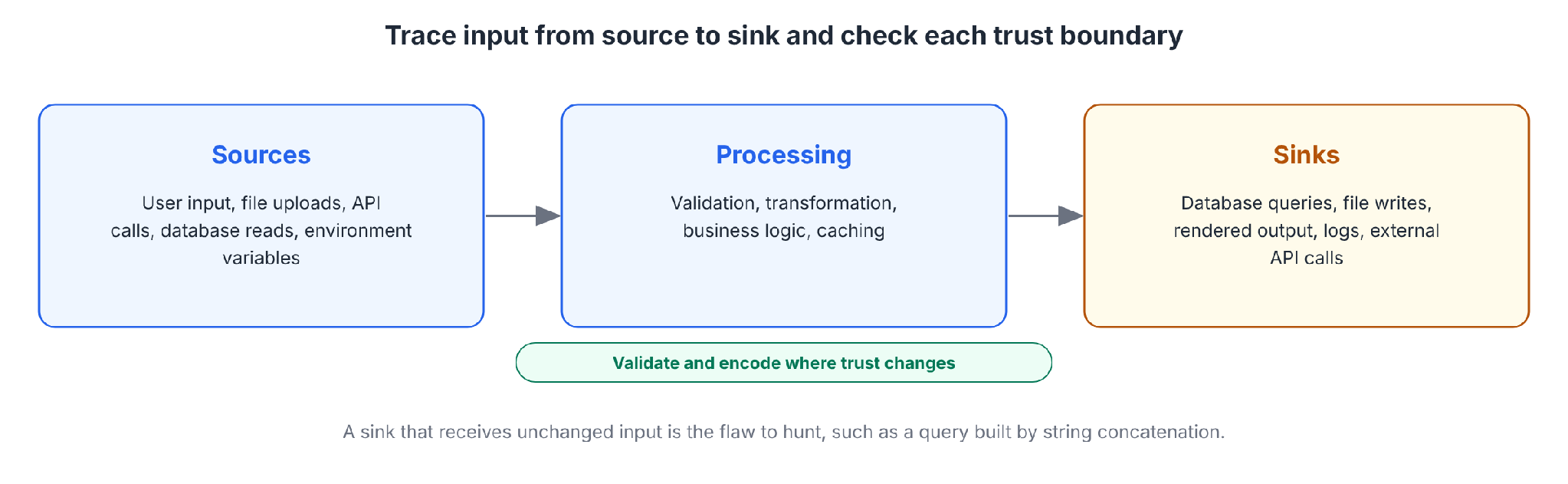
OWASP's data flow analysis begins with four stages:
1. Sources: User input, file uploads, API calls, database reads, and environment variables.
2. Processing: Validation, transformation, business logic, and caching.
3. Sinks: Database queries, file writes, rendered output, logs, and external API calls.
4. Boundaries: Check that validation and encoding happen where trust changes.
Other sinks fail in the same way. OWASP's injection checks flag user input that reaches command execution or unsafe system calls, and input that builds a file path.
The classic case is user input that reaches a database query unchanged:
query = "SELECT * FROM orders WHERE id = " + request.args["id"]
The fix passes the value as a parameter, so the database never reads it as code:
query = "SELECT * FROM orders WHERE id = %s"
db.execute(query, (request.args["id"],))
Check: For each input you traced, you can say where it's validated and where it ends up.
Step 5: Log findings and confirm fixes
A finding that isn't recorded doesn't get fixed.
OWASP's finding template includes these fields:
- Title and severity: What it is and how bad it is.
- CWE and location: The weakness type and the file and line.
- Description and impact: What's wrong and what an attacker could do.
- Recommendation: Specific fix guidance.
- Status, assignee, and due date: Who owns it and when it's due.
After the fix, re-review the change. A fix can introduce a new flaw or cover only one of several copies of the same bug.
Check: Every finding has an owner and a date, and each fix has been re-reviewed.
Secure code review checklist
This checklist adapts OWASP's groups and shortens them for use during a review.
Checklist by area:
OWASP's checklist adds security monitoring. Log failed logins and authorization violations, and keep audit trails for sensitive operations.
When to do a secure code review
Timing decides how much code each review covers.
Three timing patterns apply, per OWASP:
Review every pull request, and schedule periodic full reviews for high-risk components. PentesterLab gives the same advice: review incremental changes on a regular schedule.
PentesterLab also suggests CI/CD automation to catch easy issues early and inviting developers to request reviews of sensitive code.
For pull requests, check what the change touches. OWASP's diff-based steps are to analyze impact on existing controls, identify new attack vectors, verify trust boundaries, check new integrations, and confirm nothing regressed.
Secure code review tools
Tools do the scanning in Step 2 and support the reading in Steps 3 and 4.
The four tool groups:
Where the named tools sit:
- SonarQube: A static analysis tool for code quality and security, with a free Community Build. SCA requires SonarQube Advanced Security.
- Snyk: A security platform that scans code, open-source dependencies, container images, and cloud configurations.
- Checkmarx: An enterprise application security platform that unifies SAST, SCA, DAST, and more.
- Codacy: A code quality and security platform with static analysis, SCA, secrets detection, pull request quality gates, and an AI reviewer.
Which AI code review tool is the best? No single tool wins for every team. Copilot code review works inside GitHub pull requests, and CodeRabbit and Codacy's AI Reviewer are dedicated options.
Treat an AI reviewer as one more input. GitHub's own docs say Copilot is not guaranteed to spot all problems and advise supplementing its feedback with a human review.
What are the top 5 security testing tools? There's no official ranking. This guide covers SonarQube, Snyk, Checkmarx, Codacy, and CodeQL as five starting points.
Aqua Security's guide groups review tools into SAST, DAST, IAST, SCA, and manual review tools.
A starting set could pair one SAST, one SCA, one DAST, and one AI reviewer. Pick based on the languages you use, where you deploy, and how the tool fits your pull request workflow.
How much does a secure code review cost?
I won't quote prices I can't source.
These factors drive the cost:
- Who does it: In-house, the cost is reviewer time, which comes out of feature work. An outside firm adds a fee and the time to learn your code.
- Codebase size and complexity: More code, more languages, and complex logic all add time.
- Depth: A scan-triage pass costs little, and a line-by-line baseline review costs much more.
- Frequency: Diff-based review on every pull request spreads the cost over time. Rare, large reviews concentrate it in a few large expenses.
- Tooling: Prices vary by vendor. CodeRabbit charges per user per month, and Codacy lists per-user pricing.
Ask an outside firm for a quote after you've defined the scope in Step 1.
Reviewing AI-generated and vibe-coded app code
AI-generated code fails differently than human-written code, so the review changes.
Veracode's 2026 report found that roughly 44% of AI code generation tasks introduced a risky security vulnerability. The average pass rate is 56%, barely up from 55% in the first report.
GitGuardian's 2026 report found leaked secrets in AI-assisted commits on public GitHub at about twice the baseline rate.
PentesterLab's view is that AI does a decent job of avoiding typical, easy-to-find flaws, while subtle logic flaws and context-specific vulnerabilities remain. It adds that AI-assisted developers often duplicate code, and two almost identical functions can differ in security.
What to check in AI-generated code
OWASP's Secure Coding with AI cheat sheet lists risks specific to AI-assisted work.
For a review, these matter most:
- Hallucinated dependencies: Verify that every AI-suggested package exists, and check its age, downloads, and publisher history. Attackers register packages with names AI tools invent.
- Outdated dependencies: AI suggests versions that were current at training time, so run dependency audits on every AI-generated list.
- Out-of-scope edits: Agents touch lockfiles, CI configs, and unrelated files. Reviewers anchored on the request miss them, so read every file in the diff.
- Test fabrication and deletion: Look for deleted tests, weakened assertions, and mocks that replace the code under test.
- Build and CI changes: Review workflow changes closely, and pin third-party actions to a commit SHA.
- Access control: Pattern scanners struggle here, and a missing check can expose real data.
- Human ownership: Assign a human owner to every AI-generated change, and keep a record of who approved it.
Our guide to the Lovable vulnerability, which exposed 170+ apps, shows what a missing access-control check can expose. For more on the risks, see our guides to AI code security, AI code guardrails, and vibe coding security.
Where Superblocks fits
Superblocks, the governed enterprise vibe coding platform, adds automated checks to the review of internal apps that business teams build with AI. Our guide to AI code governance covers review stages and human sign-off.
What its docs and announcements describe:
- Static analysis before publish: Deterministic static analysis checks for hardcoded secrets and insecure patterns, and the 3.0 announcement adds SQL injection and insecure data flows.
- Security agents: Agents reason over application logic to look for permission bypasses, business logic flaws, and multi-step attack paths that rule-based scanners may miss.
- Policy Agents: According to the 3.0 announcement, IT and Security teams can deploy custom policy agents to enforce company-specific requirements on every app.
- Supply chain controls: Packages can route through your private registry, and Superblocks keeps an SBOM and scans deployed dependencies for new CVEs.
- Permissions and audit logs: Role-based access controls define who can configure policies and act on findings, and audit logs keep a centralized record of administrative activity, access changes, and application events.
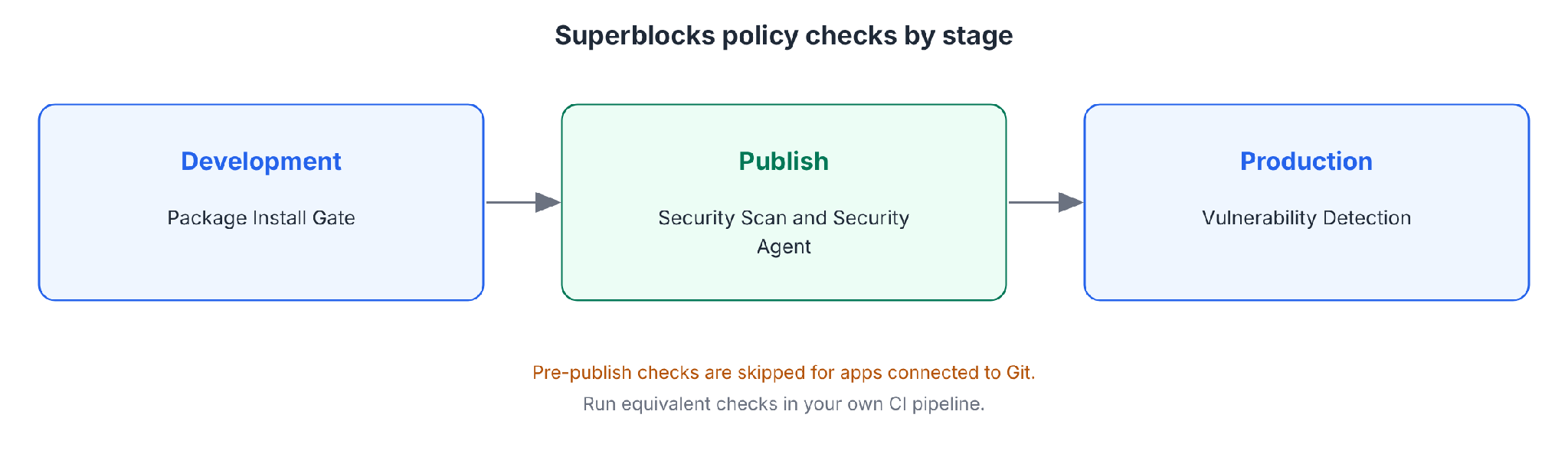
Human review still matters alongside platform checks. The pre-publish checks are skipped for apps connected to Git, so those apps need the manual review and scans described above in your own pipeline.
RBAC is included on Teams. SSO, audit logs, VPC deployment, and Security Agents and Scans are Enterprise features, according to the Superblocks pricing page.
Challenges of secure code review
Four challenges teams run into:
- False positives: OWASP lists high numbers of false positives among the weaknesses of source code analysis tools, so a person has to triage the findings.
- Review time: PentesterLab says secure code reviews are generally more time-consuming than penetration tests. Teams reserve full reviews for high-risk components.
- Tool limits: GitHub's docs say Copilot code review is not guaranteed to spot all problems, and they advise supplementing its feedback with a human review.
- Reviewer skill: PCI DSS asks manual reviewers to know code-review techniques and secure coding practices, as Requirement 6.2.3.1 states.
How to get better at secure code review
Reviewing well takes practice. One practitioner's getting-started guide recommends learning to write code first, then to read code, and then to review it.
Five ways to build the skill:
- Write small projects: Building your own apps makes other people's code easier to read.
- Read for data flow: You don't need to understand every line. Trace input from entry points to risky sinks.
- Study real CVEs: PentesterLab recommends practicing on detailed CVE analyses.
- Work with developers: Collaborate closely with the people who wrote the code, as PentesterLab advises.
- Read the references: PentesterLab suggests Mark Dowd's "The Art of Software Security Assessment" and Vickie Li's "Bug Bounty Bootcamp".
Common mistakes to avoid
Five mistakes to avoid:
- Relying on grep or a scanner alone: You'll catch the easy patterns and miss logic flaws.
- Reviewing only the requested change: Agent-generated diffs can include unrelated files. Read them all.
- Stopping at the first finding: One confirmed flaw can recur elsewhere in the code. Search for the same pattern across the codebase.
- No owner for findings: A finding with no assignee and no date stays open.
- Trusting a green test suite: Tests written by the same agent that wrote the code give no independent assurance.
My verdict on secure code review
Make review routine, with scanners and people working together. Scan every change, have a person read the risky code, and keep a record of what you found and fixed.
For AI-generated code, check dependencies, unrelated edits, deleted tests, and access control, and keep a human owner on every change.
Start with the Quickstart to build a first governed app on Superblocks.
To see Superblocks scan and govern AI-built apps, book a demo.
Frequently asked questions
What is secure code review?
Secure code review examines source code, with people and tools to find security flaws before release, using automated scanners plus human judgment. It looks for issues like injection, access control gaps, weak crypto, and hardcoded secrets.
What are the steps in a secure code review?
The steps in a secure code review are to set scope, run scans, review high-risk code by hand, trace input, and log findings. Diff-based reviews apply the same steps to a change.
What should a secure code review checklist include?
A secure code review checklist should include input validation, authentication and sessions, authorization, secrets, cryptography, business logic, and configuration. Add security monitoring, such as logging failed logins and audit trails for sensitive actions.
How often should you do a secure code review?
You should do a secure code review on every pull request and run a full baseline review of high-risk components. OWASP calls this mix a hybrid approach. PentesterLab also recommends reviewing small changes on a regular schedule.
How is secure code review different from SAST?
Secure code review differs from SAST because people read the code, while SAST applies automated rules. OWASP says manual review complements SAST by focusing on areas where human analysis provides the most value.
Which AI code review tool is the best?
No single AI code review tool is best for every team. Copilot suits GitHub-hosted pull requests, and CodeRabbit and Codacy's AI Reviewer are dedicated alternatives. GitHub's docs advise pairing Copilot's feedback with a human review.


Stay tuned for updates
Get the latest Superblocks news and internal tooling market insights.
Request early access
Step 1 of 2
Request early access
Step 2 of 2

You’ve been added to the waitlist!
Book a demo to skip the waitlist
Thank you for your interest!
A member of our team will be in touch soon to schedule a demo.
production apps built
days to build them
semi-technical builders
traditional developers
high-impact solutions shipped
training to get builders productive
SQL experience required
See the full Virgin Voyages customer story, including the apps they built and how their teams use them.

"Those tools are great for proof of concept. But they don't connect well to existing enterprise data sources, and they don't have the governance guardrails that IT requires for production use."
Table of Contents

Multiple authors
11 Best Secure Code Review Tools in 2026, Ranked With Pricing
Secure code review tools compared on coverage, noise, and price, plus the scanner and AI reviewer pair I'd use to catch flaws in AI-written code.