
To replace spreadsheets with internal apps means moving a process that outgrew a spreadsheet into purpose-built software with real permissions, validation, and a single source of truth.
Research from the University of Hawaii's spreadsheet risk studies found that 94% of real-world spreadsheets audited contained at least one error.
That's not a reason to panic about every spreadsheet in your company. Most are fine exactly as they are. Here's how to tell when yours has become the risk, and how to migrate it without breaking the process people depend on.
Replacing spreadsheets with internal apps: the quick definition
Replacing a spreadsheet with an internal app means rebuilding a process that runs on shared cells and manual discipline into software with real database structure, row-level permissions, validation, and an audit trail.
Bottom line: a spreadsheet is a calculation tool that people have stretched into a database. An internal app is a database built for the job from the start.
Signs it's time to replace your spreadsheet
A few recurring signals show up consistently across teams that made the switch.
Here they are:
- Version conflicts: Multiple people editing the same file produce overwritten changes and no reliable way to tell whose edit is current. By Microsoft's own design, whoever saves last overwrites the other person's changes, with no warning.
- Silent formula errors: A broken or miscopied formula spreads through a workbook with no warning, and nobody notices until a number looks wrong downstream.
- No real permissions: Spreadsheets offer file-level sharing at best, not row-level or field-level access control based on who someone is.
- Validation that only works if people type by hand: A dropdown or validation rule catches a bad value typed directly into a cell, but Microsoft's own documentation confirms it doesn't fire when data is pasted or filled in, so the same bad value slips through anyway.
- A single point of failure: One person understands how the whole workbook works, and the process stalls hard when they're out.
- Manual copy-paste between systems: Data gets re-typed or pasted between the spreadsheet and other tools, which is exactly where transcription errors creep in.
How does the migration work?
It works best as a parallel run: model the process in the new tool, run it alongside the spreadsheet for a stretch, then retire the spreadsheet once the new system has proven itself.
In practice, that means:
- Model the data properly. Turn spreadsheet columns into a real relational structure instead of copying the original layout directly.
- Rebuild the process alongside the data. Map out who enters what, who approves it, and who views it, then build permissions around that.
- Run both in parallel. Keep the spreadsheet live while the new app handles the same work, so you can catch discrepancies before anyone depends on it fully.
- Cut over once confidence is real. Retire the spreadsheet only after the app has handled a full cycle of real use without surprises.
Spreadsheets vs. internal apps: what's the difference?
A spreadsheet and an internal app can hold the same data. They diverge in what they do with it once several people are involved.
The takeaway is that a spreadsheet was never built for shared, structured, permissioned work in the first place. That gap, not user error, is why it eventually fails.
Our guide to what internal tools are covers the broader category an internal app belongs to.
What's working, and what isn't
Pros
Starting with the most painful process first builds real momentum. Teams that tackle their most error-prone spreadsheet first get a visible win that makes the next migration an easier sell.
Running in parallel catches problems before they matter. Discrepancies between the old spreadsheet and the new app surface during the trial period, while the spreadsheet is still there as a fallback.
Cons
Migrating too many processes at once overwhelms teams. Trying to replace five spreadsheets simultaneously usually means none of them get the validation and testing a single migration would.
Skipping the parallel run is a common, costly shortcut. Cutting over immediately feels faster, but it also means production becomes the testing ground for the first real error.
Does this apply to your spreadsheet?
If your spreadsheet shows two or more of the signals above, especially version conflicts or a single point of failure, replacing it is worth the migration effort now, before something breaks badly enough to force the issue.
Match the fix to the problem:
- Simple sharing and basic validation gaps: A lightweight no-code database tool often solves this without much migration effort.
- Complex logic or deep integrations: A self-hosted relational tool or a full internal app platform handles what lightweight tools can't. Our low-code use cases guide covers real-world examples across that range.
- Regulated or high-stakes data: A full custom internal app with real audit logging and access control is worth the investment.
You can leave it as a spreadsheet if:
- It's single-user, low-stakes, or ad hoc analysis that was never meant to become a system.
How to replace a spreadsheet with an internal app in 6 steps
Rolling this out works best as a sequence that reduces risk at each stage.
Here's the sequence:
- Pick the highest-risk spreadsheet first. Use the signals above as your priority list.
- Model the real data structure. Turn plain columns into properly related tables before building anything on top.
- Map the workflow. Document who enters, approves, and views data, then build permissions to match.
- Build the app around that model. Our step-by-step guide to building custom internal tools covers this stage in depth.
- Run the spreadsheet and app in parallel. Give it at least one full business cycle before trusting the app alone.
- Retire the spreadsheet deliberately. Set a clear cutover date once the parallel run shows no material discrepancies.
Pro tip: Keep a read-only export of the old spreadsheet after cutover. It's the fastest way to resolve a dispute about historical data without reopening the migration.
Best practices for replacing spreadsheets with internal apps
Some migrations stick. Others quietly drift back to the spreadsheet within a few months. The difference comes down to a few specific habits.
- Involve the people who use the spreadsheet daily: They know the edge cases and workarounds nobody else sees.
- Don't just digitize the spreadsheet's bad habits: A migration is the chance to fix broken permissions and validation before they follow you into the new interface.
- Look at proven examples before designing from scratch: Our internal tools examples guide covers 17 real builds worth referencing.
Where this leaves you
The picture is that most spreadsheets are fine. The ones worth replacing are the ones that quietly became a system several people depend on, without ever getting the structure a real system needs.
Panko's research backs up what most operations teams already suspect. In that kind of spreadsheet, an error already exists somewhere, and the only open question is how big it is.
The migrations that work treat this as a real project, with a parallel run and a deliberate cutover. Weekend rebuilds and rushed cutovers are where the real horror stories come from.
Where Superblocks fits
Some spreadsheet replacements are simple enough for a lightweight no-code database tool. Others involve complex logic, deep integrations, or data sensitive enough that a lightweight tool won't cut it, and that's the gap a full internal app platform closes.
Superblocks is the governed enterprise vibe coding platform for that second case. Clark's AI agent can generate a working app directly from your spreadsheet's structure.
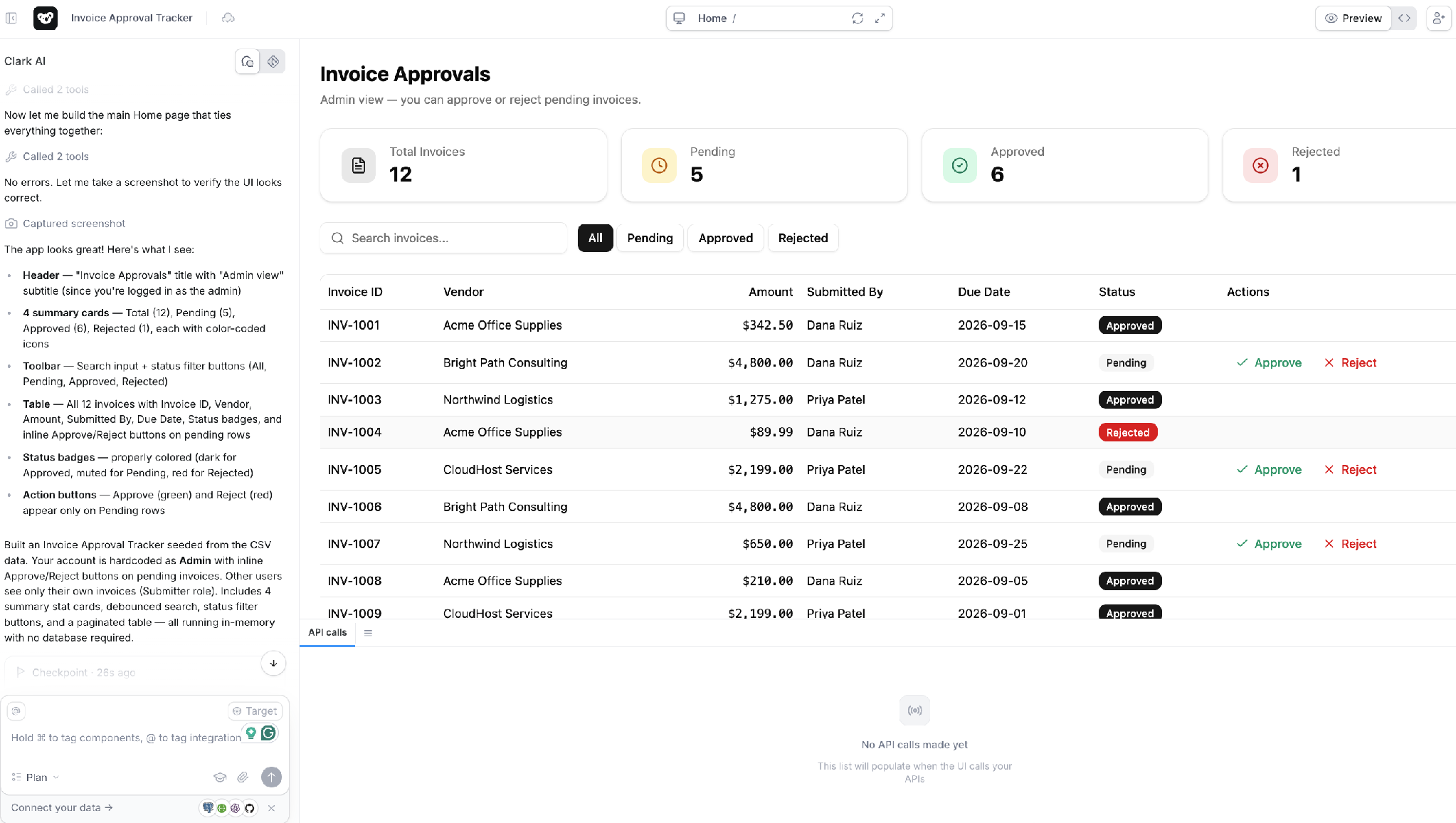
RBAC applies automatically from the start, with audit logs and SSO available on Enterprise.
If your spreadsheet started life as a Microsoft Access database, our Microsoft Access alternatives guide covers that specific migration path.
See how AI-generated apps inherit governance from the start with the Superblocks Quickstart Guide.
Or book a demo to see how Superblocks fits your spreadsheet migration.
Frequently Asked Questions
When should you replace a spreadsheet with an internal app?
Replace a spreadsheet with an internal app when it shows real warning signs: version conflicts, silent formula errors, no meaningful permissions, or dependence on one person who understands it. A spreadsheet handling simple, low-stakes work usually doesn't need replacing.
How error-prone are spreadsheets?
Research synthesizing decades of spreadsheet field audits found that 94% of 88 real-world spreadsheets examined contained at least one error, with an average cell error rate around 5.2%. A 2024 peer-reviewed literature review still cites the 94% figure as the field's standing benchmark. Errors grow more likely as a spreadsheet gets larger or gets edited by more people.
Do I need a developer to replace a spreadsheet with an app?
Not necessarily. Lightweight no-code database tools can replace simple spreadsheets without a developer, while more complex logic or deep integrations typically benefit from a platform like Superblocks, where AI-generated apps get built without tying up engineering long-term.
What is the safest way to migrate off a spreadsheet?
The safest migration runs the new app and the old spreadsheet in parallel for a full business cycle before cutting over, so discrepancies surface during testing instead of after the spreadsheet is retired. Skipping this step is the most common reason migrations run into trouble.
What's the difference between a lightweight no-code tool and a full internal app for this?
Lightweight no-code database tools handle simple sharing and basic validation well, while a full internal app platform is built for complex logic, deep integrations, and stricter governance. The right choice depends more on how complex the process is than on how big the spreadsheet has grown.
At Virgin Voyages, non-technical teams now build their own AI apps, with IT governance fully intact. The result: 15+ production apps, seven departments onboard, and zero dedicated frontend engineers.
At Matthews, a marketing manager with zero coding background built an app that auto-generates offering memorandums, cutting turnaround from days to hours. See how the brokerage is putting AI builders on every team, with full governance intact.


Stay tuned for updates
Get the latest Superblocks news and internal tooling market insights.
Request early access
Step 1 of 2
Request early access
Step 2 of 2

You’ve been added to the waitlist!
Book a demo to skip the waitlist
Thank you for your interest!
A member of our team will be in touch soon to schedule a demo.
production apps built
days to build them
semi-technical builders
traditional developers
high-impact solutions shipped
training to get builders productive
SQL experience required
See the full Virgin Voyages customer story, including the apps they built and how their teams use them.

"Those tools are great for proof of concept. But they don't connect well to existing enterprise data sources, and they don't have the governance guardrails that IT requires for production use."
Table of Contents


Multiple authors
How to Prove AI ROI to Your Board
Login counts don't prove AI value. Here's how CIOs can show the board what AI shipped, where it's stuck, and what it is changing for the business.
%20(1).png)
%20(1).png)