A knowledge graph for custom apps is a connected model of your entities and relationships that your app, or its AI agents, can query directly.
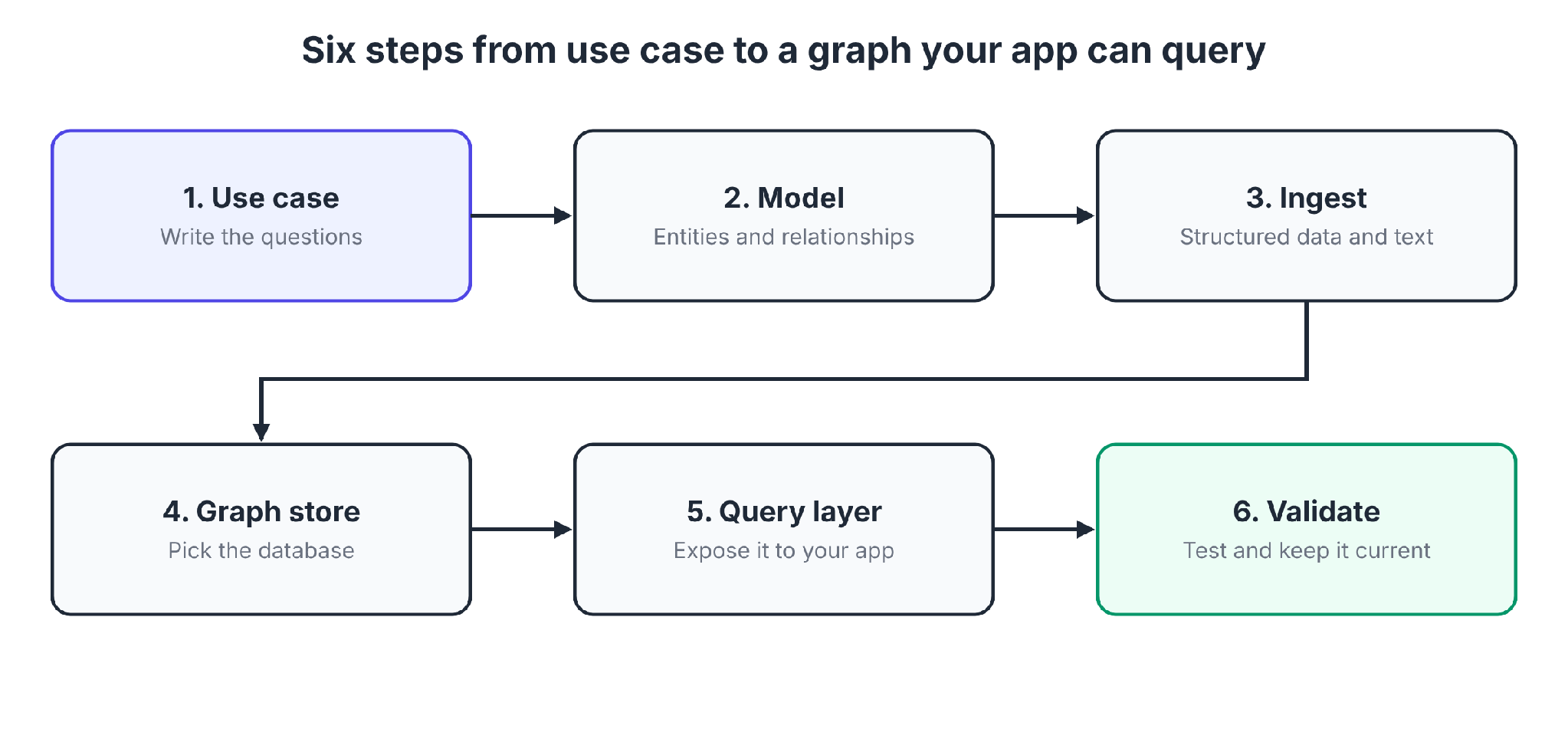
This guide covers six build steps, GraphRAG, a comparison of graph tools, and how apps read the graph through APIs, MCP, and permission-aware queries.
What is a knowledge graph for custom apps? The short answer
A knowledge graph stores your data as nodes (things like customers, tickets, and products) and edges (the relationships between them).
A custom app queries it to answer questions that span several systems, such as which customers use a product affected by an open incident.
Bottom line: A knowledge graph gives your app, and its AI features, a connected, checkable view of your data, and the quality of that graph decides how good every answer is.
A graph database is the storage engine. The knowledge graph is the modeled layer on top, with entity types, relationships, and rules that give the data meaning.
Our guide to the enterprise knowledge graph covers the company-wide view. This guide builds one for a single app.
Key terms you'll see:
- Schema or ontology: The list of entity types and relationship types your graph allows.
- Entity extraction: Using NLP or an LLM to pull entities and relationships out of text.
- GraphRAG: Retrieval-augmented generation that pulls facts from a graph and can pair with vector search over text chunks.
- Triple: A subject-predicate-object fact, the unit of RDF graphs.
What you need before starting
Prerequisites:
- One use case with 5 to 10 real questions the app must answer.
- A sample of the data, structured (tables, CSV, JSON) or unstructured (documents, tickets, notes).
- A graph database you can run locally or in the cloud.
- An LLM API key if you plan to extract entities from text.
- A language your team knows, such as Python or TypeScript.
How to build a knowledge graph for custom apps, step by step
Follow the steps in order. Each step produces the input for the next.
🎯 Step 1: Pick one use case and write the questions it must answer
Start with the questions before the data. Write 5 to 10 questions a user or agent will ask, in plain language.
Examples:
- Which customers renewed a product that has an open critical incident?
- Who owns the escalation path for this account?
- Which contracts mention a clause that changed last quarter?
These questions decide what the graph must contain. If a data source cannot help answer one of them, leave it out for now.
Pro tip: Only model what you will query. A lean graph is faster to build and easier to check.
🧩 Step 2: Model entities and relationships
A schema (or ontology) lists your entity types, the relationships between them, and the properties each one carries. Memgraph's guide starts the same way: decide which entities become nodes and which facts become relationships.
Start with a small schema:
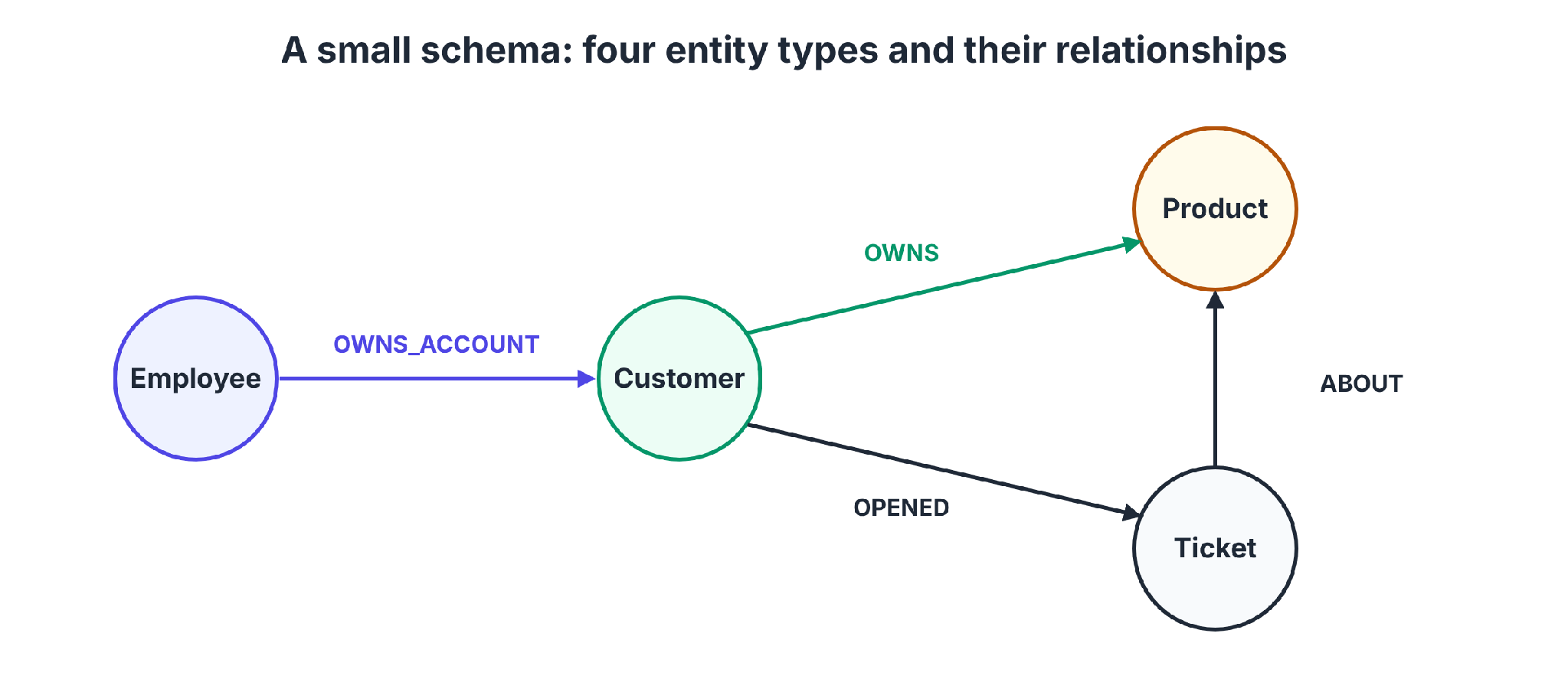
Give every entity a stable, unique identifier. Matching two records to the same entity later depends on it.
In Cypher-based databases, loading a fact looks like this:
MERGE (c:Customer {id: "C-1042"})
MERGE (p:Product {sku: "P-7"})
MERGE (c)-[:OWNS]->(p)
Constraint and index syntax differs between databases. Check your database's docs. Keep the schema in version control, the same way you keep code.
Pro tip: Add metadata early. A source, a timestamp, and a confidence value on extracted facts make each fact easier to trace and debug.
📥 Step 3: Ingest structured and unstructured data
Structured and unstructured data take different paths. With structured data, you decide the graph model and map the data to it, according to Memgraph's guide.
Structured data (tables, CSV, JSON):
- Map each table or file to node types and relationships.
- Define the properties for each.
- Import with your database's bulk loader or a script.
Unstructured data (documents, tickets, notes):
- Preprocess: Clean the text and split it into chunks that fit the model's context window.
- Extract: Ask an LLM to pull entities and relationships from each chunk, and give it your schema so it uses your types.
- Resolve duplicates: "Acme", "Acme Inc.", and "ACME Corp" should become one node.
- Validate before writing: Sample the output and fix the prompt or schema first.
The Neo4j GraphRAG Python package builds a pipeline from a data loader, text splitter, schema builder, entity extractor, and writer. Its user guide marks the knowledge graph builder as still experimental.
Neo4j also offers the LLM Knowledge Graph Builder, a Labs app that turns PDFs, web pages, and other sources into a graph with Document and Chunk nodes plus extracted entities.
Neo4j's developer guide says the Labs project is not officially supported and recommends Document Intelligence or the GraphRAG Python package instead.
Pro tip: Load structured data first, then use extraction to enrich it. An LLM can extract a wrong edge. Tag every extracted edge with its source.
🗄️ Step 4: Choose a graph store
Pick the store that fits your data model, your team's skills, and where you run. The table later in this guide compares six options.
Two rules of thumb:
- Building app features quickly: A property graph database with a Cypher-style language works well.
- Needing shared vocabularies, inference, or querying data in place: An RDF platform is the better match.
Pro tip: Run a small proof of concept with your Step 1 questions on your top two candidates before you commit.
🔌 Step 5: Expose the graph to your app
Put a thin query layer between your app and the graph database, and keep it narrow.
- Start with fixed queries: Write parameterized queries, or small API endpoints, that answer your Step 1 questions. Fixed queries are easy to test and limit what the app can ask.
- Add natural-language queries carefully: Some tools translate questions into graph queries, like Memgraph's Text2Cypher. Run them with a read-only role, cap result sizes, and set timeouts, because an LLM can write a wrong or expensive query.
- Pass the user's identity: Filter results by what the person is allowed to see. The final section on consuming the graph covers this.
Pro tip: Log every query with the user and the app that issued it. You will need that record when someone asks why the app showed a fact.
✅ Step 6: Validate the graph and keep it current
A graph that was right on launch day drifts as your data changes. Build these checks into the project from the start.
- Test with your Step 1 questions: Each should return the answer you expect. Keep them as a regression suite.
- Sample extracted facts: Check a random sample against the source on a regular schedule.
- Find gaps and duplicates: Look for orphan nodes with no relationships and near-duplicate entities.
- Plan refreshes: Decide how changes reach the graph, by scheduled reloads or by streaming updates.
- Review the schema regularly: Add types when real questions need them, and retire ones nobody queries.
GraphRAG: how the graph grounds the LLM features in your app
GraphRAG gives a language model facts from the graph, alongside vector search over text chunks. It helps when the answer depends on connections.
How the flow works:
- The user asks a question in your app.
- An LLM identifies the entities in it, such as a customer and a product.
- The app fetches those entities' direct and indirect relationships from the graph, and similar text chunks from a vector index.
- The model answers using that retrieved context, and the app can show which facts it used.
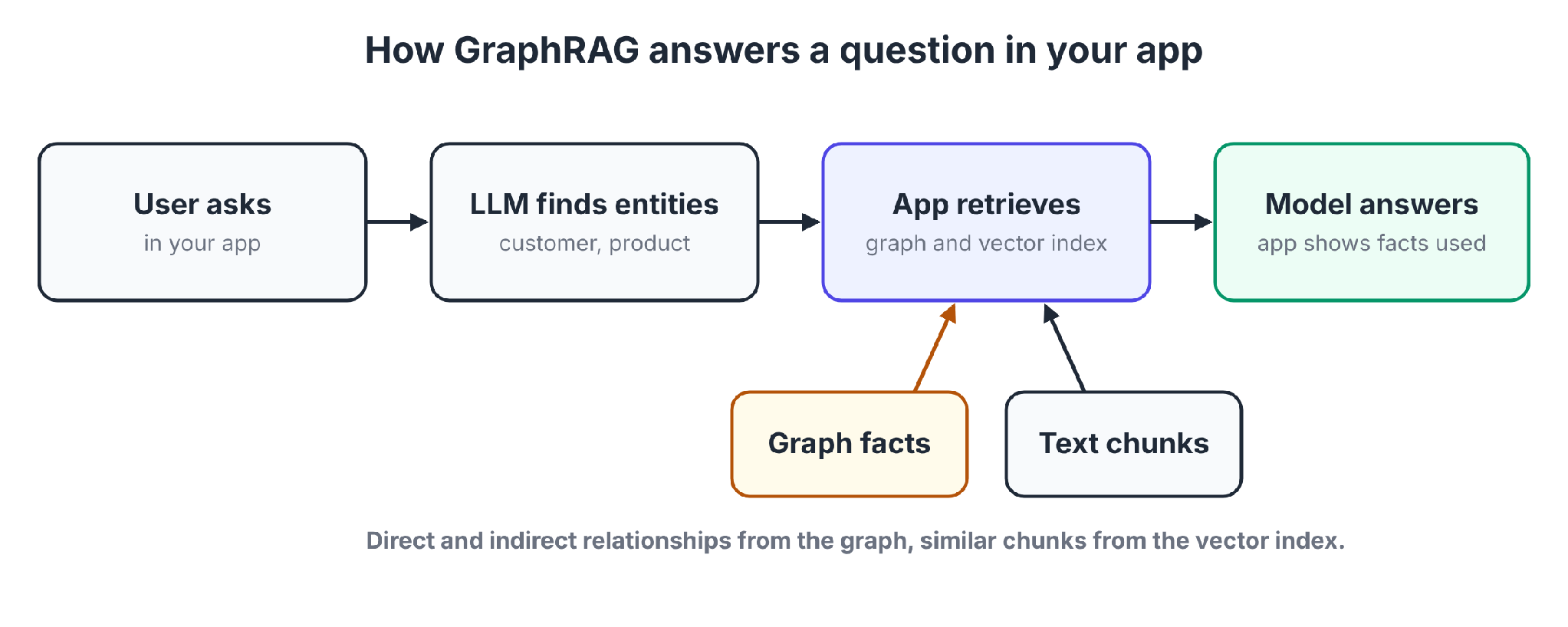
Vector search alone and GraphRAG differ as follows:
Microsoft's GraphRAG paper builds an entity graph from documents, then pregenerates summaries of related-entity groups.
On corpus-wide questions over datasets around 1 million tokens, GraphRAG led to substantial improvements in how complete and diverse the answers were, compared with a conventional RAG baseline, as judged by an LLM.
Two caveats apply. Test the approach on your own data, because that evaluation covered one kind of question. And Memgraph's guide says the quality of a GraphRAG system's answers depends on the quality of the graph.
A wrong extracted edge turns into a wrong fact that the model states with confidence.
Knowledge graph tools compared
The table compares six graph stores, builders, and services on the same columns.
Six tools, side by side:
Neptune Analytics supports only openCypher, while Neptune itself supports Gremlin, openCypher, and SPARQL.
Google's service supports up to 10 BigQuery tables and clusters matching entities. Treat it as a data-prep step ahead of your graph store.
Neo4j is a property graph database, and its LLM Knowledge Graph Builder targets knowledge graph work. Check each vendor's pricing page before you decide, because the table leaves prices out.
RDF triple stores vs. property graphs
The two main graph data models suit different jobs. Pick based on what your app needs.
The two models side by side:
Choose RDF if you need shared vocabularies, inference, or querying sources in place. Choose a property graph if you are building app features quickly with a team that knows SQL-like languages.
Neptune supports both, and FalkorDB's Jena adapter brings SPARQL to a property graph store. Memgraph's LPG vs. RDF guide covers the same choice from the database side.
How apps and agents consume the graph: APIs, MCP, and permission-aware queries
Apps and agents need a controlled way to read the finished graph.
Three ways to consume it:
- An API layer: A service exposes REST or GraphQL endpoints that run parameterized queries. A fixed set of queries suits app UIs.
- MCP: An MCP server lets AI agents call the graph as a tool. Memgraph documents an MCP server for this, and Superblocks uses MCP for its own data model, covered below.
- Permission-aware queries: Carry the caller's identity into the query, and filter results by role. Check which access controls your database offers.
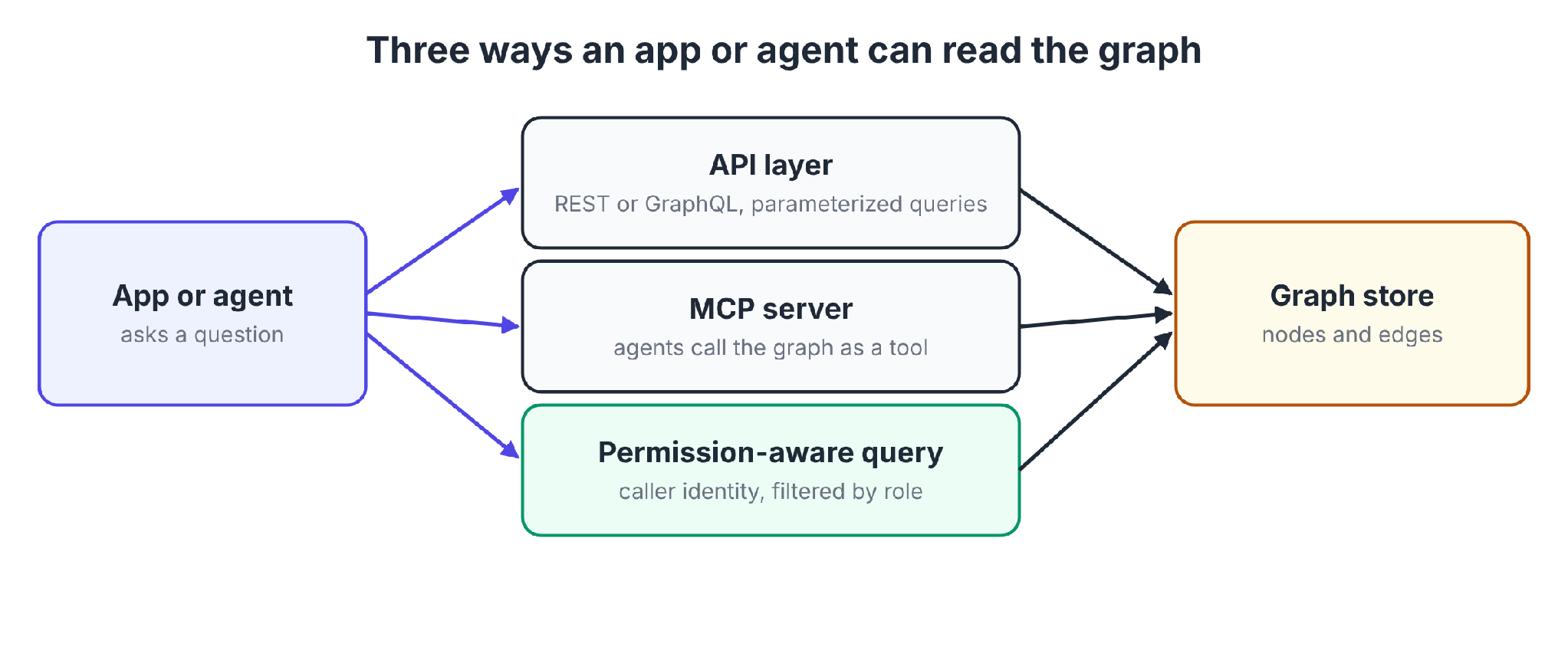
The app layer is still open. Someone must decide who builds apps on the graph, with which permissions, and with what audit trail.
Where Superblocks fits
Superblocks is the governed enterprise vibe coding platform, and it works as the app layer on top of your data platform. Our guide to governing the app layer covers that split.
According to its integrations page, Superblocks can connect to a service that accepts REST or GraphQL. A graph store that exposes such an endpoint can connect the same way.
Business teams then build apps on that data with Clark, its AI builder, while IT sets access rules once. Federated building splits the work this way.
Superblocks also builds a graph of its own. In Superblocks 2.0, Clark's Knowledge is a context graph for building on enterprise systems. As builders work with Clark, Clark learns relationships across your integrations.
For example, a customer ID in Salesforce may map to a user ID in Snowflake. Clark remembers that relationship and applies it for the next builder.
Clark's built-in agent memory also lets admins define code policies, design systems, and audit rules.
Clark's graph covers how your systems connect. A graph store holds your domain data, such as documents and entities.
The Superblocks MCP gives admins programmatic access to builders, applications, integrations, permissions, audit logs, queries, and usage events. Agents can trace an alert about a suspicious query back to the application, integration, and builder behind it.
What you get:
- Permission-aware apps: Role-based access control (RBAC) governs what each person can do, and our guide to AI contextual governance explains the model.
- A queryable record of the app layer: The Superblocks MCP gives agents programmatic access to apps, builders, and audit logs.
- Your own network: Cloud-Prem deploys the full platform, including Clark inference, inside your own cloud on AWS, GCP, or Azure, and Superblocks manages it
RBAC is on Teams, while SSO, audit logs, and VPC deployment are Enterprise features. The Superblocks MCP is available to all Enterprise customers. Teams is a flat $125/month for up to 15 builders.
Do you need a knowledge graph?
Some projects need no graph.
Skip the graph if:
- Your questions are about finding similar text, where vector search already works.
- Your data is small, and a few SQL joins answer everything.
- You have no defined use case yet, and modeling would be guesswork.
Use a graph when relationships carry the answer, as in multi-hop questions, ownership and dependency chains, or facts that agents must cite.
Common mistakes to avoid
Avoid these five mistakes:
- Modeling everything: A graph with every field "just in case" is slow to build and hard to trust.
- Skipping duplicate resolution: Two nodes for the same customer split the facts and break multi-hop answers.
- Giving an LLM write access: Let natural-language queries be read-only, with limits on results and time.
- Dropping provenance: Without a source on each fact, you cannot debug a wrong answer.
- Ignoring permissions: A graph that joins every system exposes data from every system to anyone who can query it.
To see how a governed app layer works on top of your data, start with the Superblocks quickstart.
Or book a demo to walk through building apps on your own data sources with Clark.
Frequently asked questions
How can I build my own knowledge graph?
To build your own knowledge graph, pick a use case, model entities and relationships, load structured and unstructured data, choose a graph store, expose a query layer, and validate the result. Start with one data source.
Is the knowledge graph still relevant?
The knowledge graph is still relevant in the LLM era because multi-hop questions and agents that act need explicit relationships, sources, and permissions.
Memgraph, Neo4j, and Amazon Neptune each document GraphRAG support, and simple lookups still do not need a graph.
What is the difference between a graph database and a knowledge graph?
A graph database stores nodes and edges, while a knowledge graph is the modeled layer on top, with entity types, relationships, and rules that give the data meaning. You build a knowledge graph in a graph database.
What are some good knowledge graph tools?
Good knowledge graph tools include Neo4j, Memgraph, FalkorDB, Stardog, and Amazon Neptune. Google's Enterprise Knowledge Graph reconciles entities across BigQuery tables. Pick by data model, where you run, and what your team already knows.
Can Superblocks help build apps on a knowledge graph?
Superblocks can help build apps on a knowledge graph when the graph store exposes a REST or GraphQL endpoint, and Clark builds apps on that data. Its own Knowledge feature also builds a context graph across your integrations.


Stay tuned for updates
Get the latest Superblocks news and internal tooling market insights.
Request early access
Step 1 of 2
Request early access
Step 2 of 2

You’ve been added to the waitlist!
Book a demo to skip the waitlist
Thank you for your interest!
A member of our team will be in touch soon to schedule a demo.
production apps built
days to build them
semi-technical builders
traditional developers
high-impact solutions shipped
training to get builders productive
SQL experience required
See the full Virgin Voyages customer story, including the apps they built and how their teams use them.

"Those tools are great for proof of concept. But they don't connect well to existing enterprise data sources, and they don't have the governance guardrails that IT requires for production use."
Table of Contents

Multiple authors
AI Governance Platform Pricing: 11 Tools Compared (2026)
AI governance platform pricing compared side by side, from published monthly prices to custom quotes, plus the hidden costs that change the final bill.