
Hi, I'm Blake, AI strategist at Superblocks. I help enterprises get AI into the hands of every team and turn what those teams build into results leadership can see. Every day I speak with CIOs and CISOs about what's paying off and what isn't.
Over the next year I'll share what I'm seeing in a short series, so you can learn from the fastest-moving enterprises before you learn it the hard way. This is the first piece.
Last month I sat across a conference table from the CIO of one of the largest consumer entertainment companies in the country. His board meeting was a few weeks away, and you could feel the weight of everything on his plate.
He was bringing two apps his business teams had built, one of them by someone who had never written a line of code. Each builder would record a short video showing what their app does and how many hours it gives back. As he walked us through them, his shoulders dropped a little. For the first time that morning, he looked like a man with an answer. I was glad we'd helped him get there.
The question boards ask has changed. A year ago, boards asked, "Are we using AI?" Now they ask, "What did it produce?" Most AI dashboards can't answer the second one.
How teams turn AI into outcomes: real examples
I spent five years at EY helping enterprise clients roll out large-scale technology transformations, and I got a front-row seat to how AI fit into them.
For most of that time, the story was usage. Every status update came down to the same two metrics: how much people were prompting and how much we were spending.
Then one day, mid-presentation, an SVP at a bulge bracket bank stopped me. Did we know what value those prompts were adding? Had AI actually changed how any of their teams worked?
We didn't have a clean answer. Neither did anyone else in the room.
The teams who can answer that question track output, not just usage, every week.
Why AI usage metrics fail the board test
Usage metrics count activity. They can't show value, and they can't show risk.
IBM surveyed 2,000 CEOs in 2025. Only 25% said their AI initiatives delivered the expected ROI, and only 16% had scaled AI across the enterprise. MIT's Project NANDA found that 95% of organizations saw no measurable business return from $30 to $40 billion in generative AI spend.
The same MIT study found the risk hiding under the usage numbers. Only 40% of companies bought an official LLM subscription, yet workers at over 90% of companies used personal AI tools for work. So a high prompt count can mean productive work. It can also mean customer data pasted into a chat window your security team had not approved.
A usage chart shows people are busy. It can't tell a CFO whether a process got faster, a contract got cut, or an engineer got freed up. It can't tell a CISO where the data went.
How to report AI output: three questions
Every week I sit down with CIOs, CISOs, IT leads, and department heads at enterprises in gaming, travel, healthcare, and energy. They rolled out AI, and now they have to prove it worked.
The teams pulling ahead answer three questions every week.
1. What did AI ship?
Count apps in production. An app that runs a process every day proves the investment turned into work. Once a CIO can say, "Operations shipped nine apps this quarter and Finance shipped five," the board stops asking whether people use AI and starts asking where to invest next.
With Superblocks, that list is always current. Audit logs and observability record every app that gets built, deployed, and opened, by user.
2. Where is it spreading, and where is it stuck?
Every company has a few people who build constantly, a larger group finding their feet, and some who started and stopped. Watch the ones who stopped. The cause is almost always missing data access, no clear use case, or a sponsor who moved on. Fix those, and adoption grows without another training program.
3. What did it change for the business?
Every app should move one of three numbers:
- Time back. Hours returned to a team every week.
- Spend cut. A SaaS contract you don't renew because your team built what it needed.
- Engineering refocused. Internal tools that no longer sit in the engineering queue.
If an app moves none of them, it's an experiment. Keep it, but leave it out of the board deck.
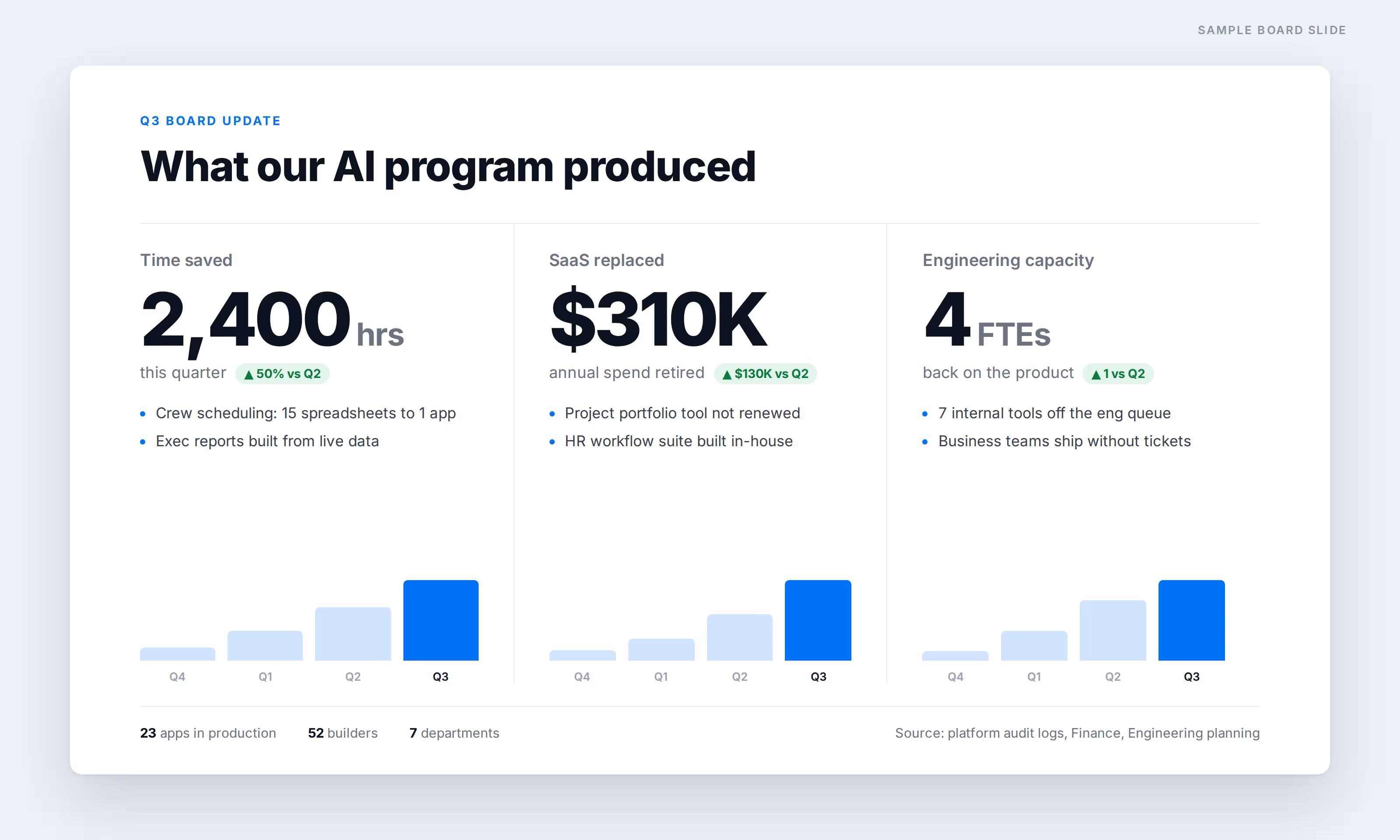
How teams turn AI into outcomes: real examples
Here are real apps from teams I've worked with. Names are masked.
Operational efficiency: hours back every week
A business portfolio manager at a large consumer entertainment company had no engineering background. Her team tracked projects across several tools and rebuilt the same status report by hand for every exec review. She built a portfolio hub that holds plans, risks, and decisions in one place and generates the leadership deck straight from live project data. She had a prototype in another AI tool. Moving it into Superblocks took 15 minutes, because login, permissions, and hosting were already in place. Her verdict: "I'm in here every day. It has saved me so much time."
A global travel operator planned 18 months of crew rotations across 15 spreadsheets. An operations analyst replaced them all with one scheduling app built on Superblocks in 2 days, saving him about 4 weeks of manual work.
SaaS replacement: build what you'd otherwise buy
A public healthcare organization needed an HR platform that no vendor offered off the shelf. They tried PowerApps, where each task took a full day. Appian couldn't meet their interface requirements. A designer with no engineering background built the platform himself on Superblocks, working alongside Clark, its AI agent: 30+ pages, 70 APIs, multi-factor login. Tasks that took a day in PowerApps took 30 minutes. The custom-software quote they avoided ran into the millions.
Engineering cost avoidance: stop queueing internal tools
A fast-growing energy technology company had people in every department who wanted to build with AI: sales engineers, product managers, operations leads. But each of their tools still needed an engineer to reach production, with login, security review, and hosting. Engineering spent more and more of its week helping the rest of the business ship internal tools.
Once those teams moved to Superblocks, they put apps into production themselves, with IT's controls already in place. Engineering went back to the product.
How to let everyone build without losing control
Most AI programs hit the same wall. IT either locks building down and the list stays short, or looks away and tools spread that nobody can see.
Superblocks gives IT a third option:
- Central control. Role-based access and your company SSO decide who builds, what data they reach, and what they publish, down to a single app.
- Your data stays home. With Superblocks Hybrid, production data and API calls run inside your own cloud.
- A full record. Audit logs capture every edit, deploy, and permission change.
Everyone can build because governance stays central, with IT and security.
How to make it stick: review weekly
Run this review every week and three things change.
- Your AI spend becomes a story you can defend. You walk into budget conversations with apps, owners, and hours saved.
- Adoption grows where it matters. You catch stalled builders early, while the fix is still a data access request.
- Engineering gets its roadmap back. Business teams ship their own tools, and engineering stays on the product.
It takes 30 minutes a week and ends with a one-page note to your exec sponsor: what shipped, what it's worth, and what's blocked.
At EY, our clients all had different AI review cycles, typically once a month, and by then the stalled users had already given up. Moving to a weekly cadence changed the math. You want to catch a builder in week one, when the fix is a 10-minute data access request, not in three weeks when they've gone back to manual spreadsheets.
At Superblocks, we run this review with every enterprise customer. A forward-deployed engineer builds alongside the customer's team and clears technical blockers on the spot. I own the weekly cadence: the report, the priorities, and the conversation with the exec sponsor. That pairing is how one customer went from kickoff to showing its board production apps in about five weeks.
Run the review once this week. If you can't fill in the app inventory, you have your answer about where your AI program stands.
Questions I get asked often
To make this easy to come back to, I've summarized the article as the questions IT and Security teams ask me most, each with a short answer.
How do you measure AI ROI in an enterprise?
Measure output, not usage. Count the apps in production, tag each one to a value driver (time saved, a SaaS contract replaced, or engineering work avoided), and put one number on each. Review it weekly, and take help of your vendor.
What AI metrics should a CIO report to the board?
Report three things: what got built, who's building, and what it's worth in hours or dollars. Add the top blockers and next priorities.
Why are AI usage metrics misleading?
Usage counts activity. A high prompt count can mean productive work, or it can mean employees pasting sensitive data into unapproved tools. MIT found workers at over 90% of companies use personal AI tools for work, while only 40% of companies bought an official subscription.
How do you find out why AI adoption is stalling?
Track builders individually. Sort them into power, growing, and stalled, and record why each stalled builder stopped. The usual causes are missing data access, no clear use case, or a lost sponsor.
How do you let non-engineers build with AI safely?
Use role-based access control. Roles decide who can build, connect to data, and publish. Access scopes to specific resources, and apps inherit the company's SSO, so IT can open building widely without losing control. Superblocks adds audit logs and a hybrid deployment that keeps production data in your own cloud.
How often should you review AI program results?
Weekly. A quarterly review catches stalled builders after they've already quit. A weekly review catches them while the fix is still small.
At Virgin Voyages, non-technical teams now build their own AI apps, with IT governance fully intact. The result: 15+ production apps, seven departments onboard, and zero dedicated frontend engineers.
At Matthews, a marketing manager with zero coding background built an app that auto-generates offering memorandums, cutting turnaround from days to hours. See how the brokerage is putting AI builders on every team, with full governance intact.


Stay tuned for updates
Get the latest Superblocks news and internal tooling market insights.
Request early access
Step 1 of 2
Request early access
Step 2 of 2

You’ve been added to the waitlist!
Book a demo to skip the waitlist
Thank you for your interest!
A member of our team will be in touch soon to schedule a demo.
production apps built
days to build them
semi-technical builders
traditional developers
high-impact solutions shipped
training to get builders productive
SQL experience required
See the full Virgin Voyages customer story, including the apps they built and how their teams use them.

"Those tools are great for proof of concept. But they don't connect well to existing enterprise data sources, and they don't have the governance guardrails that IT requires for production use."
Table of Contents
%20(1).png)

Multiple authors
Data Governance and Generative AI: What Changes in 2026
Data governance and generative AI intersect differently than with traditional AI, since outputs become new data too. Here's what changes and how to govern it.
%20(1).png)
%20(1).png)