Enterprise design system enforcement is the mix of owners, rules, and automated checks that keeps every team building with the same components and tokens. Without it, small exceptions compound across teams.
Seven steps to enforce a design system without hurting adoption follow below, along with the enforcement-versus-enablement debate and what changes when AI builds the interface.
What is enterprise design system enforcement? The 30-second answer
An enterprise design system is the shared kit for building interfaces, made of reusable components, design tokens, documentation, and a contribution model. Builder.io calls these the four pillars of a complete system.
Enforcement gets teams to use the kit and catches deviations when they skip it. The practice combines people (an owner with authority), rules (what is mandatory), and automation (checks that run without a meeting).
Bottom line: Enforcement keeps the system consistent, and enablement keeps it adopted. A design system needs both.
Enforcement vs. enablement in design systems
Two well-known positions pull in opposite directions.
The two positions compared:
Daiello says nobody likes being forced, and a system should compete for adoption. NN/g's Laura Klein says good intentions are not enough, and someone has to look after the whole product.
NN/g illustrates the risk with a standard carousel that small change requests turned into dozens of versions.
Both positions share a rule of thumb. Daiello's motto is that one occurrence is an outlier, two is something to watch, and three becomes a pattern.
NN/g's rule is that a change that helps three or more teams probably belongs in the system.
My take: enforce the foundations, enable the edges
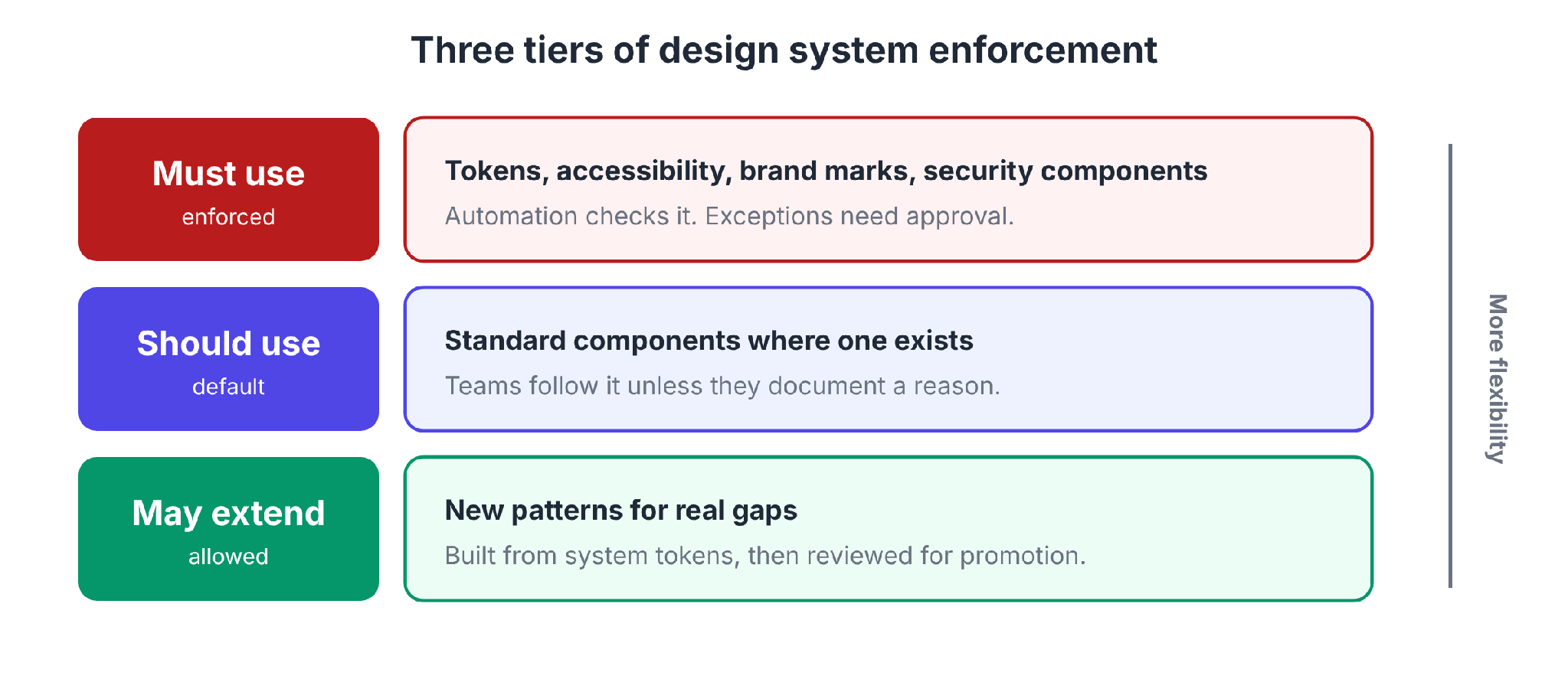
Enforce where a deviation is costly, and allow flexibility where teams have real, local needs. The split below is my recommendation, built from both positions.
Three tiers of enforcement:
Who owns enforcement?
Someone has to be named. NN/g calls the role an enforcer and frames it as stewardship. The enforcer makes sure teams use the system, sends needed changes back into it, and helps teams compromise when their needs conflict.
The enforcer needs leadership support. NN/g says the design-system team has to be able to veto changes that break consistency, and that without top-down backing, enforcement becomes a suggestion.
NN/g also advises winning over engineers, who benefit when they do not have to keep up multiple versions of one component.
Where business teams build with AI, our guide to vibe coding governance covers six controls IT can use to keep AI-built apps secure and visible.
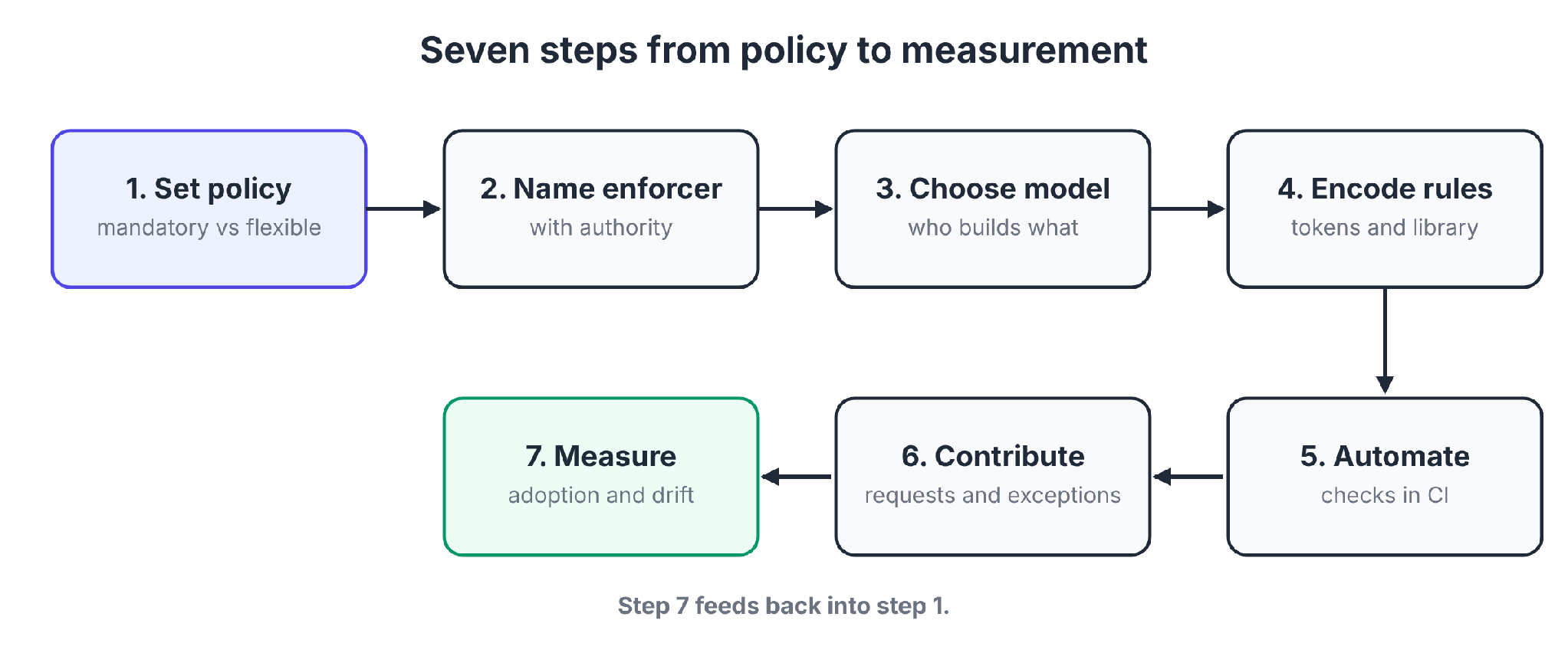
How to enforce an enterprise design system in 7 steps
The steps run from policy to measurement. Each step ends with a check.
Step 1: Decide what's mandatory and what's flexible
Write down what is required, what is the default, and what can be extended. The three tiers above are a starting point.
Check: A team can read the policy and tell at once whether a change needs approval.
Step 2: Name the enforcer and give them authority
Pick a person or team, and write down their decision rights. Include who breaks ties when teams disagree.
Check: The enforcer can say no to a change, and leadership has said they will back it.
Step 3: Choose a governance model
Governance decides who approves changes and who builds components. The next section compares three models.
Check: Everyone knows whether components come from one central team, from product teams under shared standards, or from a mix.
Step 4: Encode the rules in tokens and a shared component library
Put the decisions in code, and following them becomes easier than skipping them. Design tokens are named values for color, spacing, and type. Components consume tokens, and teams consume components.
Check: A team can build a standard screen using only system components and tokens.
Step 5: Automate the checks
Add automation where deviations enter, in the design file and in CI before merge. The mechanisms section below lists what to check.
Check: A hardcoded color or spacing value fails a CI check before the pull request is approved.
Step 6: Run a contribution and exception process
Teams need an obvious, low-friction way to request a change. NN/g suggests a simple submission form or regular office hours, plus a documented timeline for decisions.
Review at the right moment. Too early, and teams have nothing concrete to show. Too late, and they have already shipped.
Check: A team can submit a request with a short form and get a decision within the documented timeline.
Step 7: Measure adoption and drift, then adjust
Track whether teams use the system and where they work around it. Use the metrics in the measurement section below, and revise the policy as the data comes in.
Check: You can name the team with the lowest adoption and the likely reason.
Governance models: centralized, federated, and hybrid
Builder.io compares centralized, federated, and hybrid governance, and Magic Patterns compares centralized, federated, and community-driven governance. The right model changes as an organization grows.
Governance models compared, using Builder.io's descriptions:
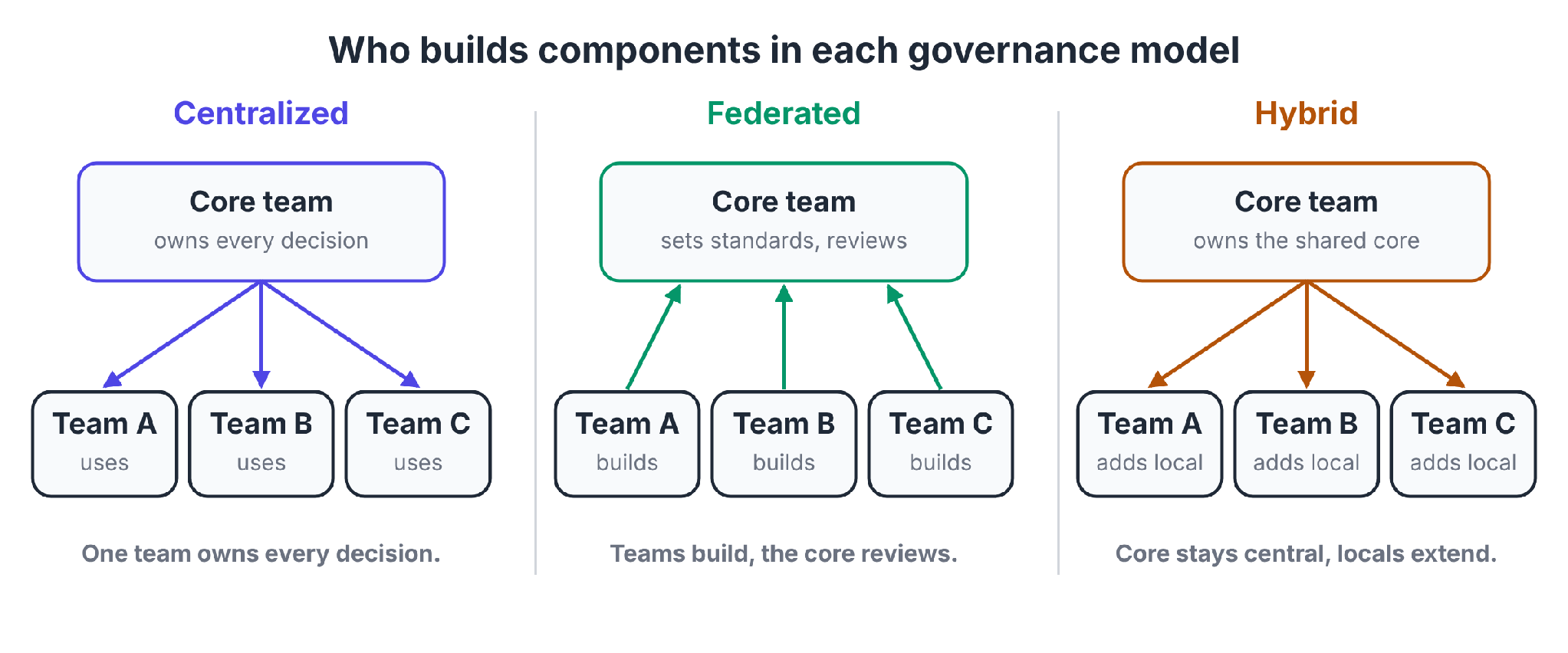
Magic Patterns also describes a community-driven model, where any team can propose, build, and ship components, and says it needs the strongest review processes to prevent divergence.
Magic Patterns says most organizations start centralized because it is the fastest way to establish standards and build credibility. Federated governance becomes necessary as the system matures.
Explicit triggers tell you when to revisit the model. Magic Patterns lists a growing backlog of contribution requests, plateauing adoption metrics, and a rising ratio of rogue components to system components.
When non-engineers do the building, our citizen developer governance framework covers the rules for them.
Enforcement mechanisms: what to check
Five mechanisms put the policy into practice.
Enforcement mechanisms and their limits:
Checks can sit in the design tool and in CI. In Magic Patterns' examples, a linter catches off-system colors in Figma before export, and a CI check runs before a pull request is approved.
Token architecture, in brief
Magic Patterns recommends three token layers. Primitives are raw values, such as a specific blue. Semantic tokens map intent to primitives, such as "primary action." Component tokens bind semantic decisions to elements, such as a button's background.
Each layer points to the one below, and changing a primitive reaches every component built on it.
The Design Tokens Community Group released the first stable version of its Design Tokens Specification in October 2025, a vendor-neutral format for sharing tokens across tools.
Token updates can be version-controlled commits. In Magic Patterns' example, a token change goes through a pull request, and a CI/CD pipeline then transforms it into platform-specific formats and publishes it.
Enforcing the design system in AI-generated apps
UXMagic's answer to whether AI tools follow design tokens is "sometimes." Long prompts bury token rules, and the model falls back to hardcoded values such as hex codes.
UXMagic recommends running deterministic validation scripts after generation that flag raw hex values and primitive tokens used directly in components.
Magic Patterns warns that AI-generated drift can replace manual drift without guardrails. It recommends role-based permissions on what AI tools can create or modify, audit trails that track AI-generated contributions separately from human ones, and explainable outputs.
For business teams building apps with AI, the question is where the design system lives so the AI builder can apply it. Our guide to AI code guardrails covers related controls.
Where Superblocks fits
Superblocks, the governed enterprise vibe coding platform, handles this through Organization Knowledge. Admins save the design system as organization-level knowledge, and Clark, the Superblocks AI builder, applies it by default in every conversation across the org.
What the docs say Organization Knowledge covers:
- Design systems and conventions: Entries can hold design systems, coding conventions, domain terminology, and team-wide patterns.
- Org-wide reach: Organization entries apply to all builders in the org, and knowledge also exists at the integration, user, and app levels.
- Admin control: Only Owners and Admins can create, update, or delete organization knowledge, and admins can set entries up by chatting with Clark on the Knowledge page.
Organization Knowledge suits federated building. Business teams build with Clark, and admins set the standards once for every builder in the org.
Clark's launch post describes a Design agent that applies your design system, reusable React components, themes, and UX standards. Organization Knowledge opened to all customers as a beta in February 2026.
Knowledge guides how Clark builds. Keep entries focused, because the docs warn that enabling too many entries at once can reduce Clark's effectiveness.
Superblocks adds pre-publish checks through its Code Security policies, shown on the Policy Agents page
For design-system checks, run your own in CI. A Superblocks app can connect to a Git repository, and changes then go through pull requests in your normal review and CI.
Use the same token and lint rules there that your other projects use.
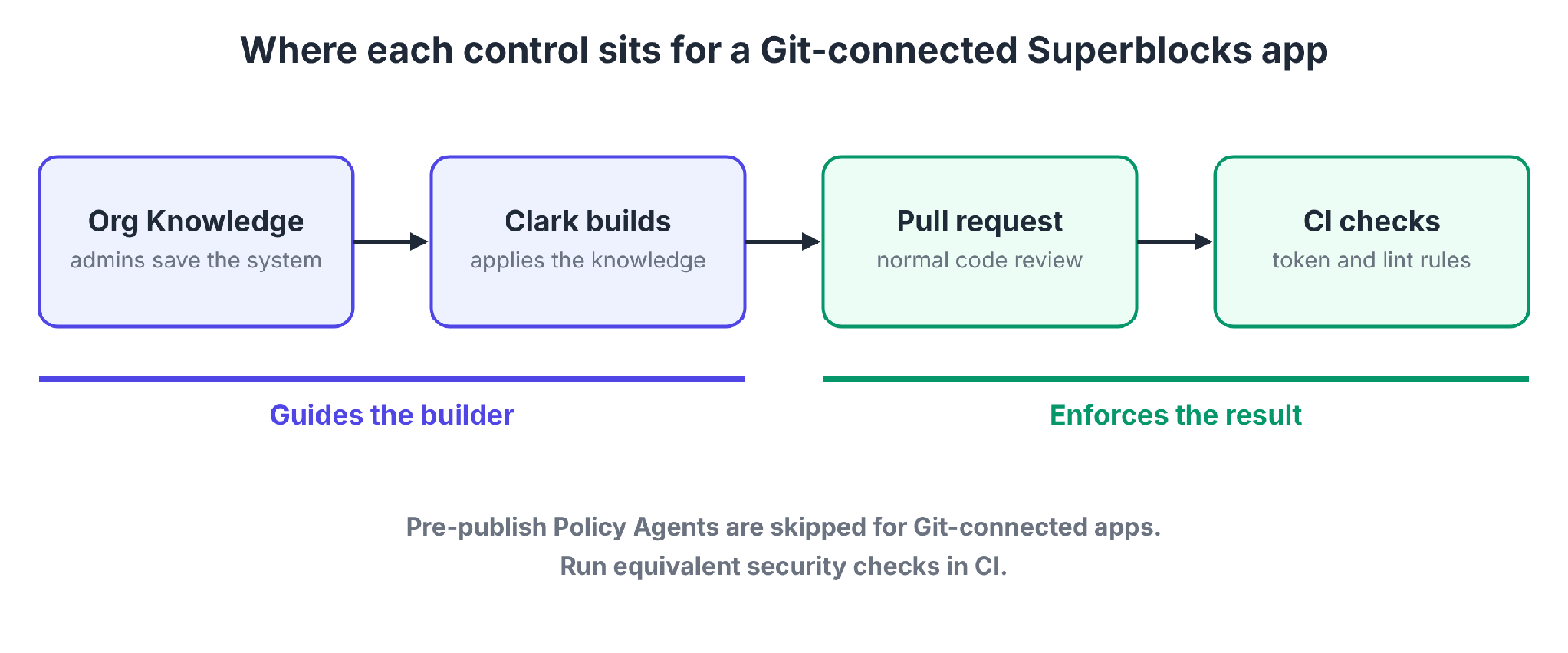
Pre-publish Policy Agents are skipped for Git-connected apps. Run equivalent security checks in CI for those apps, as the docs advise.
RBAC is on Teams, $125 per month for up to 15 builders. SSO, audit logs, and VPC deployment are Enterprise features.
For platform evaluation, our enterprise buyer's guide to AI app development lists what to check.
Measuring design system adoption and drift
Without data, enforcement turns into arguments. The metrics below show where the system works and where teams bypass it.
Metrics to track, with warning signs:
Builder.io lists adoption rate, component coverage, contribution velocity, and defect rates as health metrics. Magic Patterns lists token overrides as a diagnostic signal.
For design files, Figma's library analytics show how teams use components, styles, and variables. The feature is available on Education, Organization, Government, and Enterprise plans.
Audit logs and access controls help track who builds what in AI-built apps. Our comparison of low-code platforms with AI governance features ranks six platforms on access controls, audit logging, data processing location, and code portability.
Benchmarks vary. Builder.io says successful implementations reach 60% adoption, and Magic Patterns says teams should aim above 70% component reusability. Set your own baseline first, then track the direction.
Common mistakes to avoid
Avoid these five mistakes:
- Enforcing before the system is ready: Daiello warns that requiring adoption of a system that meets less than 80% of needs leads to resentment.
- An enforcer without authority: If leadership will not back the veto, the enforcer cannot stop a change.
- Saying no to everything, or yes to everything: NN/g notes that rejecting every request makes teams route around you, and approving every exception makes the system meaningless.
- No contribution path: If asking for a change is hard, teams build their own.
- Measuring only compliance: Track adoption and friction too, to see why teams work around the system.
My verdict on enterprise design system enforcement
Enforce the foundations with automation, and enable the edges with a fast contribution path. Tokens and checks carry the policy, and the contribution path keeps teams from working around it.
AI tools now build more of the interface. Put the rules in tokens, in checks, and in the knowledge your AI builder follows.
To see how a governed platform applies your design system, start with the Superblocks quickstart.
Or book a demo to walk through Organization Knowledge with your own design system.
Frequently asked questions
What is the difference between an enterprise design system and a component library?
The difference between an enterprise design system and a component library is scope. A component library is a set of reusable UI elements. An enterprise design system adds design tokens, documentation, and a contribution model. Builder.io's four pillars are the component library plus these three.
Should I use centralized or federated governance for my design system?
Centralized governance suits a young design system, and federated governance suits a system that several teams depend on. Magic Patterns recommends starting centralized and moving to federated governance as the system matures. Builder.io notes that central teams become bottlenecks when product teams need components faster than the core team can deliver.
What are design tokens?
Design tokens are named values for design decisions, such as colors, spacing, and type. Builder.io describes them as named variables that keep visual consistency across every product. A change to a token updates every product that uses it.
How does AI change design system enforcement?
AI changes design system enforcement because AI-generated drift can replace manual drift. Magic Patterns recommends role-based permissions on what AI tools can create or modify, audit trails for AI-generated contributions, and explainable outputs. UXMagic adds deterministic validation scripts that flag raw hex values after generation.
How can I enforce a design system in AI-built apps?
To enforce a design system in AI-built apps, save the design system as organization knowledge in Superblocks so Clark applies it by default. Then run your token and lint checks in CI on connected Git repositories. Knowledge guides the builder, and CI enforces the result.


Stay tuned for updates
Get the latest Superblocks news and internal tooling market insights.
Request early access
Step 1 of 2
Request early access
Step 2 of 2

You’ve been added to the waitlist!
Book a demo to skip the waitlist
Thank you for your interest!
A member of our team will be in touch soon to schedule a demo.
production apps built
days to build them
semi-technical builders
traditional developers
high-impact solutions shipped
training to get builders productive
SQL experience required
See the full Virgin Voyages customer story, including the apps they built and how their teams use them.

"Those tools are great for proof of concept. But they don't connect well to existing enterprise data sources, and they don't have the governance guardrails that IT requires for production use."
Table of Contents

Multiple authors
AI Governance Platform Pricing: 11 Tools Compared (2026)
AI governance platform pricing compared side by side, from published monthly prices to custom quotes, plus the hidden costs that change the final bill.