AWS internal tools are the employee-only apps, such as admin panels, dashboards, and approval flows, that a company builds and runs on AWS. The phrase also covers the systems Amazon uses inside its own walls.
The guide covers Amazon's own tooling, the AWS service for each layer of an internal tool, and six steps to build your own. Later sections cover AI-powered tools and running them in your AWS account.
What are AWS internal tools?
An internal tool is software only your employees use. Examples include admin panels, reporting dashboards, approval apps, and operations consoles. Customers never see them, and employees depend on them daily.
The phrase has two meanings:
- Amazon's own internal systems: The build, review, and deployment tooling that Amazon's engineers use.
- Internal tools you build on AWS: Employee-only apps that run on AWS services inside your own account.
Bottom line: Amazon's internal tools show what standardized engineering infrastructure looks like. AWS services let you build an equivalent for your own teams.
For ideas on what to build, see our list of 17 internal tools examples.
Internal tools Amazon is known for
Gergely Orosz's overview of Amazon's internal systems calls Amazon's custom stack "still surprisingly different from the stack AWS customers would use." The list reflects the state as of early 2022.
Hacker News commenters on a 2018 write-up of Amazon's engineering practices say the tooling has changed since. Read the table as a snapshot.
Amazon's internal systems:
Patterns worth copying:
- Standardized builds and reviews: Brazil and Crux give every engineer the same build and review path.
- Approval for sensitive operations: 2PR requires a second person for high-risk actions.
- Isolated accounts per environment: Isengard gives each stage its own AWS account. A mistake stays inside one account.
Employees disagree about Amazon's tooling. In a Hacker News thread, one commenter who says they have worked at Amazon for eight years calls the code submission and logging tools "fantastic".
Other commenters say new hires struggle with the tools far more than long-tenured staff. These are commenter opinions, not Amazon statements. Your own tools need an onboarding guide for the same reason.
Which AWS service fits each layer of an internal tool?
An internal tool is built from the same layers as any web app. The table maps each layer to AWS options. Check service status before you commit, because AWS has changed availability for App Runner, Cloud9, and CodeCatalyst.
AWS options for each layer:
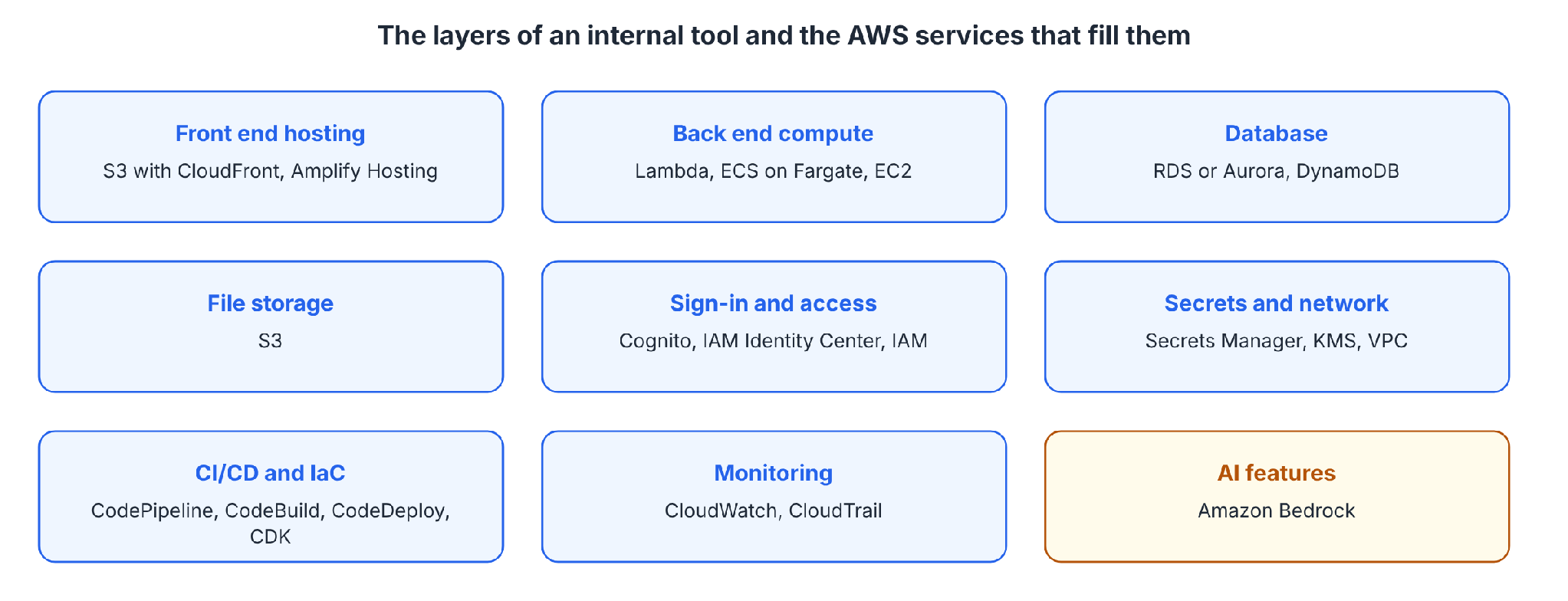
Status notes: AWS says Cloud9 is no longer available to new customers, and CodeCatalyst stopped accepting new customers on November 7, 2025. AWS's own App Runner notice lists the April 30, 2026 cutoff.
What are the 5 core AWS services?
AWS publishes no official list of five core services. AWS's Cloud Practitioner Essentials course teaches compute, networking, storage, databases, and security in separate modules.
An internal tool needs a service from each category, such as EC2 or Lambda, VPC, S3, RDS, and IAM.
What you need before starting
Prerequisites:
- An AWS account, with a plan for who administers it and how people sign in.
- A named internal process to improve, and the people who run it.
- A list of the data sources the tool will read or change.
- A decision on who will own the tool after launch.
How to build internal tools on AWS, step by step
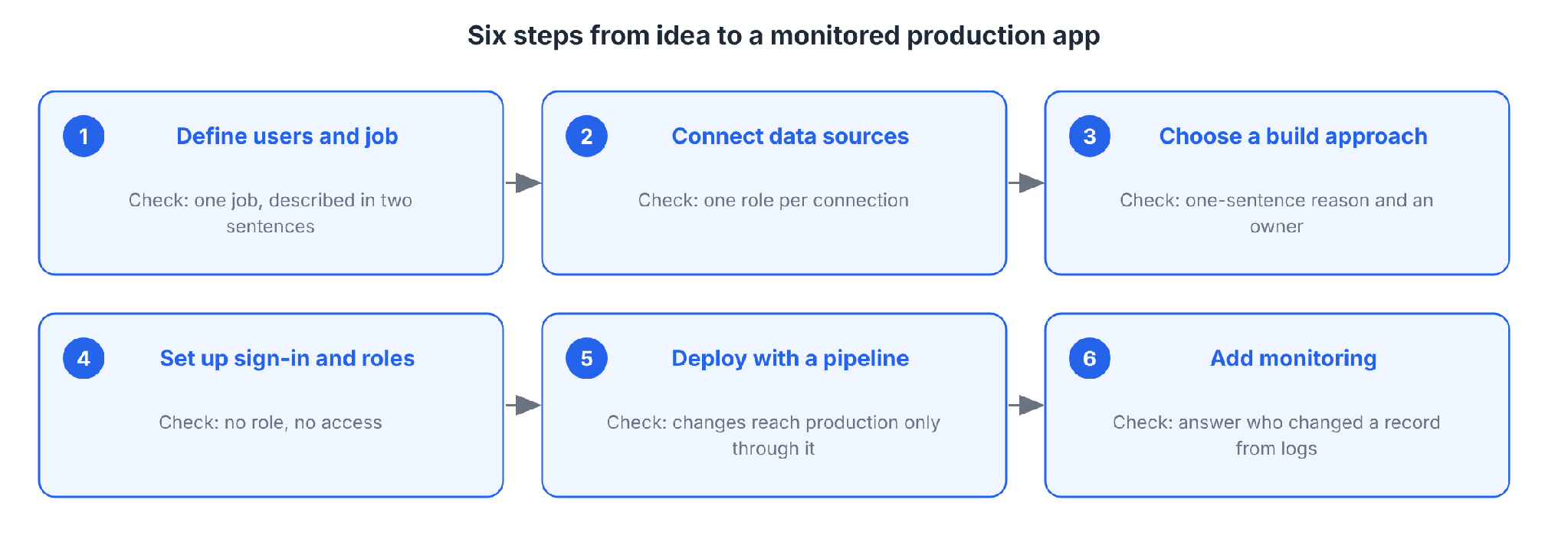
Six steps take a tool from idea to a monitored production app. Each step ends with a check you can verify.
Step 1: Define the users and the job
Start with who will use the tool and the one job it must do. Talk to those people before you design anything.
Write down what they do today, where the process breaks, what data they need, and what actions they take. Mark any action that changes money, customer data, or access, because those actions need extra controls.
Check: You can describe the tool's one job and its users in two sentences.
Pro tip: Pick one workflow first. Add a second job after the first one is in use.
Step 2: Connect your data sources
List every system the tool needs, including your databases, S3 buckets, internal APIs, and SaaS apps. Decide which sources are read-only and which the tool may change.
Connect with least-privilege roles, and keep shared admin credentials out of the tool. Start read-only. Where you can, read data in place, and one source of truth remains.
Our guide to building the application layer for an AWS data strategy covers the app layer in more depth.
Check: Each connection uses its own role, and you can list what that role can touch.
Step 3: Choose a build approach
Three routes are available, and the right one depends on your team and your security rules.
Three build approaches compared:
For AI coding help, AWS points to Kiro, an agentic development environment built for spec-driven development.
Agent Toolkit for AWS connects coding agents such as Kiro, Claude Code, Cursor, and Codex to AWS through an IAM-governed path. AWS lists no additional charge for the toolkit.
Amazon Q Developer's IDE plugins stopped taking new sign-ups on May 15, 2026, and will reach end of support on April 30, 2027, according to AWS's announcement, with Kiro as the successor.
Our guide to building custom internal tools compares these routes in more depth. The platform route, where Superblocks fits, has its own section below.
Check: You can state why you chose this approach in one sentence, and name who looks after the result.
Step 4: Set up sign-in and permissions
Put every tool behind your company sign-in. Use IAM Identity Center or your identity provider for single sign-on, or Cognito user pools for app users.
Then define roles. Decide who can view, who can edit, and who can approve, and deny everything else by default. Keep secrets in Secrets Manager, outside code and shared environment files.
Check: A person without a role cannot open the tool, and each role does only what you intended when you test it.
Pro tip: Copy Amazon's approval idea. Require a second person for the few actions that can cause real damage, such as changing production data.
Step 5: Deploy with a CI/CD pipeline
Keep the code in Git and deploy through a pipeline. Then review, build, and promote every change the same way. On AWS, CodePipeline, CodeBuild, and CodeDeploy cover the steps, and CDK defines the infrastructure as code.
AWS's DevOps blog shows how CodeBuild splits ownership. Platform engineers keep the buildspec in the project configuration and protect it with an IAM policy. Developers own build steps defined in source code.
A failed security control stops the later actions in the pipeline.
Use separate stages for development, staging, and production. Amazon goes further and gives each stage its own AWS account. You can copy that setup to limit the damage from a mistake in a test account.
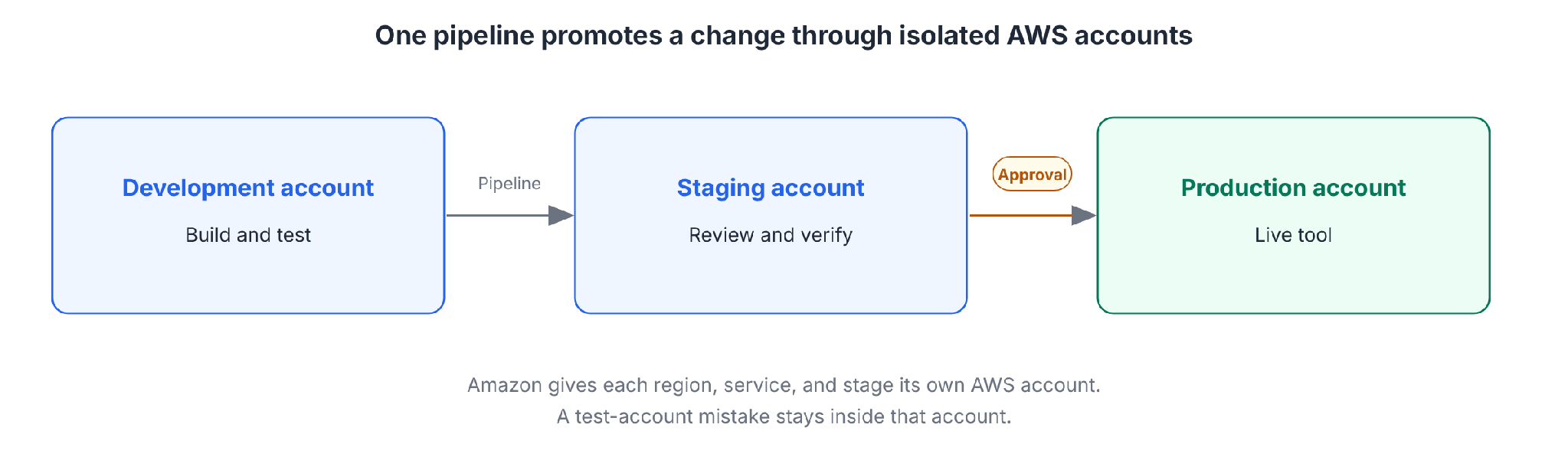
Check: A change reaches production only through the pipeline, and production deploys need approval.
Step 6: Add monitoring
Turn on logging before you launch. CloudWatch collects metrics and logs and sets alarms, and CloudTrail records API calls made in your account.
Add an app-level audit record too, covering who did what, to which record, and when. Alert on errors, slow responses, and unusual access, and set a cost budget that alerts on a runaway job.
Check: You can answer "who changed this record last Tuesday" from logs alone.
Treat internal tools as a product
AWS's principles for building an internal developer platform carry over to employee-facing tools, and Ran Isenberg's guide to internal tools makes the same case.
Six principles from AWS guidance and Isenberg:
- Focus on your customers: AWS states that the customers of an internal platform are its developers. For an internal tool, the customers are the employees who use it. Isenberg frames teams as the customers.
- Gather requirements: Isenberg advises collecting input from several teams, not one, to promote consistency.
- Start with one journey: AWS says teams adopt a platform at different paces. The platform starts with one journey and adds features over time.
- Define golden paths: AWS calls golden paths the foundational capability because they carry the best practices and standards that help developers get started.
- Document and simplify onboarding: AWS says the platform needs an easy-to-follow onboarding guide.
- Measure adoption: Isenberg writes that platform engineering is measured by adoption. AWS suggests outcomes such as a faster software delivery cycle or fewer operational incidents.
Metrics worth tracking:
AI-powered internal tools on AWS
Internal AI tools generally fall into three types:
Three types of internal AI applications:
Two design rules apply: A personal assistant ties access rights to each individual user and sees only what that person is authorized to see. Autonomous agents keep humans in control at critical decision points.
On AWS, Amazon Bedrock supplies the models. Apply the same roles, approvals, and audit logs from the build steps to agents that you apply to people.
Amazon's internal AI tools
The best documented example is Amazon Q Developer's code transformation agent. AWS reports that Java upgrades with the agent saved over 4,500 years of development work for over a thousand developers, compared with manual upgrades.
Andy Jassy said the agent cut the average Java 17 upgrade from about 50 developer days to a few hours.
Both figures are Amazon's own estimates, and the $260 million annual savings figure counts hosts removed after the Java 17 performance gains.
Capital Brief, citing The Information, reports that AWS is building internal agents that help sales staff answer technical customer questions and coordinate with partners on deals.
Building AWS internal tools with Superblocks
The platform route fits teams where business users need tools, and IT wants them inside the AWS account.
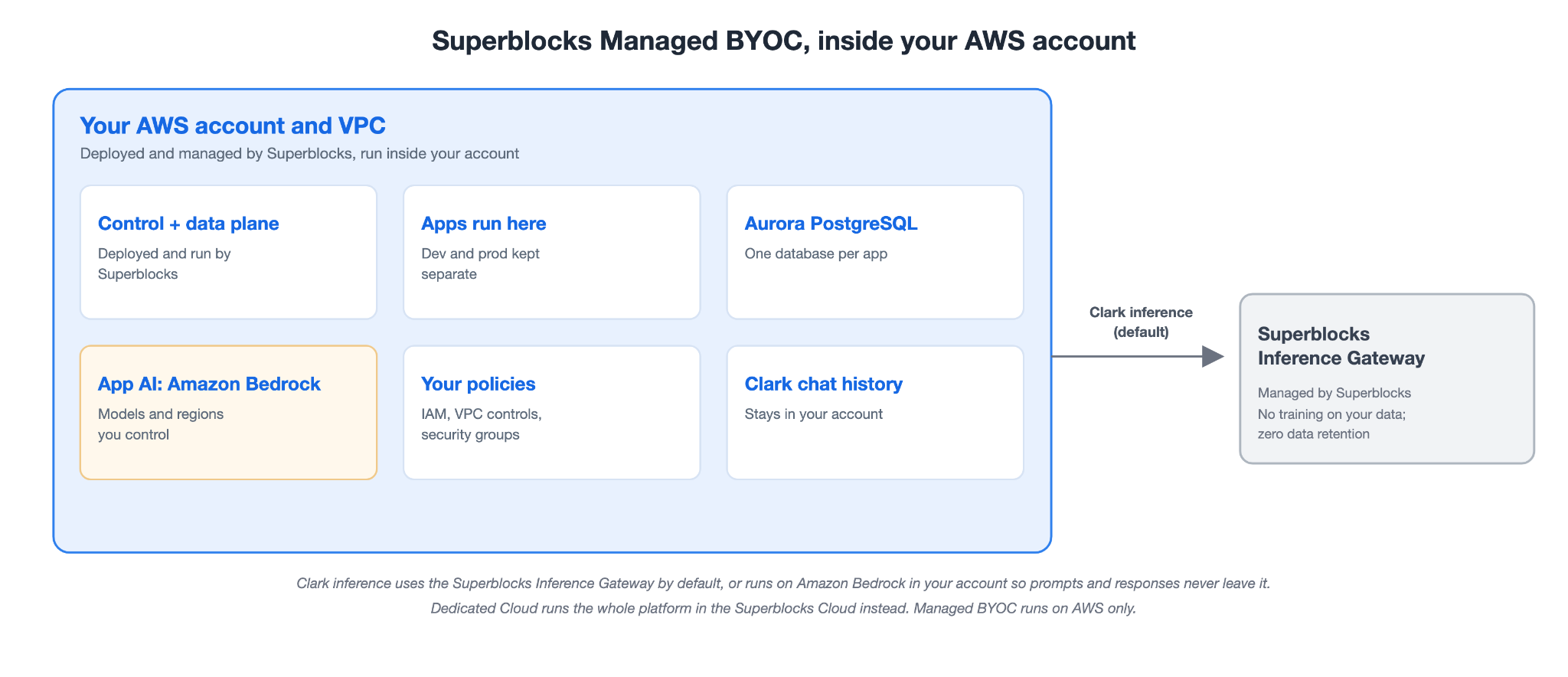
Superblocks, the governed enterprise vibe coding platform, offers two deployment models. Dedicated Cloud runs a single-tenant instance in the Superblocks Cloud, while Managed BYOC (bring your own cloud, previously called Cloud-Prem) runs the whole platform inside your own AWS account. For an internal tool that must stay in your AWS boundary, Managed BYOC is the fit. Federated building lets each business team create apps while IT keeps the AWS policies.
How Superblocks maps to AWS, per its docs:
- Runs in your AWS account: Superblocks deploys and manages the platform inside your account. Your application data, Clark chat history, and platform data stay in your AWS account, in the region you choose.
- A database and file store per app: Each app gets its own Aurora PostgreSQL database in your account, with schema migrations applied automatically on deploy, plus its own isolated S3 bucket.
- App AI and Clark inference: The runtime AI features in your deployed apps route through Amazon Bedrock, using the models and regions you control. Clark, the builder, uses the Superblocks Inference Gateway by default, or you can run its inference on Amazon Bedrock in your own AWS account, so its prompts and responses never leave your account. Neither mode trains on your data, and both apply zero data retention with inference providers.
- Your existing controls: Superblocks applies your IAM policies, VPC network controls, and security groups, supports CrowdStrike and Wiz sensors, and its infrastructure counts toward your existing AWS commitments.
Business teams build with Clark, the Superblocks AI builder, and can import prototypes from Claude, ChatGPT, Lovable, and Replit into an IT-approved path to production.
Deterministic scanners and AI agents check each change before it goes to production. The Superblocks 3.0 announcement covers the AWS partnership in full.
Plan notes:
- Teams: RBAC is on Teams at a flat $125/month for up to 15 builders.
- Enterprise: SSO, audit logs, and VPC deployment are Enterprise features. Managed BYOC, running in your own AWS account, is the Enterprise deployment option.
Superblocks runs on top of your AWS services.
Common mistakes to avoid
Five mistakes to avoid:
- Building before talking to users: The tool solves a guessed problem.
- Over-permissioned roles: A shared admin role turns a small bug into an incident.
- One AWS account for everything: Separate dev and prod accounts limit the damage from mistakes.
- No owner after launch: A tool without a named owner has nobody to fix it.
- Skipping the service check: AWS has closed App Runner and Cloud9 to new customers and set an end-of-support date for the Amazon Q Developer IDE plugins. Check status before you build on a service.
Start with the Quickstart to build a first governed app on Superblocks.
To see Superblocks running in your own AWS account, book a demo.
Frequently asked questions
What does internal tool mean?
An internal tool is software only your own employees use, such as an admin panel, dashboard, approval app, or operations console. Customers never see an internal tool.
What are the tools used in AWS?
The tools used in AWS for internal apps cover compute (EC2, Lambda, ECS), storage (S3), databases (RDS, Aurora, DynamoDB), sign-in (Cognito, IAM), CI/CD (CodePipeline, CodeBuild, CodeDeploy), and monitoring (CloudWatch, CloudTrail).
What are the 5 core AWS services?
The 5 core AWS services are not an official AWS list. AWS's Cloud Practitioner Essentials course teaches compute, networking, storage, databases, and security in separate modules. An internal tool needs a service from each category.
What are Amazon's internal AI tools?
Amazon's internal AI tools include Amazon Q Developer's code transformation agent. Amazon used the agent to upgrade internal Java applications, and AWS reports savings of over 4,500 years of development work.
What is the best way to build internal tools on AWS?
The best way to build internal tools on AWS depends on your team. Engineering-led teams can write custom code on AWS services. Business-built tools that need governance inside your AWS account suit an app platform such as Superblocks.


Stay tuned for updates
Get the latest Superblocks news and internal tooling market insights.
Request early access
Step 1 of 2
Request early access
Step 2 of 2

You’ve been added to the waitlist!
Book a demo to skip the waitlist
Thank you for your interest!
A member of our team will be in touch soon to schedule a demo.
production apps built
days to build them
semi-technical builders
traditional developers
high-impact solutions shipped
training to get builders productive
SQL experience required
See the full Virgin Voyages customer story, including the apps they built and how their teams use them.

"Those tools are great for proof of concept. But they don't connect well to existing enterprise data sources, and they don't have the governance guardrails that IT requires for production use."
Table of Contents


Multiple authors
What Is Claude Enterprise? Pricing, Plans, and Who It's For
Claude Enterprise costs $20 per seat plus usage. See what's included, how pricing really works, Team vs Enterprise, and who it's for.