A system of record for custom apps has two meanings. One is a custom app that holds the authoritative data for a workflow, and the other is a registry of the apps themselves.
Both matter now that AI tools let business teams build their own apps. This guide defines both meanings, lists what a real system of record provides, and shows how to build one.
What is a system of record for custom apps? The 30-second answer
A system of record is the authoritative data source for a given piece of information. The data is created, updated, and governed there, and other systems defer to it when their copies disagree.
Bottom line: A system of record names the one copy of the data that counts as the real one.
Systems of record by data type, using [Aerospike's examples](https://aerospike.com/glossary/system-of-record/):
Each one is the official home for its data. When the sales team and the finance team both need a customer's details, they read them from the CRM instead of keeping their own versions. The comparison section below separates that idea from a system of record.
System of record for custom apps: the two meanings
The phrase gets used two ways, and the two meanings describe different jobs.
The two meanings side by side:
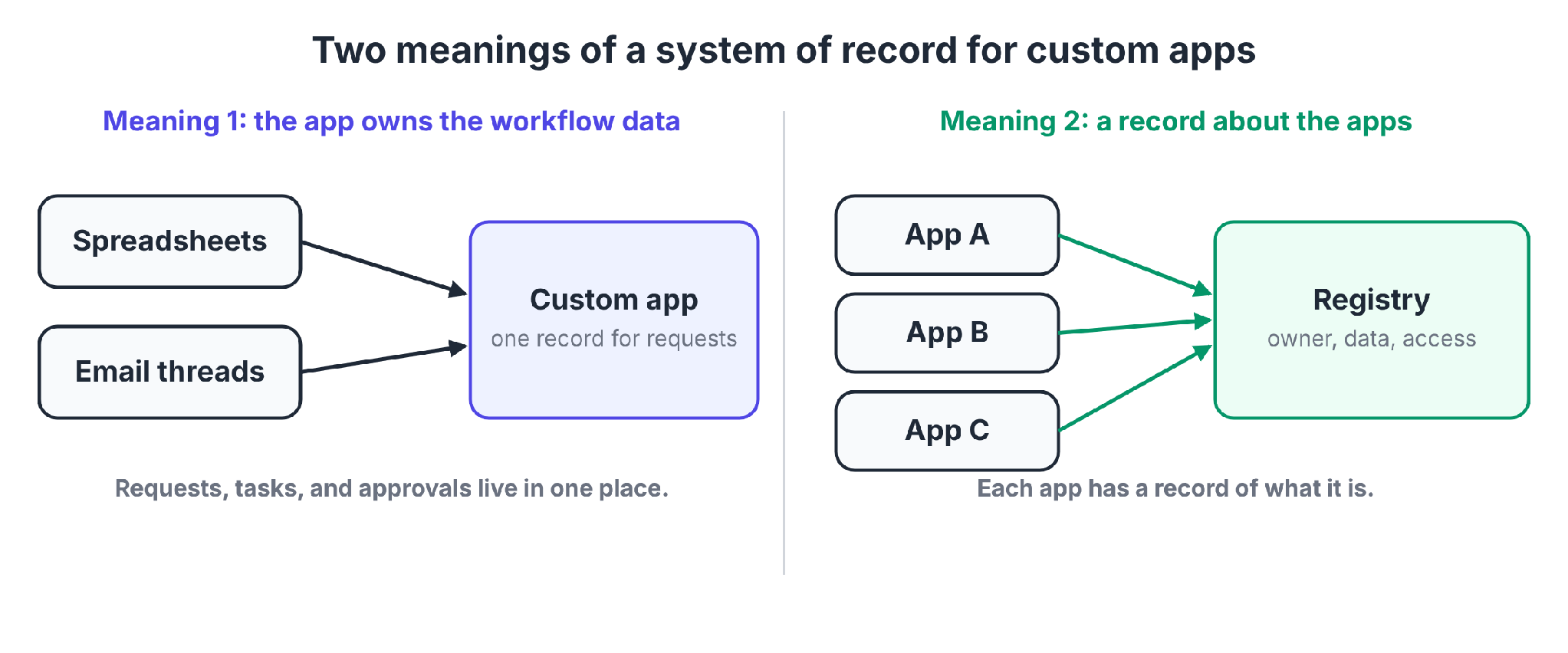
Meaning 1: the app owns the workflow's data. Requests, tasks, and approvals can live in spreadsheets and email threads. A custom app can replace them and become the one place that data lives.
Common examples include internal service requests, project tasks, and approval workflows for budgets, content, and purchases.
Meaning 2: a record about the apps. ServiceNow's documentation says the custom application record "defines and identifies an application and all its associated artifacts."
The record stores the app's name, version, scope, access settings, files, and dependencies. Any app needs a record of what it is.
Internal tools are one kind of custom app, and our guide to what internal tools are covers the category.
What a real system of record provides
A spreadsheet can hold authoritative data for a while. A real system of record guarantees certain properties all the time.
Aerospike's glossary entry names seven characteristics, including authoritative data, secure access, auditable changes, and high availability.
The table maps them to a custom app and adds ownership, integration, and reporting.
Properties of a real system of record:
The audit trail matters when someone asks why a decision happened. Our guide to the AI audit trail lists seven things to log for compliance.
Benefits of a system of record for custom apps
For request, task, and approval workflows, a system of record brings four benefits.
Benefits of centralized workflow data:
- Accuracy: Validation rules replace manual tracking, so fewer bad entries get in.
- Visibility: Anyone with access can see where a request stands.
- Faster decisions: Approvers work from current data instead of waiting on status updates.
- Easier audits: A full change history shows an auditor who did what and when.
Without a system of record, requests pile up in inboxes, teams lose track of progress across several tools, and duplicate copies of the data start to conflict.
How to make a custom app your system of record in 5 steps
Steps 1 to 4 follow the sequence in Knack's guide, and step 5 adds migration and retirement of the old copy. Each step ends with a check.
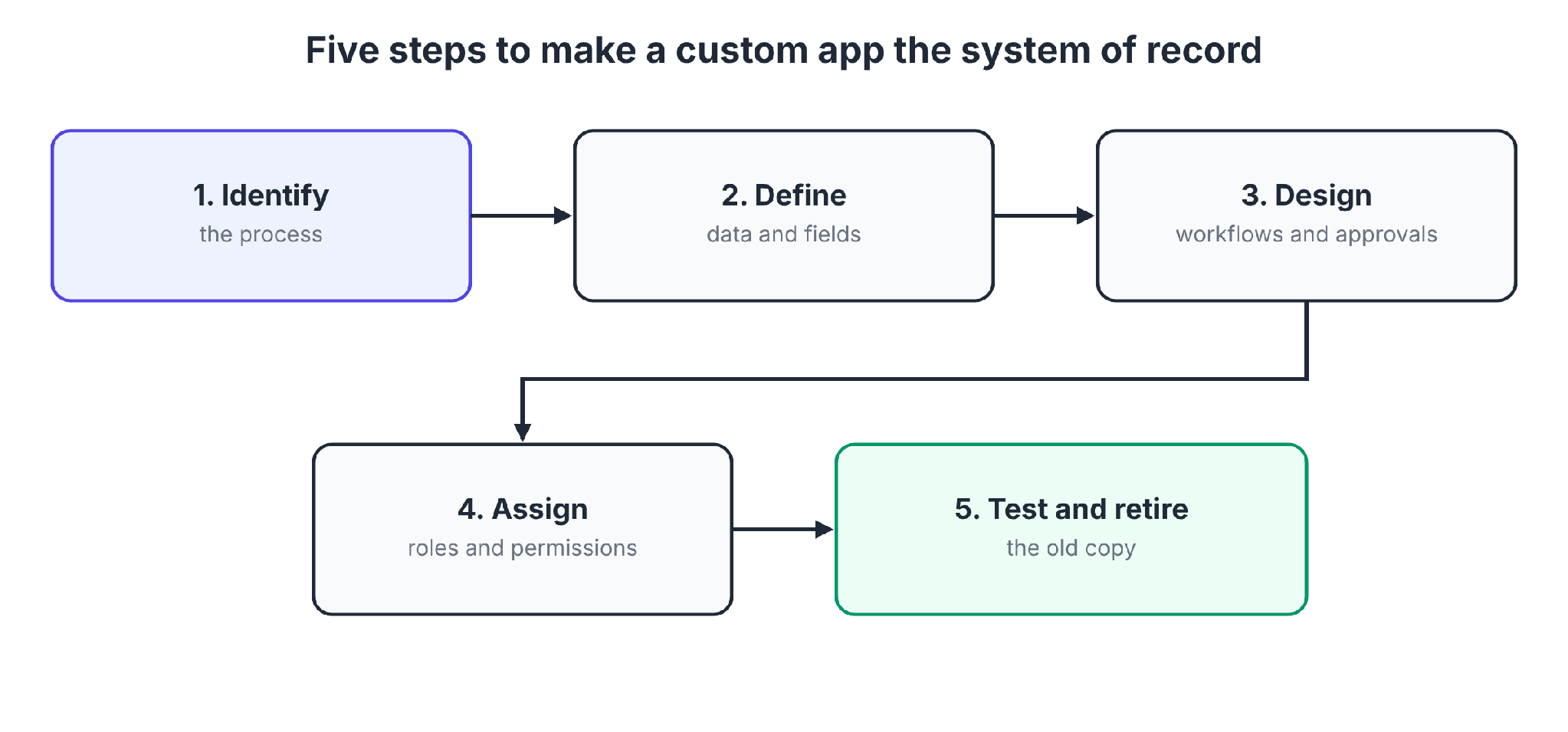
Step 1: Identify the process
Pick one workflow where the data is scattered or contested, such as purchase requests, access approvals, or equipment tracking. Map how the process runs today and note where work gets lost.
Check: You can name the data this app will own and the people who depend on it.
Step 2: Define the data structure and fields
List each entity (a request, an approver, an asset) and each field. Give every record a unique ID, and decide which fields are required and which values are allowed.
Check: Each field has one owner, one format, and validation that rejects a bad value at entry.
Step 3: Design workflows and approvals
Map the path a record follows, including who submits, who reviews, and what triggers each status change. Automate the handoffs and notifications, and write approval rules down.
Check: An approval is a recorded step with a name and a timestamp, and a chat message cannot settle it.
Step 4: Assign roles and permissions
Decide who can view, edit, and approve at each stage. Apply the narrowest access that lets people do their jobs.
Check: When you test each role, a person can do what the role allows and nothing more.
Step 5: Test, migrate, and retire the old way
Pilot with a small group, then load the existing records and fix what breaks. Finally, retire the spreadsheet or inbox the app replaces.
Check: Teams stop updating the old copy. A shadow spreadsheet that stays alive splits the truth again.
Pro tip: Set the rule early that a record outside the app does not exist. Old copies keep living without that rule.
System of record vs. source of truth vs. system of engagement
The three terms describe different jobs.
The three terms compared:
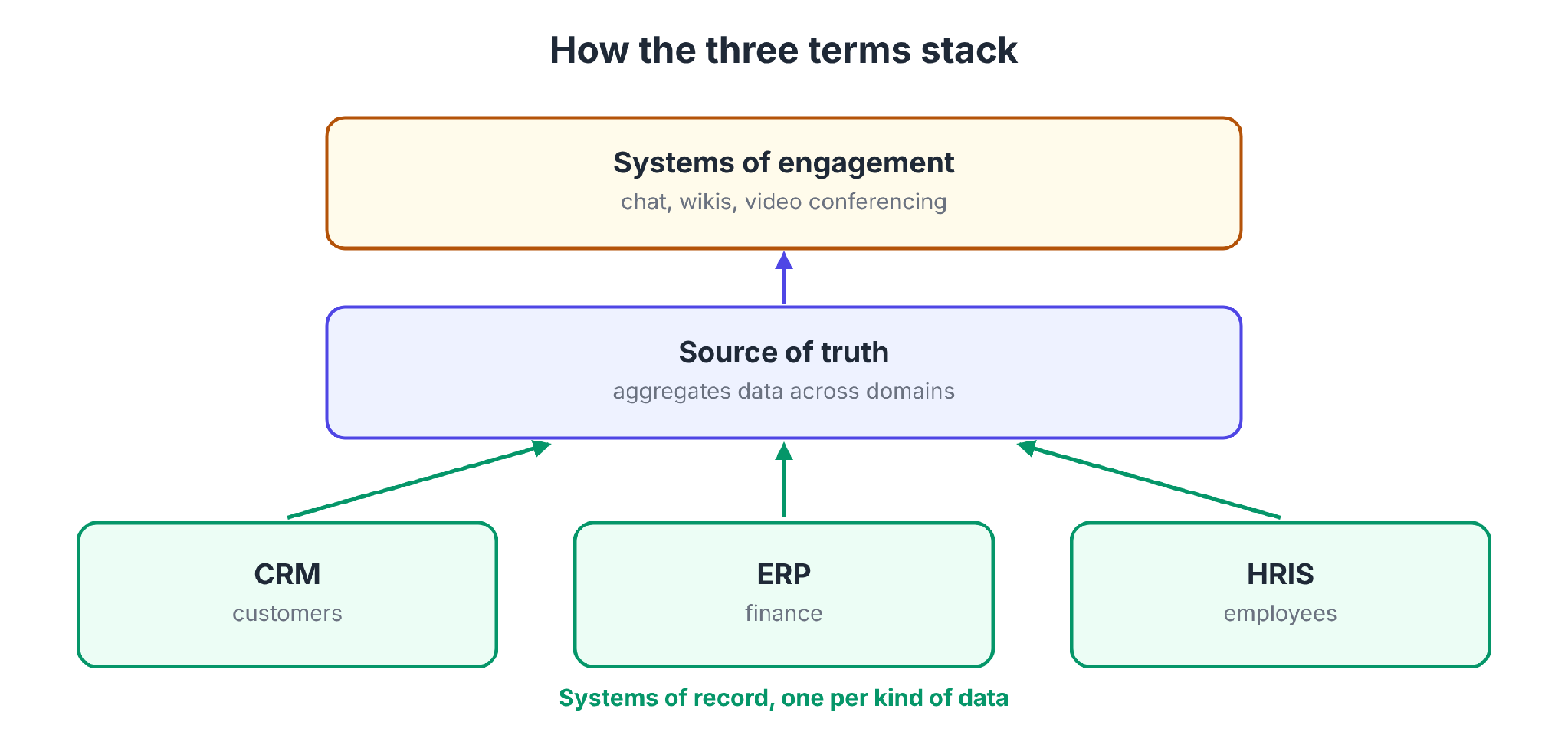
System of record vs. source of truth: IBM calls the distinction functional more than technological. A system of record owns data creation and integrity within its domain, and a source of truth owns consistency across domains.
Geoffrey Moore's 2011 AIIM white paper introduced systems of engagement, layers of collaboration tools built on top of systems of record.
Operational software links core systems and carries out daily processes. Our guide to operational software covers that layer.
Why AI-built custom apps need their own system of record
AI tools now let business teams build apps, and each app holds data, credentials, and permissions. A registry of those apps is the second kind of system of record.
IBM survey data says most large-scale enterprises will have deployed a digital workforce of over 1,600 AI agents by the end of 2026.
IBM Institute for Business Value research shows only 18% of organizations keep a current, complete AI inventory.
Code risk adds to the case. In GitGuardian's 2026 report, Claude Code-assisted commits showed a 3.2% secret-leak rate, against a 1.5% baseline across all public GitHub commits.
Questions that go unanswered without an app-level record:
Finding apps nobody registered is its own problem. Our guide to shadow AI detection covers seven methods.
What the app-level record should hold
The app-level record holds six kinds of information:
- The app: Name, owner, purpose, version, and status.
- The builders: Who created and edited it.
- The integrations: Which systems and data sources it connects to.
- The permissions: Who can use it, edit it, and administer it.
- The history: Edits, deployments, permission changes, and usage events.
- The spend: AI and infrastructure cost by team and person.
How Superblocks fits
Superblocks, the governed enterprise vibe coding platform, builds this record into the product. The Superblocks MCP gives admins programmatic access to builders, applications, integrations, permissions, audit logs, queries, and usage events.
The value is in how those pieces connect. The MCP post calls the result a connected graph of your software estate.
An alert about a suspicious query can be correlated with the app it came from, the integration it hit, and the builder who last modified it.
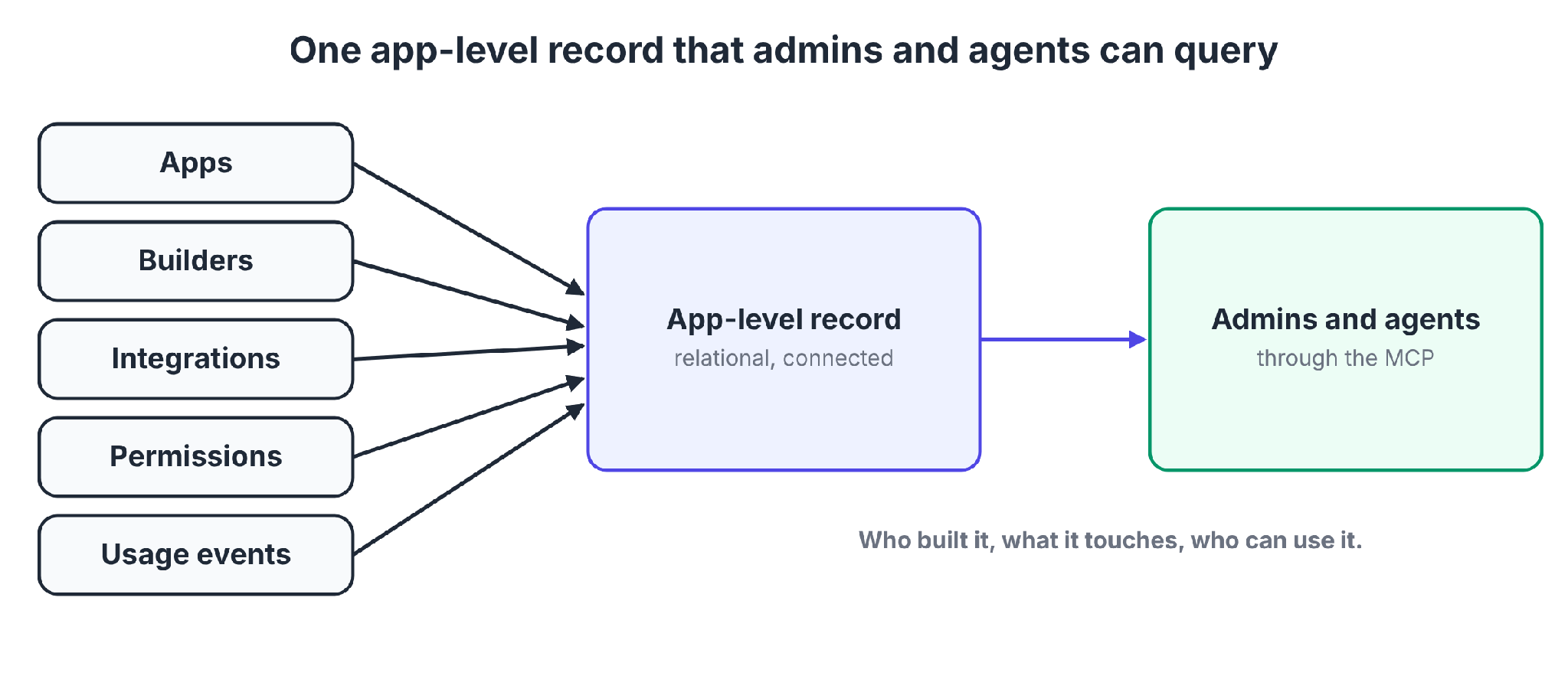
What admins and AI agents can ask:
- Which applications use a malicious package, so they can shut them down at once.
- Which critical data sources show anomalous write patterns.
- When permission rules change on sensitive systems.
- Which applications matter most, based on usage.
- How much AI and infrastructure spend each team and individual generates.
Audit logs back this up. Superblocks records builder activity, end-user activity, and integration and platform changes, and the MCP server can query the same events.
Two limits apply. The MCP covers entities inside the Superblocks platform, and apps built elsewhere still need discovery.
The MCP record also describes the apps and does not hold the business data inside them. Your CRM and ERP stay the system of record for customers and finance.
The MCP is available to Enterprise customers. RBAC is on Teams, and SSO, audit logs, and VPC deployment are Enterprise features.
When a custom app should be your system of record
A custom app makes a good system of record when no off-the-shelf system fits the process.
A custom app fits when:
- The workflow is specific to your company, such as an internal approval or an equipment checkout.
- The data lives in spreadsheets or email today.
- You can name an owner who will look after the app.
Skip it, or proceed with care, when:
- A commercial system already owns that data: A second customer database creates two masters and a reconciliation problem.
- Compliance requires a certified system: Check with your auditors before putting financial books or regulated records in a custom app.
- Nobody will look after it: A system of record without an owner stops being authoritative.
Scope creep adds risk. A custom app that starts as the record for requests and absorbs customer data, billing, and reporting becomes hard to look after and hard to trust.
Challenges to plan for with a custom system of record
Aerospike's glossary lists the challenges of building and running a system of record. Four of them apply to a custom app.
Four challenges to plan for:
- Data migration: Moving records into the new app carries risk. Run the old and new copies in parallel and compare the results.
- Integrations: Connected systems use different data formats and legacy constraints. Each integration needs transformation logic and a compatibility check after upgrades.
- Data quality: A system of record is only as good as the data inside it. Duplicate, stale, and mistyped records need ongoing monitoring and stewardship.
- Upkeep: Patching, performance tuning, and scaling take ongoing labor.
Common mistakes to avoid
Avoid these four mistakes:
- Creating a second master: If data already has a system of record, link to it instead of copying it.
- Skipping ownership: Every field and every app needs a named owner.
- Leaving the old copy alive: A spreadsheet that people still update is a competing record.
- Forgetting the audit trail: Without who, what, and when, the record cannot settle a dispute.
My verdict on a system of record for custom apps
Treat the phrase as two jobs. Use a custom app as the system of record for the workflows that do not fit a commercial product, and keep a record of the apps themselves.
The second job matters when an auditor or an incident asks which apps exist and what they touch. Build the inventory before that day arrives.
To see how a governed platform keeps that record, start with the Superblocks quickstart.
Or book a demo to walk through the Superblocks MCP on your own apps.
Frequently asked questions
What is a system of record example?
A CRM like Salesforce is the system of record for customer data, an ERP like SAP is the system of record for finances, and an HRIS like Workday is the system of record for employee data, as Aerospike's glossary lists.
Can you give me some examples of record management systems?
Examples of record management systems include CRM, ERP, HRIS, CMDB or IT service management platforms like ServiceNow, and work management tools like Jira.
Is a system of record the same as a source of truth?
A system of record is not the same as a source of truth. IBM defines a system of record as an authoritative source of original business data.
A source of truth is a system that aggregates or harmonizes data from different sources.
How do I create a custom app?
To create a custom app as a system of record, identify the process, define the data and fields, design workflows and approvals, assign roles and permissions, then test with a small group before retiring the old spreadsheet.
What is the best way to keep a system of record for AI-built apps?
The Superblocks MCP keeps a system of record for apps built on Superblocks. It gives admins programmatic access to builders, apps, integrations, permissions, audit logs, and usage events as a connected graph, and it is available to Enterprise customers.


Stay tuned for updates
Get the latest Superblocks news and internal tooling market insights.
Request early access
Step 1 of 2
Request early access
Step 2 of 2

You’ve been added to the waitlist!
Book a demo to skip the waitlist
Thank you for your interest!
A member of our team will be in touch soon to schedule a demo.
production apps built
days to build them
semi-technical builders
traditional developers
high-impact solutions shipped
training to get builders productive
SQL experience required
See the full Virgin Voyages customer story, including the apps they built and how their teams use them.

"Those tools are great for proof of concept. But they don't connect well to existing enterprise data sources, and they don't have the governance guardrails that IT requires for production use."
Table of Contents

Multiple authors
AI Governance Platform Pricing: 11 Tools Compared (2026)
AI governance platform pricing compared side by side, from published monthly prices to custom quotes, plus the hidden costs that change the final bill.