Git for vibe coding is version control that saves each working state of your app and lets you undo an AI change that breaks it.
AI-assisted projects can leak secrets into public commits, and a few Git habits keep them out.
This guide covers the seven commands, the setup steps, and the habits that keep AI-built code safe.
What is Git for vibe coding? The short answer
Git is a free tool that records snapshots of your project, called commits. For vibe coding, those snapshots work as save points. When an AI prompt breaks your app, you go back to the last commit that worked.
Bottom line: Commit every working version before you ask the AI for the next change.
Git and GitHub are different things. Git runs on your computer and tracks changes. GitHub is a website that stores your Git projects online, giving you a backup and a way to share the code.
Key terms you'll see:
- Repository: Your project folder, with Git tracking its history.
- Commit: A saved snapshot with a short message.
- Branch: A separate line of work for trying an idea without touching your working app.
- Merge: Bringing a branch's changes back into the main line.
- Remote: The online copy of your repository, stored on a host such as GitHub.
Why Git matters when AI writes your code
One prompt can edit several files at once. When the app breaks, you need to know which files changed. Scrolling a long chat to find the prompt that caused the break is slow.
Git keeps that record outside any single tool. Every commit lists what changed and lets you return to that version.
GitGuardian's 2026 report found about 29 million new secrets leaked on public GitHub in 2025, and leaks tied to AI services rose 81% year over year.
Claude Code-assisted commits leaked secrets at 3.2%, about twice the 1.5% baseline.
A .gitignore file keeps files such as .env out of your commits. The habits section below shows how.
The 7 Git commands every vibe coder needs
Seven commands cover the save-point workflow, and your AI tool can run them for you. Read each command before you approve it.
These are the seven commands:
Older guides use git checkout -b, whereas this table uses git switch -c. Both create a branch, and switch is the newer command.
Commit before every AI prompt
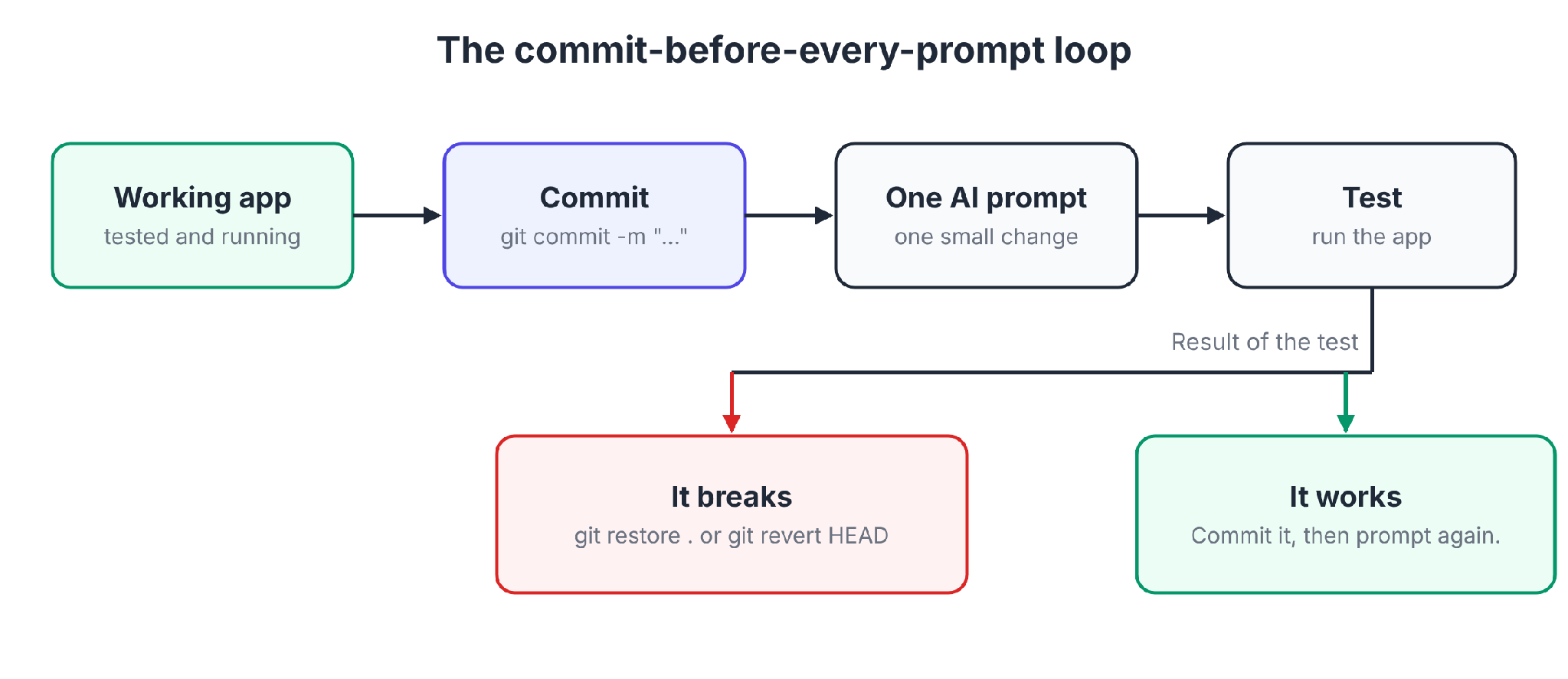
The habit is simple. Commit the working version before you send the next prompt.
The loop:
- Run the app and confirm it works.
- Run git status, then git add ., then git commit -m "Login form works".
- Ask the AI for one small change at a time.
- Run the app and test that change.
- If it works, commit it. If it breaks, undo it.
To undo a change:
- If you haven't committed yet: Run git restore . to discard your edits to tracked files.
- If you already committed: Run git log --oneline to see recent commits, then git revert HEAD to undo the last one safely.
By default, git restore . restores from the staging area. After git add, use git restore --source=HEAD --staged --worktree . instead. Both commands discard your work for good. Run them only when you want the change gone.
Small requests make this work. A prompt that rewrites the login and the database in one go leaves one giant change you cannot untangle. Five small prompts leave five save points.
git reset --hard deletes uncommitted work with no way back. Approve it only when you know what it will remove.
Use branches to keep experiments away from your working app
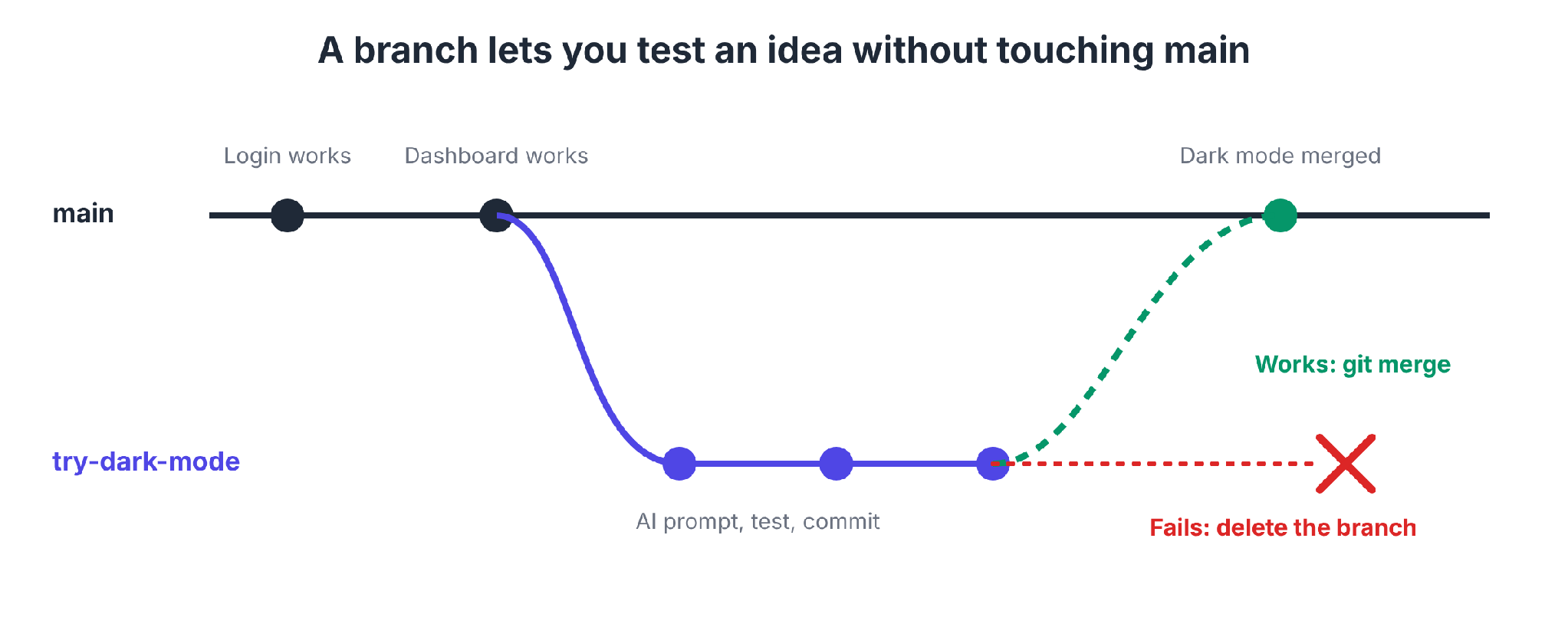
A branch is a separate line of history where you can try an idea. Your main branch keeps working while you experiment.
The branch workflow:
- Create a branch for the idea with git switch -c try-dark-mode.
- Prompt the AI, test, and commit on that branch.
- If it works, switch back with git switch main and run git merge try-dark-mode.
- If it fails, switch back to main and delete the branch, and your working app stays untouched.
Some tools handle branches for you. v0 gives each GitHub-connected chat its own working branch, commits generated changes there automatically, and creates a pull request when you publish.
Lovable syncs one branch at a time and lets you switch or create branches.
Sidebar: Git worktrees for running several AI agents at once
A worktree is a second folder for the same repository, with its own branch. Two AI agents can work in parallel without overwriting each other's files.
Create one with git worktree add ../my-app-feature-a -b feature-a, and point one agent at each folder. Each agent works on its own branch, and you merge the branches when the agents finish.
Claude Code can do this for you. According to its worktree docs, claude --worktree feature-auth creates a worktree under .claude/worktrees/ on a new branch named worktree-feature-auth.
Keep each task small, because two agents that edit the same file can still produce a merge conflict.
Git vs. your AI tool's built-in undo
Some AI builders keep their own project history, such as Bolt's version history. Git does a different job by keeping history in your own repository.
Here is how the two compare:
The winner: Git, for anything you plan to keep. Built-in undo is fine for a quick revert inside one session.
How to set up Git and GitHub in 7 steps
These steps use the terminal. GitHub Desktop offers buttons for the same tasks if you prefer not to type commands.
- Install Git. Download it from git-scm.com, then run git --version to confirm it works.
- Tell Git who you are. Run git config --global user.name "Your Name" and git config --global user.email "you@example.com".
- Create a GitHub account. Sign up at github.com and verify your email.
- Create an empty repository. On GitHub, click New, name it, and make it private. Leave the README option off so the repository starts empty.
- Add a .gitignore before your first commit. The file tells Git which files to skip. The habits section below shows what goes in it.
- Make your first commit. In your project folder, run git init -b main, then git add . and git commit -m "First working version".
- Connect and push. Copy the repository address from GitHub, then run git remote add origin ADDRESS and git push -u origin main. GitHub no longer accepts account passwords for Git operations. Use a personal access token or SSH key.
Pro tip: Ask your AI tool to run steps 5 to 7, and read each command before you approve it.
Get a project from an app builder into GitHub
If you built in an app builder, the code lives in the tool until you connect it to GitHub.
Here is how each tool connects:
Our guides to moving from Replit and deploying vibe-coded apps cover what to do once the code is in GitHub.
Git habits that keep AI-built code safe
Four habits keep your history clean and your secrets private.
Keep secrets out with a .gitignore file
A .gitignore file lists files Git should never track.
Start with these lines for a web project:
.env
.env.local
node_modules/
dist/
build/
Put API keys in a .env file and keep that file out of Git. Rotate the key if a secret ever reaches a commit, because deleting the file does not remove it from history.
GitHub reported more than 39 million leaked secrets in 2024 and runs push protection by default on public repositories.
Push protection is a backstop. Keep keys in .env so they never reach the repository.
Write commit messages you can read later
A good message says what changed and what state the app is in. "Add login form, works" tells you the state of the app. "stuff" tells you nothing. A readable history makes the last good version easy to find.
Review changes before you commit
Run git diff before git add to read what the AI changed. You do not need to understand every line. A long list of unrelated files suggests the prompt changed more than you asked for.
Use pull requests, even when you work alone
Work on a branch, then open a pull request to merge it into main. The pull request page shows every change in one view, and you review the diff before it reaches your working app.
For teams, add branch protection so nobody pushes to main without a review.
For more guardrails, see our guides to vibe coding best practices and vibe coding security.
Git for vibe coding: pros and cons
Pros
- ✅ A durable undo lets you return to any commit, in any tool.
- ✅ Branches isolate experiments and keep main working while you try ideas.
- ✅ Pushing to GitHub puts a backup outside your laptop and your AI tool.
- ✅ Pull requests let others review and extend your work.
Cons
- ❌ The commands feel odd at first, though the seven above cover the save-point workflow.
- ❌ Merge conflicts need a human decision when two changes touch the same lines.
- ❌ Git saves code only and does not back up your database contents or your secrets.
- ❌ A committed bug is still a bug, because Git does not catch it.
Should you use Git for vibe coding? My take
Yes, from the first working version. Setup is a short list of steps, and each commit protects a version that works.
Git is a good fit if you:
- Are building anything you plan to keep, share, or show to real users.
- Work with more than one AI tool, and want Git's history to stay the same across all of them.
- Run several agents or features at once, where branches and worktrees keep them apart.
- Want someone else to review what the AI wrote.
You can skip it for now if you:
- Are making a one-off script or throwaway demo you will delete.
- Stay inside one app builder's built-in history while you explore, and connect GitHub before real users arrive.
When your whole company vibe codes: Git without the command line
Everything above works for one builder with a terminal. A company has more people to cover. Business teams who build apps may never touch a branch, while IT still needs history and review.
Superblocks is the governed enterprise vibe coding platform that supports federated building, where business teams build with Clark, its AI builder, inside guardrails that IT sets once.
Every app has built-in version history. Superblocks saves a checkpoint after each Clark prompt, and a builder can preview a checkpoint, publish it, or roll back by publishing an earlier one.
Teams that want the full Git workflow can connect each app to a repository on GitHub, GitLab, Bitbucket, or Azure DevOps, according to the Git connection docs.
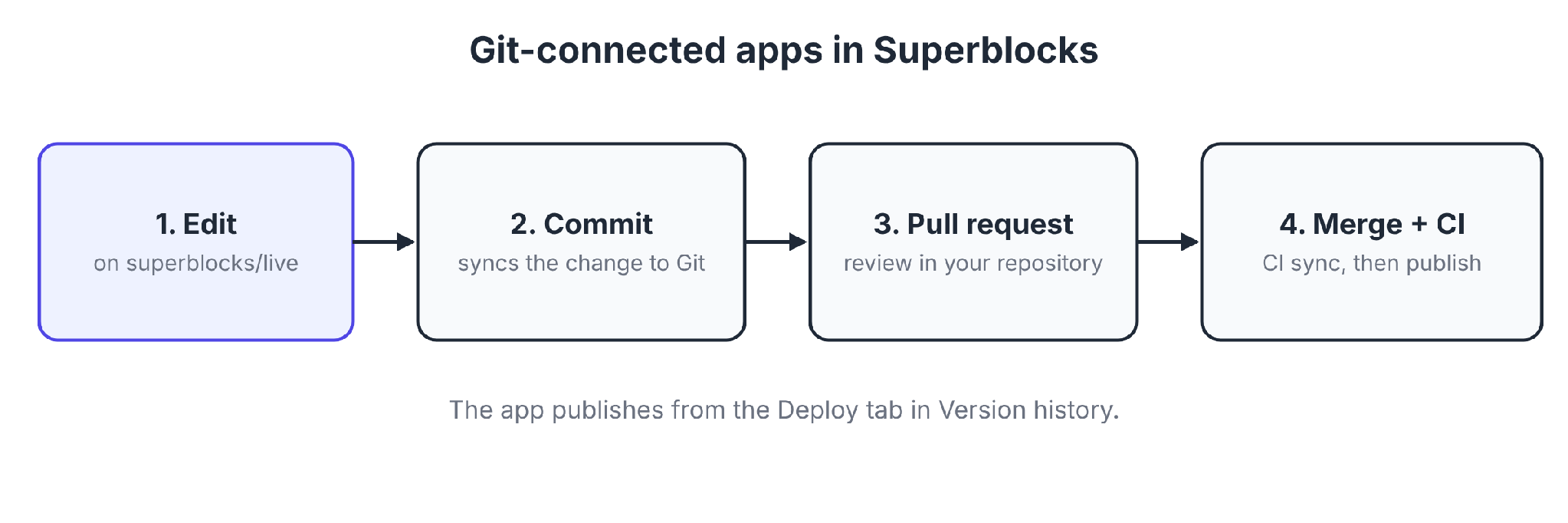
The flow runs in four steps:
- A builder edits on the superblocks/live branch in the editor.
- The builder commits to sync the change to Git.
- A pull request promotes the change, and your normal review happens in your repository.
- After the merge, your CI pipeline syncs the change back, and the app publishes from the Deploy tab in Version history.
Each app connects to one repository, and the repository must be empty before you connect it. Checkpoints created before you connect can no longer be restored.
Because the repository is standard Git, developers can clone it and open it in Cursor, Claude Code, or Copilot. Developers' changes reach Superblocks through the same pull request, merge, and CI sync.
For more on governing vibe-coded apps, see our governance guide.
RBAC is on Teams, while SSO, audit logs, and VPC deployment are Enterprise features. Teams is a flat $125/month for up to 15 builders.
Superblocks stopped running pre-publish Policy Agents for Git-connected apps on October 1, 2026, according to its release notes. Git-connected apps therefore need security and code checks in CI.
Common Git mistakes vibe coders make
These are the mistakes to avoid:
- Letting the AI run destructive commands: git reset --hard, git clean, and git push --force can erase work. Ask the AI to explain each one before it runs.
- Committing too rarely: A day of AI changes in one commit leaves you with no save points inside that day.
- Committing .env: A committed secret stays in the history, and only rotating the key makes it harmless.
- Editing main directly: Work on a branch to keep main as the version that works.
My verdict on git for vibe coding
Git for vibe coding takes seven commands, one habit (commit before every prompt), and a .gitignore file to cover the basics.
Start with Git and GitHub as an individual. If your whole company is building, add a platform that gives non-technical builders version control and gives IT review and audit trails.
To see how version control works in a governed app, start with the Superblocks quickstart.
Or book a demo to walk through Git-backed source control on your own team's apps.
Frequently asked questions
What is Git for vibe coding?
Git for vibe coding is the habit of saving each working version of an AI-built app as a commit. A bad prompt then costs you one undo instead of the whole app.
Do I need to learn Git to vibe code?
Learning Git for vibe coding comes down to seven commands (init, status, add, commit, switch, merge, and revert). Your AI tool can run them while you check each one.
What is the difference between Git and GitHub?
The difference between Git and GitHub is where each one runs. Git tracks changes on your computer, and GitHub stores repositories online with pull requests, reviews, and an off-machine backup.
How often should I commit when vibe coding?
Vibe coders should commit every time the app works, and always before asking the AI for the next change. Several small commits beat one large commit at the end of the day.
What is the best version control for a company that vibe codes?
The best version control for a company that vibe codes is Git on GitHub, GitLab, or a similar host. Superblocks adds built-in version history and Git-backed pull request review, with RBAC on Teams and audit logs on Enterprise.


Stay tuned for updates
Get the latest Superblocks news and internal tooling market insights.
Request early access
Step 1 of 2
Request early access
Step 2 of 2

You’ve been added to the waitlist!
Book a demo to skip the waitlist
Thank you for your interest!
A member of our team will be in touch soon to schedule a demo.
production apps built
days to build them
semi-technical builders
traditional developers
high-impact solutions shipped
training to get builders productive
SQL experience required
See the full Virgin Voyages customer story, including the apps they built and how their teams use them.

"Those tools are great for proof of concept. But they don't connect well to existing enterprise data sources, and they don't have the governance guardrails that IT requires for production use."
Table of Contents

Multiple authors
AI Governance Platform Pricing: 11 Tools Compared (2026)
AI governance platform pricing compared side by side, from published monthly prices to custom quotes, plus the hidden costs that change the final bill.