To deploy ChatGPT app projects, first decide whether ChatGPT built the app for you or the app runs inside ChatGPT. The first goes live with ChatGPT Sites. The second needs a public MCP server and OpenAI's review.
I checked both paths against OpenAI's help center and developer docs. This guide shows how to pick yours, the steps for each, and what to check before real users arrive.
Deploy ChatGPT app projects: which kind do you have?
The phrase “ChatGPT app” covers more than one kind of project, and search results mix them up. Pick the row that matches yours.
Here are the three kinds and where each one goes:
"Can ChatGPT build me an app?" points to Path A. "How do I publish my app to ChatGPT?" points to Path B.
What you'll need before starting
Prerequisites:
- Path A: A ChatGPT Plus or Pro account, or a supported Business or Enterprise workspace. Sites is not available on Free or Go.
- Path B: An MCP server you can deploy to a public HTTPS endpoint, and a ChatGPT account with access to Plugins at chatgpt.com/plugins.
- Path B, for public submission: An organization owner or a member with the Apps Management Write permission, plus identity or business verification.
- A list of every secret and key the app uses.
Path A: Deploy an app ChatGPT built, with Sites
ChatGPT Sites lets you create, preview, publish, and share interactive websites and lightweight apps. You build in Work on ChatGPT web, or in Work or Codex in the ChatGPT desktop app.
📝 Step 1: Start the site from a prompt
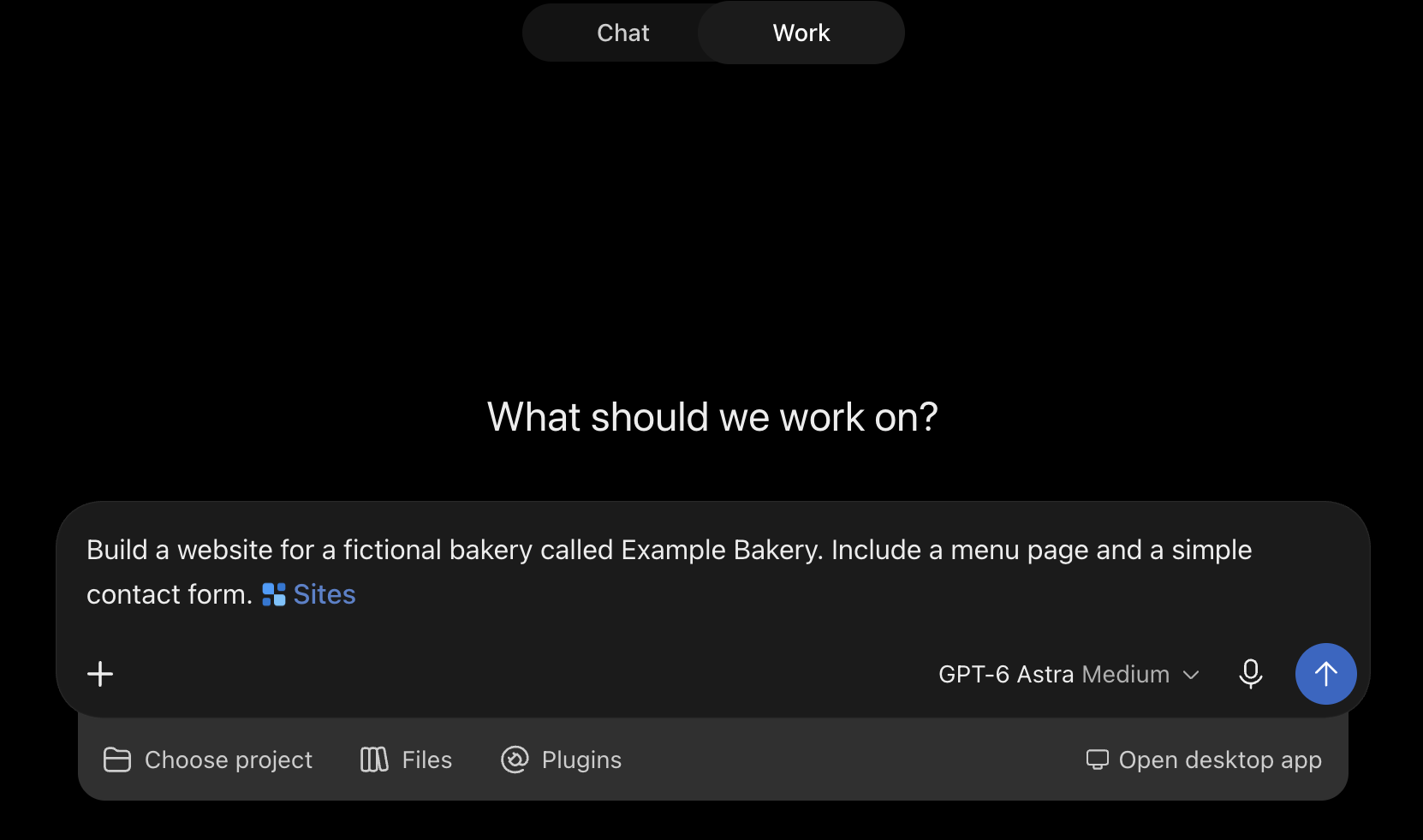
Open the Work tab, describe what you want, and include the word "website" or mention @Sites. Add the content, files, data, and constraints ChatGPT should use, and tell it to save a version for review before publishing.
Use a prompt like this:
Use @Sites to build a searchable resource hub from the files I attach.
Add filters, and show a clear message when nothing matches.
Save a version for review. Don't publish or share it yet.
Pro tip: Only use content you have the right to share. A site can include whatever you feed it.
👀 Step 2: Review the private preview and refine it
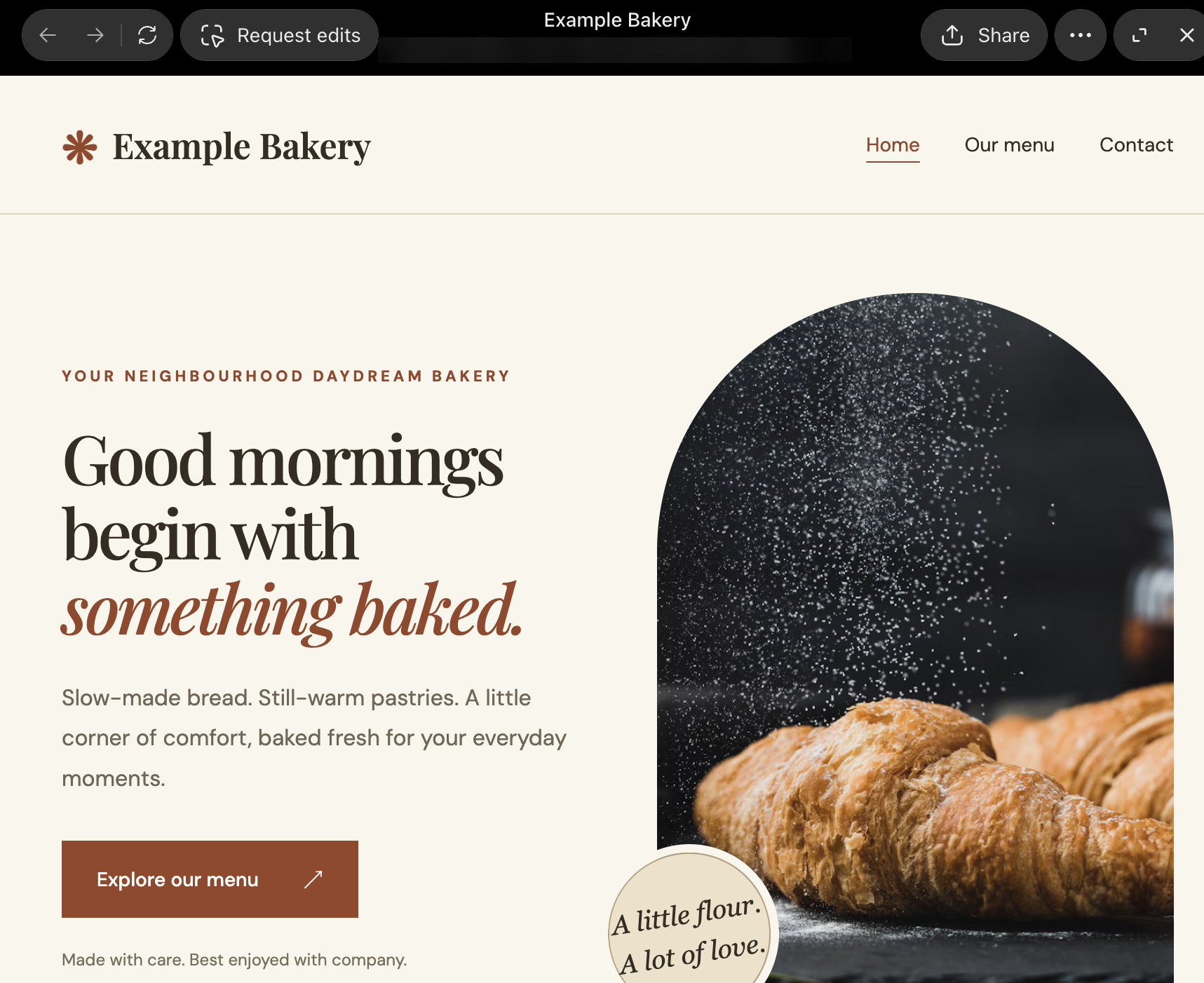
ChatGPT generates a private preview. Click through it, then use Request edits in the preview toolbar to ask for changes until it works.
Test the cases a visitor will hit, such as a blank required field, a search with no matches, and a reload after saving a record.
Pro tip: Open the site with a second account as well as your own.
💾 Step 3: Save a version before you deploy
Every Sites deployment URL is a production URL. To review changes without touching the live site, save a version first and deploy only after you've reviewed it.
Publishing can also change the site's database before the new version goes live. If publishing fails, some database changes may already be saved, so check the database before you try again.
🔐 Step 4: Set who can visit it
A new site is limited to its owner and workspace admins until you change access. Select Share on the site to open the sharing dialog.
Choose who has access:
- Selected people or groups: Add them in the dialog, including named external viewers.
- Link access: The menu offers Just me and Public, and Public lets anyone with the link view the site.
- Anyone in the workspace: Available where your workspace supports it.
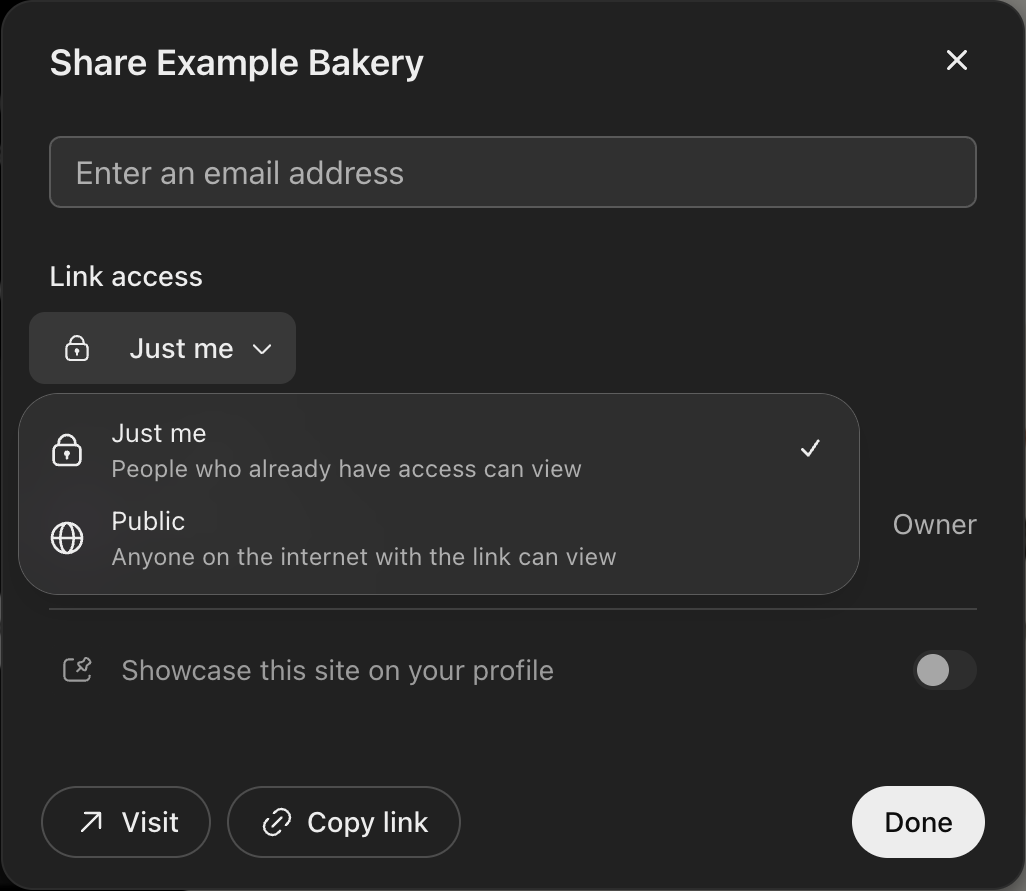
In Enterprise workspaces, public publishing is off by default, and an owner must turn it on in Workspace settings. If you choose the public option, review the site first, because anyone can open it.
Pro tip: If you add a sign-in feature inside the site, it has its own controls. Test as an intended visitor.
🔗 Step 5: Publish, share, and plan edits
Select Share, then use Visit to open the site or Copy link to share it with the people your access setting allows. Sites addresses use chatgpt.site, and where custom domains are available, you can connect one you already own.
To connect a custom domain:
- Open the site's ... menu, choose Settings, and select Add custom domain.
- Enter a domain you own and can manage DNS records for, then select Add domain.
- Add the DNS records Sites provides at your DNS provider.
- Refresh the status, and check the verification TXT record if the domain stays pending.
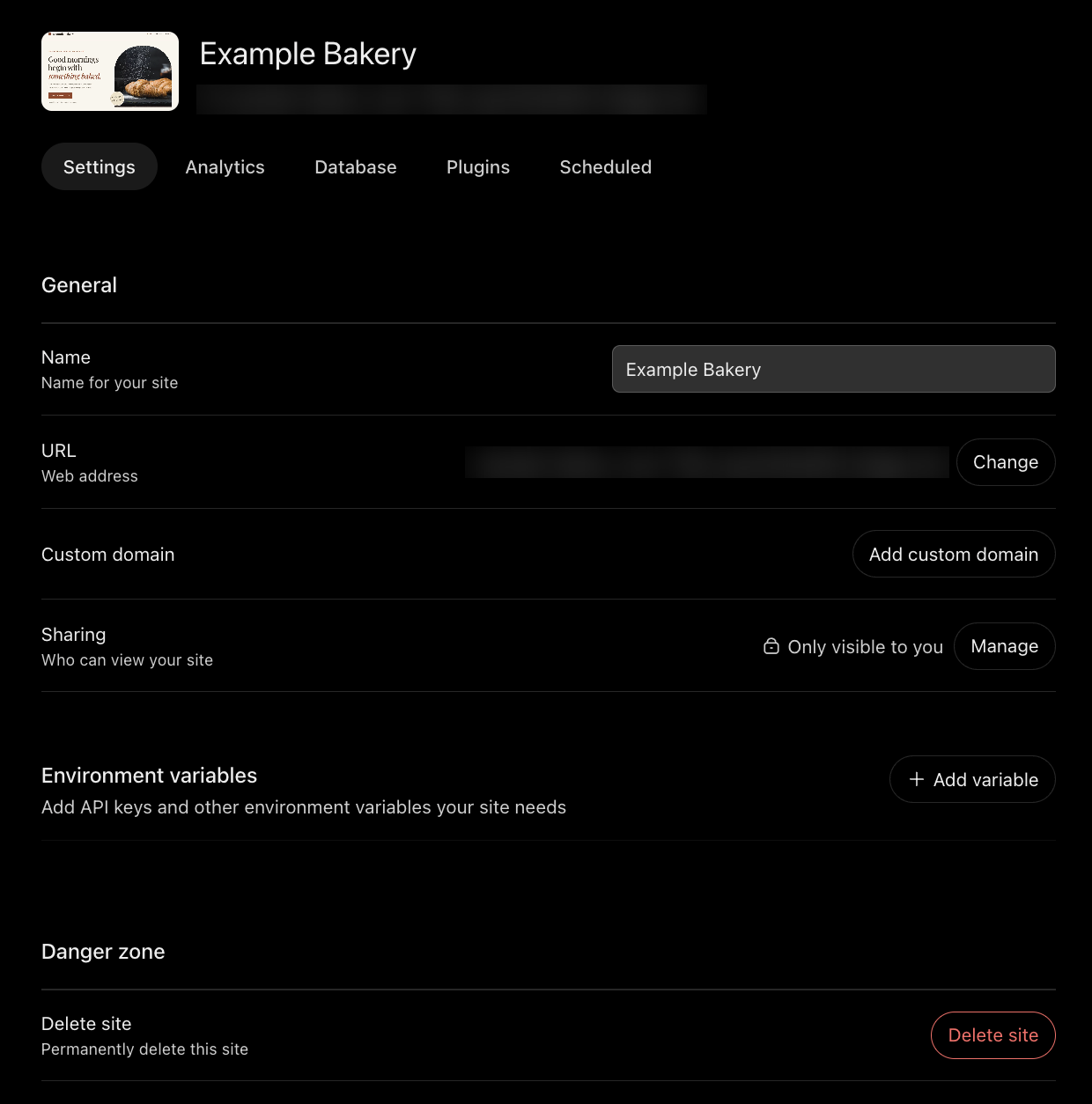
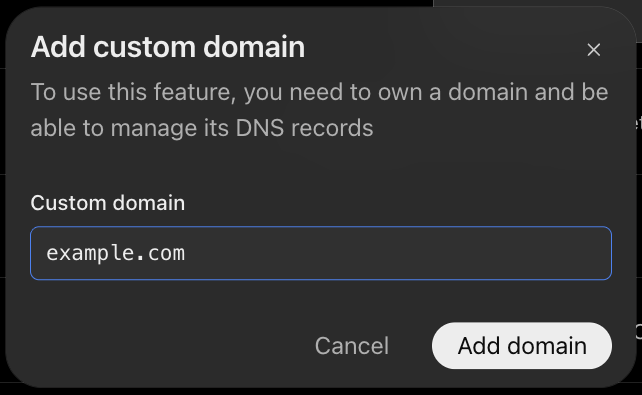
To change the site later, use Request edits, describe the change, review the new preview, and publish the updated version. Restoring an earlier version restores only the code, not the database or uploaded files.
Limits and costs: Each site's database holds up to 10 GB, and file storage has no fixed limit per site. Sites hosting is currently included with Plus and Pro, and building or editing counts toward your Codex usage.
OpenAI says some frameworks, private networks, databases, and background services may not be supported.
Outgrown Sites? Move the code to a repo and a host
If the app needs a runtime or database Sites does not support, move the code to a Git repo and a host. Sites has no one-click migration to another host, so plan the move. You can export the project code as a zip from ChatGPT (ask ChatGPT to prepare it, then download it), and the data moves separately.
These are the routes I found:
- Built in Codex from a local project: The code is already on your machine. Commit it to a repo.
- Built in ChatGPT on the web: Superblocks' ChatGPT import guide starts from a zip archive exported from ChatGPT.
- The data: Plan the data move separately, because the zip export covers the code, not the Site’s stored data.
Then follow the Git route. Our guide to deploying vibe-coded apps covers it, and our AI app deployment guide compares the hosts.
Path B: Deploy an app that runs inside ChatGPT
An app that runs inside ChatGPT is an MCP server that gives ChatGPT tools to call. OpenAI's developer docs package it as a plugin, and approved public plugins appear in the plugin directory.
freeCodeCamp's Tetris tutorial walks through a full example on Vercel with OAuth.
To deploy:
- Host the MCP server on a public HTTPS endpoint: ChatGPT connects to a stable endpoint that supports streamable HTTP, such as https://your-domain/mcp. OpenAI's deploy docs allow serverless, container, edge, or traditional hosting.
- Test the endpoint: Check it with MCP Inspector, then try it in the API Playground, as OpenAI's testing docs describe.
- Add sign-in if the app touches user data: Configure authentication when you add the server. In the Tetris tutorial, the app publishes OAuth discovery at /mcp/.well-known/oauth-protected-resource and validates tokens against the identity provider's JWKS endpoint.
- Connect it in ChatGPT: On chatgpt.com/plugins, select Add, then Add custom MCP server. Enter the name, server URL, and authentication (OAuth by default). Tick I understand and want to continue, then select Create as a plugin.
- Verify your domain: Host the token OpenAI gives you as plain text at /.well-known/openai-apps-challenge on your domain.
- Submit for review: Upload the plugin ZIP on the Plugins page, add five positive and three negative test cases, a video walkthrough URL, release notes, and reviewer credentials, then select Submit for review.
- Publish after approval: Open the approved package version and select Publish plugin. You choose when it goes live.
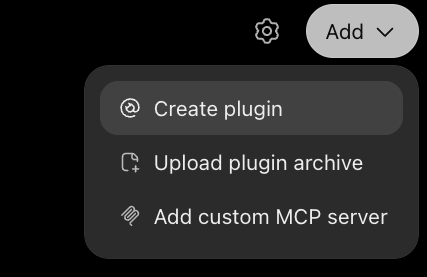
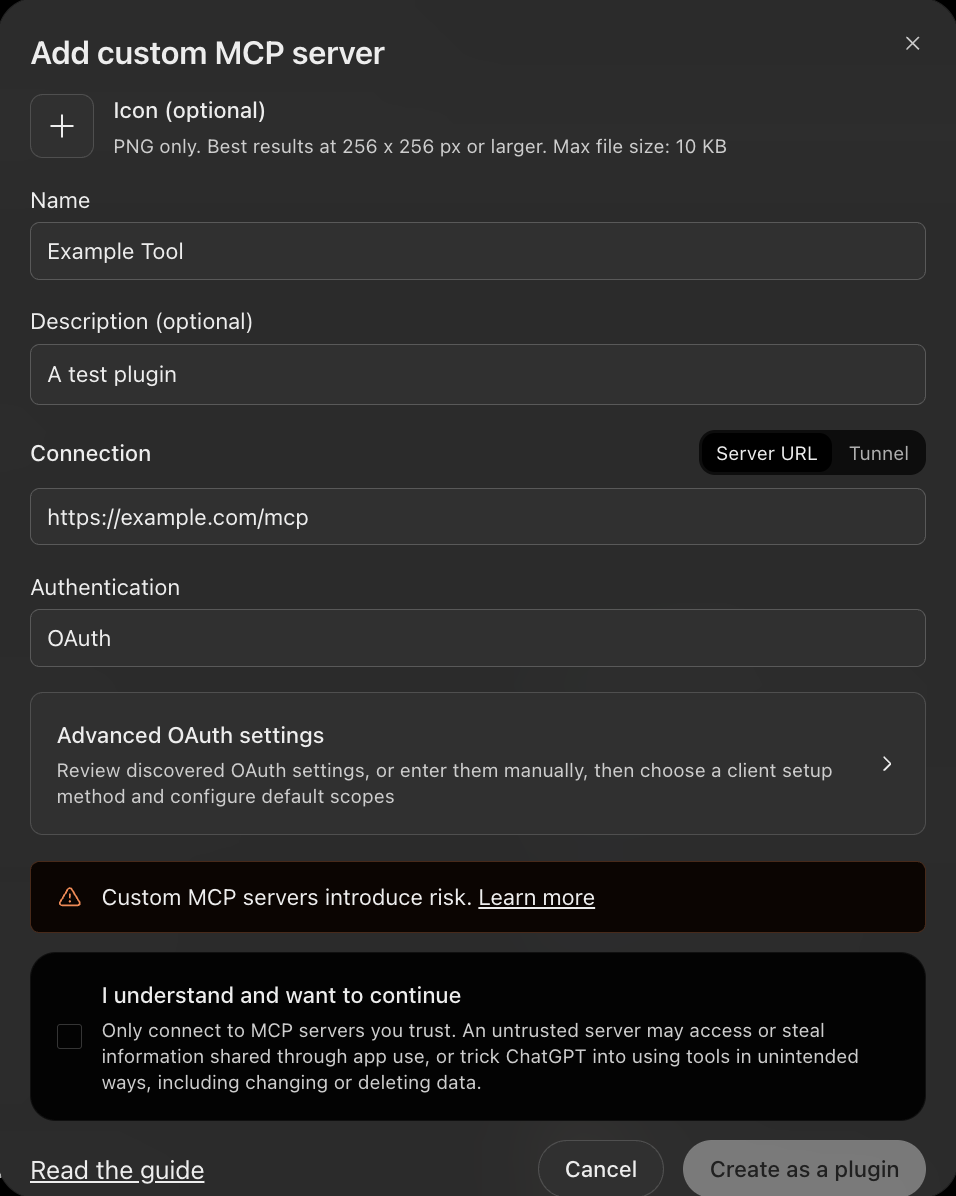
The submission docs list each requirement. A development tunnel works for local testing, but OpenAI's docs rule out a temporary tunnel or a local endpoint for public submission.
After approval, OpenAI scans hosted MCP servers daily, and eligible server changes go live once they pass automated checks. Changes to metadata, assets, or skills need a new ZIP and a new review.
For internal use, a workspace admin can publish a plugin to the workspace directory instead of the public directory.
OpenAI's plugin hosting guide also describes hosting the MCP server inside a ChatGPT Site. Only Business and Enterprise users can share a Site-hosted plugin with coworkers.
Pro tip: Give reviewers a demo account without MFA. OpenAI's review requirements say reviewers must log in with no further setup, and credentials must not require MFA.
Production-readiness checklist
These checks apply to every kind of ChatGPT app. Our vibe coding security guide covers the wider risks.
Run through these checks before launch:
- Move keys out of the code: Put your OpenAI API key and other secrets in environment variables, never in browser code. Keep .env out of Git, and add each variable in the host's settings, such as Environment variables on a Sites Settings page.
- Rotate anything exposed: Replace a key that was ever committed or pasted into a chat.
- Add sign-in: A public URL with no login lets anyone use the app and its data.
- Check where data lives: Sites hosting is regional for supported workspaces, and residency behavior depends on your workspace and region, so confirm it before storing anything sensitive.
- Keep restricted data out: Sites must not process protected health information or payment-card data, except card payments handled solely by a third-party processor.
- Mind personal data: If a Site uses Sign in with ChatGPT, you must explain what visitor information it receives and how it's used, and you're responsible for the privacy laws that apply.
- Test as another user: Confirm the audience setting matches who should see the app.
One privacy detail matters for builders. For Plus and Pro accounts, Site conversations may be used for training if "Improve the model for everyone" is on. Business and Enterprise conversations are not used by default.
When a prototype turns into something people depend on, our guide to prototype to production lists the six fixes every AI app needs first.
Can you deploy a ChatGPT app for free?
Partly. ChatGPT Sites is not available on Free or Go, and its hosting is currently included with Plus and Pro. To avoid a paid plan, build the code and host it yourself.
These hosts have free options:
- Vercel Hobby: Free for personal, non-commercial use, according to Vercel's pricing.
- Render Hobby: A $0/month workspace plus compute, with a Free instance, on Render's pricing page.
- Google Cloud Run: A free tier of 2 million requests a month for request-billed services, based on us-central1 pricing, per Cloud Run pricing.
The freeCodeCamp tutorial lists a ChatGPT Plus subscription as a prerequisite. Hobby plans also exclude commercial use, so check each host's terms before you launch a public plugin.
Taking a ChatGPT app to production for work
Sites suits sharing and lightweight apps. A work app that needs company data, sign-in, and an audit trail reaches its limits there. Sites connects to a private service only through tunnels that are rolling out to eligible workspaces.
Superblocks is the governed enterprise vibe coding platform. Superblocks supports federated building, where business teams build apps with Clark, its AI builder, inside guardrails that IT sets once, and it has a dedicated ChatGPT import.
To import a ChatGPT-built app:
- Set up the databases and APIs the app needs as integrations in Superblocks.
- Export your app from ChatGPT as a zip archive, excluding node_modules, .git, dist, and build folders.
- Start an import in Superblocks, choose ChatGPT as the source, and upload the zip.
- Connect the integrations Clark asks for.
Clark then rewrites the code to run on Superblocks. Hardcoded API calls become integrations connected to your data sources, hardcoded secrets become platform-managed credentials, and custom auth becomes platform authentication with RBAC.
React pages and components are hosted on the platform, and your design and styles are preserved.
What you add after import:
- SSO and role-based access: RBAC controls who can use each app, and Enterprise workspaces can add SSO through your identity provider.
- Your own network: Hybrid keeps the production data plane in your AWS, GCP, or Azure account with Clark in Superblocks Cloud, and Cloud-Prem runs the full platform, including AI inference, inside your AWS, GCP, or Azure account, with Superblocks managing it.
- Audit logs: Enterprise adds audit logs for the access and changes your security team asks about.
- Git and pull requests: Each app connects to one Git repository of your own, and changes go through pull requests.
RBAC is on Teams, while SSO, audit logs, and VPC deployment are Enterprise features. Teams is a flat $125/month for up to 15 builders, and Enterprise pricing is custom.
Superblocks stopped running pre-publish Policy Agents for Git-connected apps on October 1, 2026, according to its release notes. Git-connected apps therefore need security and code checks in CI.
Superblocks also imports apps from Claude, Replit, Lovable, and v0, plus custom code, according to its App Imports announcement.
To bring your first ChatGPT-built app into Superblocks, start with the import guide.
Or book a demo to see Superblocks run your own apps.
Frequently asked questions
How do I publish my app to ChatGPT?
To publish an app to ChatGPT, host an MCP server on a public HTTPS endpoint, test it, verify your domain, and submit the plugin for review in OpenAI's portal. After approval, you choose when the plugin goes live.
Can ChatGPT build me an app?
Yes, ChatGPT can build you an app with Sites. Describe a website or lightweight app, review the private preview, and publish it. Sites needs a Plus or Pro account, or a supported Business or Enterprise workspace.
Is a ChatGPT Sites URL a preview?
A ChatGPT Sites URL is a production URL. To review changes without updating the live site, save a version first and deploy only after you've reviewed it.
Can I deploy my ChatGPT app for free?
Deploying a ChatGPT app for free depends on the path. Sites need a Plus or Pro plan, and self-hosted code can use free tiers such as Vercel Hobby, Render's Hobby workspace, or the Cloud Run free tier.
Can Superblocks help me take a ChatGPT-built app to production?
Superblocks can help you take a ChatGPT-built app to production when the app is an internal tool. Export the app as a zip and import it with Clark, which rewrites hardcoded calls, secrets, and auth to platform equivalents.


Stay tuned for updates
Get the latest Superblocks news and internal tooling market insights.
Request early access
Step 1 of 2
Request early access
Step 2 of 2

You’ve been added to the waitlist!
Book a demo to skip the waitlist
Thank you for your interest!
A member of our team will be in touch soon to schedule a demo.
production apps built
days to build them
semi-technical builders
traditional developers
high-impact solutions shipped
training to get builders productive
SQL experience required
See the full Virgin Voyages customer story, including the apps they built and how their teams use them.

"Those tools are great for proof of concept. But they don't connect well to existing enterprise data sources, and they don't have the governance guardrails that IT requires for production use."
Table of Contents


Multiple authors
AI Governance Platform Pricing: 11 Tools Compared (2026)
AI governance platform pricing compared side by side, from published monthly prices to custom quotes, plus the hidden costs that change the final bill.