To migrate from Bolt.new, the AI app builder from StackBlitz, you'll move the code, database, users, secrets, and domain. An export carries the code, and each of the other four pieces needs its own move. I checked each step against Bolt's help center and the Superblocks docs.
This guide covers the five steps to migrate off Bolt.new, what stays on Bolt Cloud, and when to rebuild instead.
What moves when you migrate from Bolt.new, and what stays on Bolt Cloud
The code moves with a download. The backend services that Bolt Cloud runs for the app each need their own plan. Sort your app into the pieces below before you change anything, because each piece moves in a different way.
What moves, and how:
If you connected your own Supabase project when you built the app, that database already belongs to you and the claim step does not apply. Pro and Teams users can choose Supabase at the start of a project. Otherwise, Bolt created a Bolt Database for you, and Step 3 shows how to claim it.
Why teams migrate off Bolt.new
Bolt.new builds a working full-stack prototype from a prompt. Migration comes up when that prototype becomes an app people depend on.
Reasons to migrate:
- The backend lives in Bolt Cloud: The database, sign-in, secrets, and server functions run in Bolt Cloud, so an exported app still depends on it.
- IT needs control: IT teams can require SSO, role-based access, and audit logs for apps that touch company data. Check each of those against what your Bolt plan includes.
- Hosting and domain ownership: The app publishes to a bolt.host address, and custom domains are not available on the Free plan.
Staying is a valid answer if the app is still a prototype. If you are comparing destinations, our Bolt.new alternatives guide covers the options.
Rebuild or migrate off Bolt.new?
Porting saves time when Bolt generated clean code, and rebuilding saves time when it did not. The table below sorts the two cases, and the audit in Step 1 supplies your answers.
Rebuild or migrate, question by question:
If three or more of your answers fall in the rebuild column, rewrite the app's logic from scratch and reuse only the screens. That is my own rule of thumb, with no published benchmark behind it.
Moving from Supabase to Firebase is closer to a rebuild than a port, because Postgres tables become a document database and auth and storage change too. If you rebuild, our guide to prototype to production lists what the new version must fix. Our Lovable migration guide covers the same move for Lovable apps.
What you need before you start
Prerequisites:
- Owner access to the Bolt project. On individual accounts, only the project owner can claim a database. On team accounts, owners, co-owners, and team admins can.
- A Pro or Teams plan on Bolt, which claiming requires.
- A Supabase account where you are the organization owner.
- A GitHub account for the code.
- A written list of every secret, integration, and domain the app uses.
- A decision on which host will run the new app.
How to migrate from Bolt.new step by step
Five steps take the app off Bolt Cloud. Do them in order, because Steps 4 and 5 depend on the database you claim in Step 3.
🔎 Step 1: Audit what your Bolt.new app uses
Open the project and click the database icon at the top center. The Database Settings view has tabs for Tables, Security, Authentication, User Management, Server Functions, File Storage, Secrets, Logs, and Advanced.
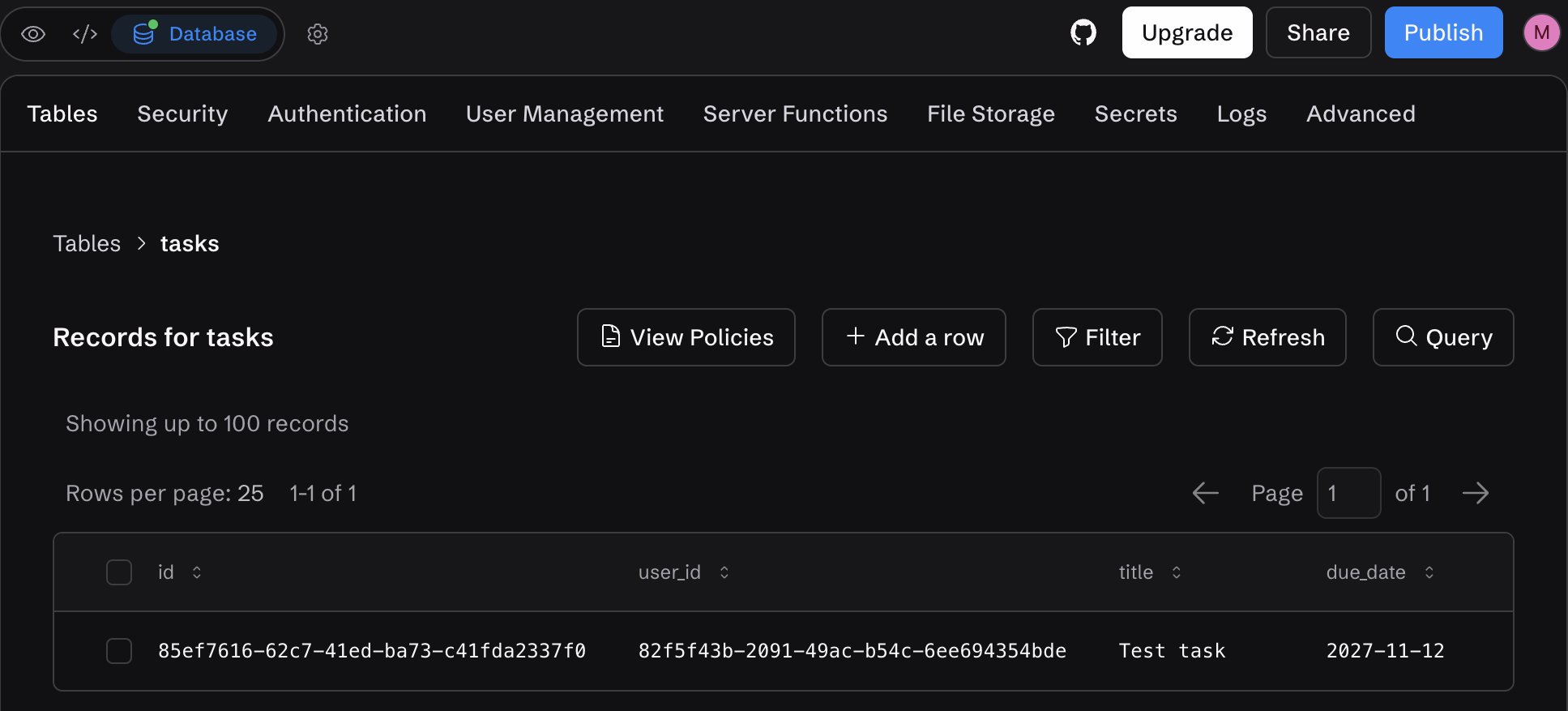
Write down every table with its row count, how users sign in, each storage bucket, the name of each secret, each server function, and each integration.
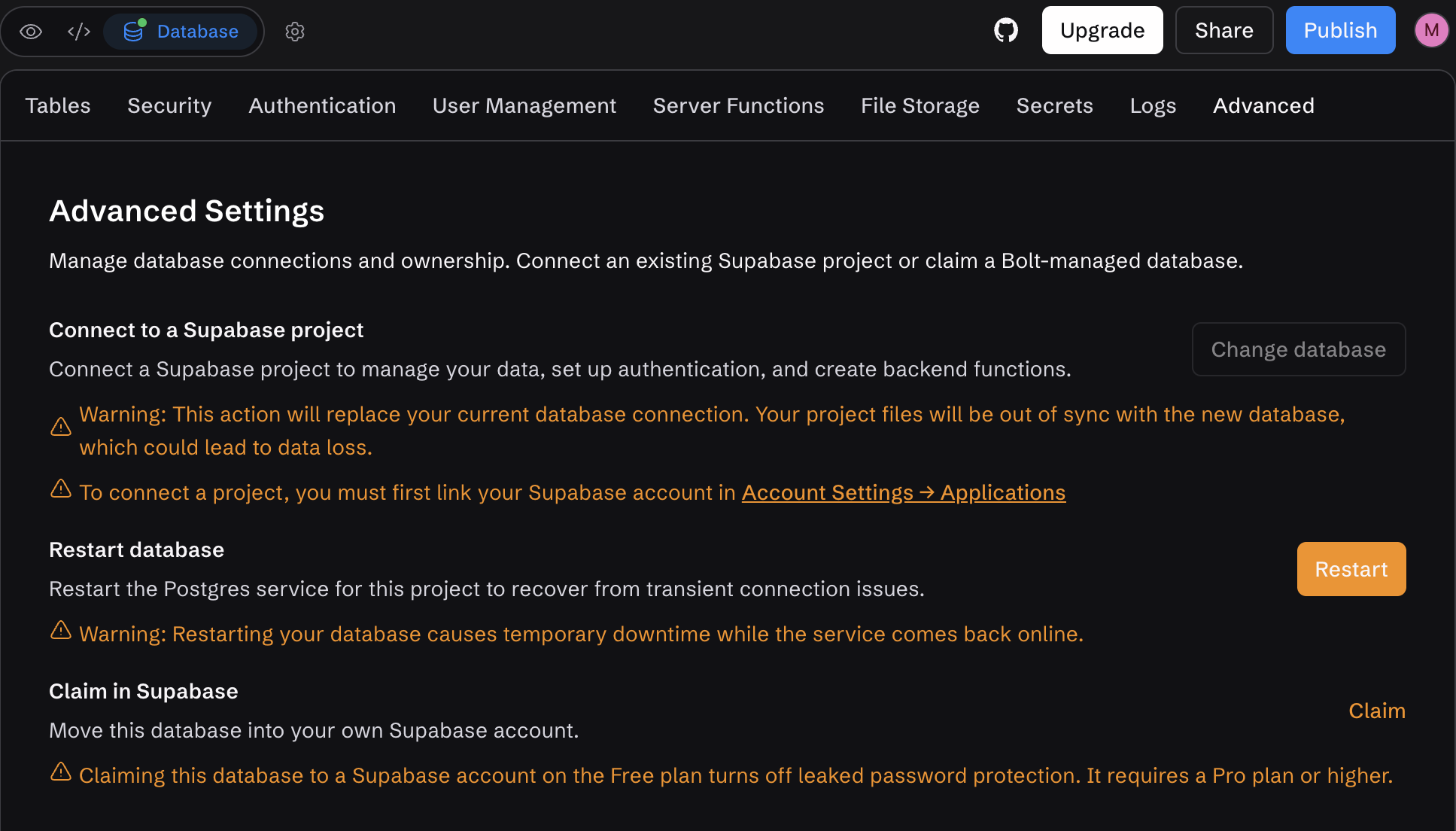
Then open Advanced. A Claim option means Bolt manages your database. If the project already connects to your own Supabase project, you own that database.
Click through the live app and screenshot every working screen. Compare the migrated app against these screenshots at the end.
Pro tip: Do not delete or duplicate the Bolt project to experiment. Deleting removes the Bolt database, and a duplicate copies only the database structure.
📥 Step 2: Export the code
You have two routes. A zip is a one-time snapshot, and GitHub sync keeps a copy outside Bolt continuously.
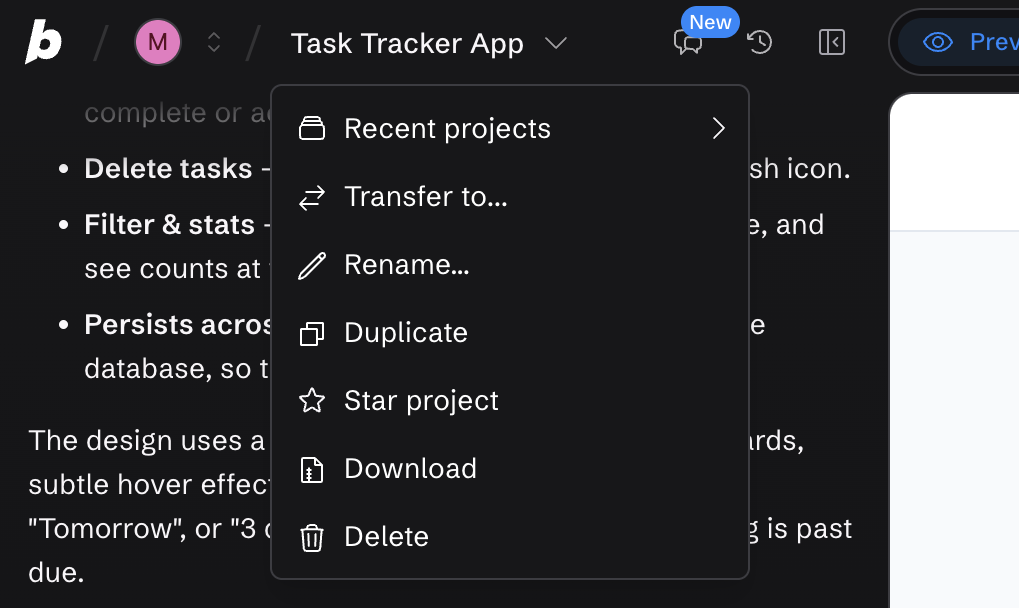
Download a zip: Open the project, click the project title in the top left, then click Download. Bolt's project docs describe this path.
Sync to GitHub: Connect GitHub from the project, and Bolt creates a private repository with a main branch. Per Bolt's Git docs, Bolt commits every change that does not break the project and checks GitHub every 30 seconds for outside edits.
Two rules matter during a move. If Bolt and GitHub update at nearly the same moment, Bolt keeps its changes and overwrites the GitHub version. Disconnecting a project permanently removes its connection to the repository, and reconnecting to the same repository requires contacting Bolt support.
Treat the repository as a backup of Bolt until you stop building there. Clone it and run npm install && npm run dev. Bolt's docs do not list what the zip contains. The first run will fail to connect to a backend because the secrets and database stay in Bolt Cloud until Step 3.
If npm install itself fails, delete the node_modules folder and reinstall. If the project has a package-lock.json file, run npm ci to install the exact versions it lists, and check that your local Node.js version matches the one the project expects.
🗄️ Step 3: Stand up your backend and database
For most apps, the cleanest move is to claim your Bolt database into your own Supabase account. Claiming moves the database into a Supabase project you administer, where you can use Supabase's SQL editor and direct connections.
To claim your database:
- Link your Supabase account in Bolt under Account Settings, then Applications, if you have not already.
- In the project, click the database icon, open Advanced, and click Claim.
- Complete the remaining steps in Supabase.
- Open your Supabase dashboard and confirm the project, its tables, and its users are there. If the project does not appear, refresh the Supabase Projects page.
Do not use Connect to attach a different Supabase project. Bolt's Supabase docs warn that connecting replaces the connection and may cause data loss.
Bolt's Advanced tab also warns about the Supabase Free plan. Claiming into a Free-plan Supabase account turns off leaked password protection, and that feature requires a Supabase Pro plan or higher.
Secrets: Bolt's Secrets docs cover creating and deleting secrets, and the value is hidden as you type.
Because Bolt documents no way to read a stored secret back, collect each key from the provider that issued it, and treat anything pasted into a chat or shared document as a key to rotate. Then add each key to your new host as an environment variable, and recreate the .env file for local runs.
Server functions: Bolt's server functions, also called edge functions, run in Bolt Cloud and use the secrets above. Check your claimed Supabase project's Edge Functions list. If a function is missing, redeploy it on the new backend from the code in your repository.
🔁 Step 4: Move your data and users
Data: Once the claimed project is yours, you can dump it like any Postgres database. A common route is pg_dump with your Supabase connection string, the --no-owner and --no-privileges flags, and the custom format. Then run pg_restore into your destination.
For small tables, you can also export rows from Bolt's Tables view.
Count rows table by table against the numbers from Step 1 before you trust the copy.
Users: Supabase says that every Bolt Cloud project with a backend is powered by Supabase. Your users should therefore sit in the Supabase project you now own.
Bolt's public docs do not spell out how claiming treats auth users and storage files. Check Authentication for your user list and Storage for your buckets in the Supabase dashboard.
Also check your tables for a user ID column. In the sample task tracker pictured in Step 1, every task row stores a user_id. If you move users to a new auth system, carry the original IDs over, or those rows lose their owner.
If the claimed project lists your users, you can keep Supabase Auth. If you move off it, Supabase stores bcrypt password hashes in an encrypted_password column, and WorkOS and Kinde document importing them so users keep their passwords. Export the user records with a SQL query.
If the hashes do not come across, plan a password-reset or magic-link email. For internal apps, you can replace passwords with your company SSO.
Files: Download each storage bucket through Supabase's storage tools or a script, and compare file counts before you close the old project.
🌐 Step 5: Cut over the domain
Deploy the new app to a temporary URL first, and test it before you touch DNS. Our guide to deploying vibe-coded apps covers first-deploy failures.
Cutover checklist:
- Sign in with two real accounts, and confirm neither can read or edit the other's records.
- Run one full workflow end to end, including anything that depends on a secret or an emailed link.
- Stop writes in Bolt, take a final data export, and load the rows that changed since your last copy.
- Lower your DNS TTL a day ahead so the switch propagates quickly.
- In Bolt, click the gear icon, then All project settings, then Domains & Hosting. Click the three dots on the domain's row and choose Remove domain, then point DNS at the new host.
Domains bought through Bolt are locked for 60 days from purchase, and during that window you can move them into your own Name.com account. After the lock ends, you can transfer them to other registrars.

Leave the Bolt site published for a few days as a fallback, then unpublish it. Delete the project only after you have confirmed that the claimed Supabase project and your exports are safe.
Where to host your app after you migrate from Bolt.new
Step 5 assumes you have chosen a host. The right one depends on what Bolt built, and Railway's guide shows the settings to check on any host.
Settings to check on a new host:
- Build and start: Railway's build system detects Node.js projects and installs dependencies automatically, so compare the detected commands with your project.
- Routing for a Vite app: A single-page app with client-side routing may need static file serving or a small server.
- Frontend and backend: A full-stack project deploys as separate services in one project, each with its own build and deploy configuration.
- Next.js: Set output to standalone in next.config.js.
- Database connection: A database that stays on Supabase needs only its connection string, added as an environment variable on the new host.
Some hosts automate the build and start settings. Zeabur's guide has an AI agent configure the build and start commands for a Vite, React, and Tailwind app. Our AI app deployment guide compares hosts in more depth.
Can you import a Bolt app into another AI builder?
Some AI builders import Bolt projects directly. Replit's Bolt import supports Vite and React apps only, does not migrate Supabase data, and does not import secrets or environment variables.
An import moves the code, so Steps 3 to 5 still apply to the database, secrets, and domain. Superblocks also imports Bolt apps through the Other option described below.
Common mistakes to avoid when you migrate from Bolt.new
Six mistakes to avoid:
- Treating the export as the whole job: The zip holds the code only. The database, users, secrets, files, and domain each need their own step.
- Using Connect instead of Claim: Connect replaces the existing database connection and may cause data loss.
- Deleting the Bolt project too early: Deletion removes the Bolt database, files, and chat history. Claim and verify first.
- Editing in both places: Bolt overwrites the GitHub copy when both change together, so pick one place to build and stop editing in the other.
- Reusing old keys: Keys that lived in Bolt keep working until you rotate them. Rotate anything that touched a chat or document.
- Skipping permission tests: Access rules written for one backend can behave differently on another. Test them with two real accounts.
How Superblocks makes it easier to migrate from Bolt.new
The steps above get your app out of Bolt Cloud. The host you choose decides whether IT can govern the app. Superblocks is the governed enterprise vibe coding platform for internal apps.
You import the app and skip the rebuild. Zip your project's root folder, excluding node_modules, .git, and build output. In Superblocks, click Import, choose Other, and upload the zip. The docs name Bolt among the supported tools, and the App Imports announcement has the overview.
What Clark rewrites when you import a Bolt app:
What Superblocks adds after import:
- Your own network: Hybrid keeps the data plane in your AWS, GCP, or Azure account, and Cloud-Prem runs the full platform, including inference, in your own cloud (AWS, GCP, or Azure).
- Git and pull requests: Each app connects to one Git repository of your own, and changes go through pull requests.
- Admin visibility: Admins can use the Superblocks MCP to list apps and integrations, view builder seats, and query audit events.
Details to plan around:
- Set up integrations first: Configure your databases as Superblocks integrations before you import, and point one at the Supabase project you claimed or your own Postgres.
- Security checks move to CI: Superblocks skips its Security Agent for apps connected to Git, so those apps need equivalent checks in CI.
- Controls depend on plan: RBAC is on Teams. SSO, audit logs, and VPC deployment are Enterprise features.
Teams costs $125/month, billed monthly, for up to 15 builders, and Enterprise pricing is custom.
Start with the import overview to bring your first Bolt app into Superblocks.
Or book a demo to see the import run against your own app.
Frequently asked questions
Can I export my code from Bolt?
Yes. Download a zip from the project title menu, or sync the project to a GitHub repository. Either route carries your code only. The database, secrets, and hosting stay in Bolt Cloud.
Will my Bolt app keep working after I export it?
No. The code runs locally with npm install && npm run dev, but it needs a database connection, secrets, and a backend, and those stay in Bolt Cloud until you claim or replace them.
How do I get my data out of Bolt Database?
Claim the database into your own Supabase account from the Advanced tab, then dump it with standard Postgres tools. Claiming requires a Pro or Teams plan. Do not use Connect, which replaces the database connection.
Where can I host a Bolt app after I export it?
You can host an exported Bolt app on any host that builds your project, stores your environment variables, and connects to your database. Railway's guide walks through GitHub deploys, variables, builds, and a public domain. Vite single-page apps may need static file serving for client-side routing.
Can Superblocks help me migrate from Bolt.new?
Yes. Superblocks imports Bolt apps through the Other option with a zip upload, and Clark rewrites Supabase clients, auth, and hardcoded keys to platform equivalents. Superblocks is built for internal apps.


Stay tuned for updates
Get the latest Superblocks news and internal tooling market insights.
Request early access
Step 1 of 2
Request early access
Step 2 of 2

You’ve been added to the waitlist!
Book a demo to skip the waitlist
Thank you for your interest!
A member of our team will be in touch soon to schedule a demo.
production apps built
days to build them
semi-technical builders
traditional developers
high-impact solutions shipped
training to get builders productive
SQL experience required
See the full Virgin Voyages customer story, including the apps they built and how their teams use them.

"Those tools are great for proof of concept. But they don't connect well to existing enterprise data sources, and they don't have the governance guardrails that IT requires for production use."
Table of Contents

Multiple authors
Deploy a v0 App to Production in 5 Steps (2026)
Deploy a v0 app to production with Publish, GitHub pull requests, and the Vercel settings that decide what's public, what's secret, and what breaks.